

What This Workflow Does
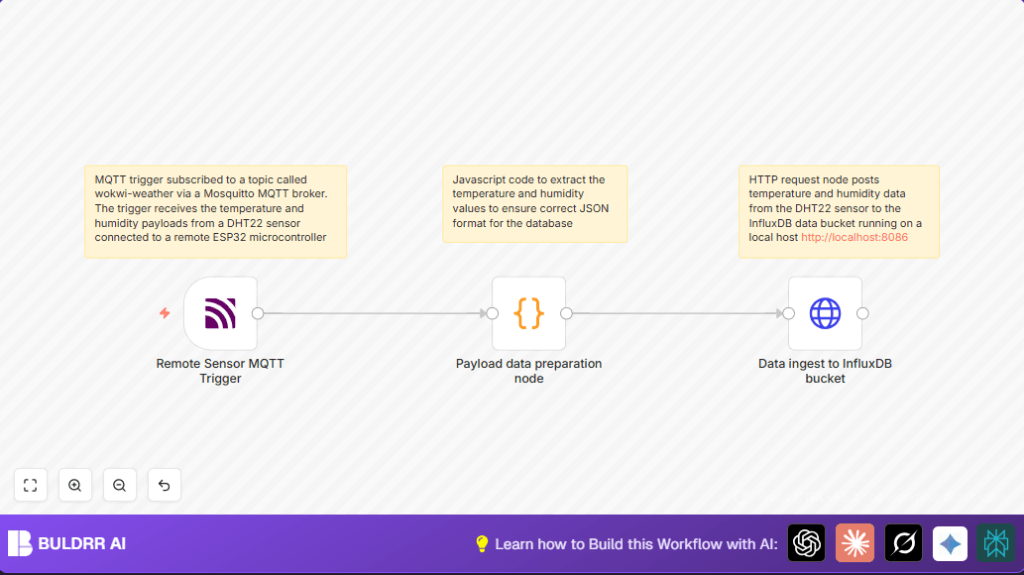
This workflow listens to MQTT messages from a DHT22 sensor on the topic “wokwi-weather.”
It takes the incoming JSON data, checks it for correct temperature and humidity values, and changes it into a format InfluxDB needs.
Then, it sends this data to an InfluxDB database for storage.
The workflow stops bad or incomplete data from reaching the database.
Who Should Use This Workflow
This is for anyone who needs to save sensor data from an MQTT broker into InfluxDB.
Ideal for hobbyists or beginners monitoring environment data in places like greenhouses or small IoT projects.
No deep technical skills needed, the workflow handles data parsing and validation automatically.
Small errors or bad data are caught early to keep database clean.
Tools and Services Used
- MQTT Broker (Mosquitto): Sends live sensor data from the DHT22.
- n8n Automation Platform: Runs the workflow to process data.
- DHT22 Sensor: Measures temperature and humidity.
- InfluxDB v2: Saves time series sensor data with proper format.
Beginner Step-by-Step: How to Use This Workflow in n8n
Download and Import Workflow
- Click the Download button on this page to save the workflow file.
- Go to the n8n editor where the workflow will run.
- Click the Import from File option and select the downloaded file to load the workflow.
Configure Credentials and Settings
- Open the MQTT Trigger node and add your MQTT broker credentials.
- Make sure the topic matches your sensor topic, typically “wokwi-weather”.
- Open the HTTP Request node and fill in your InfluxDB Organization ID, bucket name, and API Key.
- If needed, update the InfluxDB URL to match your server location.
Test and Activate
- Trigger the workflow by sending a test MQTT message or waiting for live sensor data.
- Check the workflow result in n8n to confirm data parses and posts to InfluxDB.
- Toggle the workflow Active switch to put it into production mode.
- Ensure the MQTT broker and InfluxDB remain accessible while the workflow runs.
You may want to consider self-host n8n if running this workflow on a server.
Inputs, Processing, and Output
Inputs
- MQTT messages on topic “wokwi-weather” containing sensor JSON strings.
Processing Steps
- The MQTT Trigger catches new messages.
- A Code node parses each JSON string.
- The node validates that “temp” and “humidity” exist and are numbers.
- If valid, the node formats data into InfluxDB line protocol.
- An HTTP Request node sends the formatted line to InfluxDB.
Output
- Clean sensor data stored in the InfluxDB bucket with timestamps.
- Errors thrown in workflow if data is malformed or missing.
Edge Cases and Failures
- If MQTT message is not valid JSON, the workflow throws an “Invalid JSON” error.
- If JSON misses “temp” or “humidity” fields or they are not numbers, the workflow throws a “Missing or invalid humidity/temp” error.
- If InfluxDB API token or URLs are wrong, HTTP errors like 401 appear.
- MQTT connection failure causes no sensor data reception.
Handling these early prevents bad data from polluting the database.
Customizations Ideas
- Change MQTT topic in the MQTT Trigger node to listen to other sensor feeds.
- Edit the Code node to match your sensor’s JSON field names (like “temperature” instead of “temp”).
- Add extra tags in the line protocol string to mark sensor location or type.
- Update the HTTP request URL to send data to cloud-hosted InfluxDB.
- Add error handling nodes or retry logic for resilience.
Summary
✓ Workflow listens to MQTT sensor messages, parses JSON data, validates values.
✓ Converts sensor data into InfluxDB line protocol format.
✓ Sends data to InfluxDB with authentication, preventing bad data storage.
→ Helps save time by automating sensor data storage.
→ Makes sure database only gets correct, usable data.
