
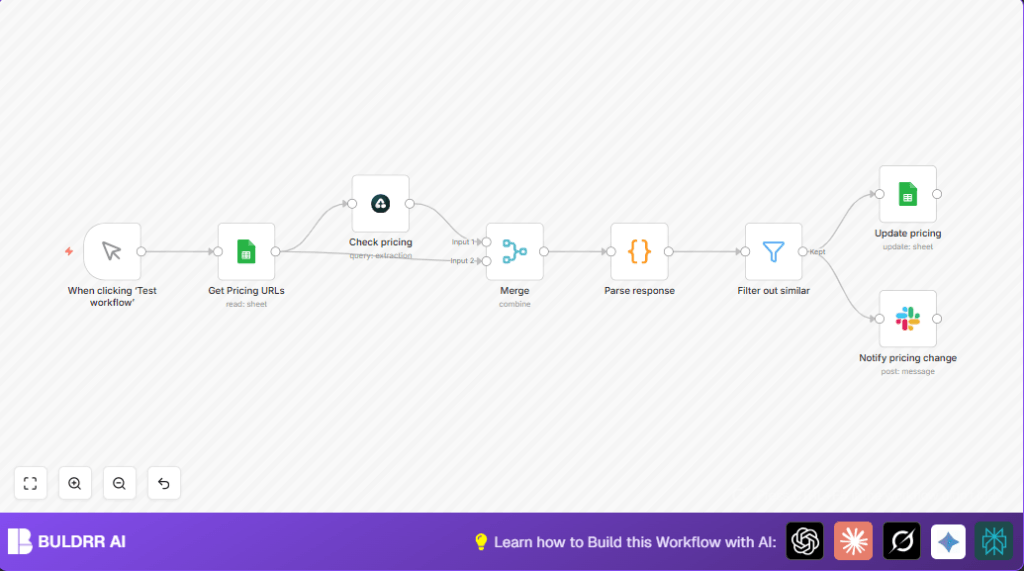

What this workflow does
This n8n workflow reads competitor pricing URLs from Google Sheets, uses Airtop AI to extract and compare pricing details, updates the sheet with changes, and sends Slack alerts only for meaningful price differences.
Its main goal is to stop the manual, error-prone process of checking competitor prices by hand and give fast updates on important pricing changes.
Who should use this workflow
This workflow fits product managers or teams who watch competitor SaaS pricing.
It helps save hours weekly by automating price checks and alerts, reducing mistakes and improving decision speed.
Tools and services used
- Google Sheets: Holds competitor pricing page URLs and stores updated pricing info.
- Airtop AI: Extracts detailed pricing info, like plan names and top features, and compares new data to old.
- Slack: Sends notifications about pricing changes to a team channel.
- n8n: Automates the workflow connecting all these tools smoothly.
Input, processing, and output summary
Inputs
Competitor pricing URLs stored in a Google Sheets document’s specific sheet and column.
Processing steps
- Read URLs from Google Sheets.
- Send each URL to Airtop AI with a prompt to extract pricing details and compare with previous data.
- Merge Airtop AI results with original URL data for clarity.
- Parse AI JSON responses into usable fields like pricing summary and change status.
- Filter out results where pricing didn’t change much.
- Update Google Sheets rows with new pricing summaries and timestamps.
- Send Slack messages only for pricing URLs with notable changes.
Outputs
Updated Google Sheets with fresh pricing summaries and change times.
Slack notifications alerting the team about significant competitor pricing updates.
Beginner step-by-step: How to use this workflow in n8n
Import the workflow
- In the n8n editor, click the “Import” button or use “Import from File”.
- Select the workflow file downloaded from this page using the Download button.
Configure nodes
- Add your Google Sheets OAuth2 credentials for both reading and updating sheets.
- Enter correct Document ID and Sheet Name where competitor URLs live in the Google Sheets (Get Pricing URLs) node.
- Provide Airtop API credentials inside the Airtop (Check pricing) node.
- Verify the prompt inside the Airtop node matches the pricing page style for best extraction (copy-paste prompt if needed):
Extract competitor SaaS pricing page details: plan names, prices, top 3 features. Compare with last saved prices and highlight differences.- Configure Google Sheets (Update pricing) node to update correct rows with new pricing and use
{{$now}}for timestamp. - Set Slack API token and target channel ID in the Slack (Notify pricing change) node.
Test and activate
- Run workflow once by clicking the manual trigger’s Execute Workflow button to check if data flows and nodes work without errors.
- If all tests pass, enable the workflow to run automatically or replace manual trigger with a Cron trigger for scheduled runs.
Optionally, for more security and control, run this workflow on a self-hosted n8n instance self-host n8n.
Common problems and edge cases
Airtop AI returns errors or wrong data
The prompt might mismatch the competitor’s page format or the URL might be down.
Try checking the URL in a browser and adjusting the Airtop node’s prompt for better matching content.
Google Sheets update fails
This happens if row_number is wrong or credentials expired.
Ensure the workflow passes the right row_number and reauthorize Google OAuth2 if needed.
No Slack notifications sent
Slack node needs the correct API token scopes and the right channel ID.
Verify Slack credentials and channel settings to fix.
Ways to customize the workflow
- Edit Airtop AI prompt to capture more or fewer details from pricing pages.
- Add a Gmail node after filtering to send emails besides or instead of Slack messages.
- Include extra competitor info in Google Sheets, like product names, and show these in notifications.
- Change manual trigger to Cron node to run monitoring automatically on a schedule.
- Save pricing history also in a database like Airtable or MySQL to spot trends over time.
Summary of benefits and results
✓ Saves hours spent checking competitor pricing manually.
✓ Reduces mistakes from human error in price tracking.
✓ Delivers fast, clear alerts only when prices actually change.
✓ Keeps competitor pricing data neatly updated in Google Sheets.
✓ Notifies teams via Slack instantly to react quickly.
