
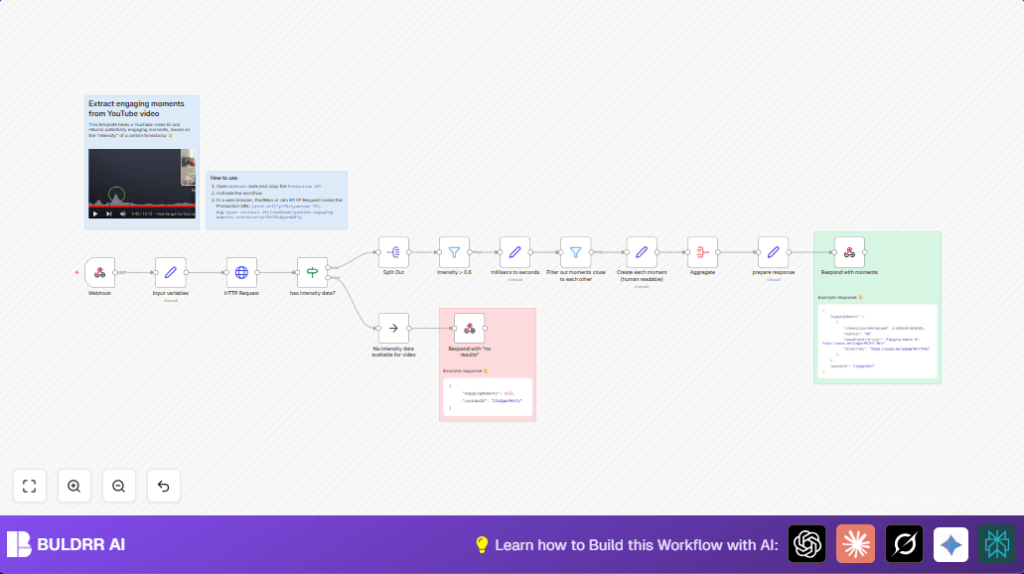

What This Automation Does — n8n Extracts Key YouTube Moments Effortlessly
This workflow finds the most engaging parts of a YouTube video by taking its video ID as input.
It uses a public API to get “most replayed” data and filters moments with intensity scores under 0.6.
The process also removes moments too close in time (within 20 seconds) to avoid overlaps.
The output is a list of shareable URLs pointing to the best video moments.
This automation saves time and improves content highlights accuracy for better viewer engagement.
Inputs and Processing Steps
Inputs
- The workflow receives a YouTube video ID via an HTTP GET request to the Webhook node URL.
Processing Steps
- Extract Video ID: The Set node pulls the
ytIDquery parameter from the webhook call and saves it asyoutubeVideoID. - Fetch Intensity Data: The HTTP Request node calls
https://yt.lemnoslife.com/videos?part=mostReplayedwith the video ID to get video replay intensity markers. - Verify Data: An If node checks if
mostReplayeddata exists in the API response. - Handle Absence: If no data is present, the workflow sends JSON indicating no engaging moments were found.
- Split Markers: A Split Out node breaks the intensity markers array into individual markers.
- Filter by Intensity: A Filter node removes markers with
intensityScoreNormalizedbelow 0.6. - Convert Time: A Set node converts start times from milliseconds to seconds.
- Remove Close Moments: Another Filter node removes moments less than 20 seconds apart.
- Format Messages: A Set node creates human-readable links starting a few seconds before each moment.
- Aggregate Results: The Aggregate node groups all moments into a single array.
- Send Response: The final Respond to Webhook node returns the structured JSON with engaging moments.
Who Should Use This Workflow
This workflow is best for anyone who needs to find important segments inside YouTube videos automatically.
Content creators, marketers, and digital strategists can save hours manually scrubbing videos.
Tools and Services Used
- n8n automation platform: Builds and runs the workflow.
- Public YouTube Replay Intensity API: Provides “most replayed” video segment data at
https://yt.lemnoslife.com/. - HTTP GET Webhooks: Receives video IDs to trigger the sequence.
Beginner Step-by-Step: How to Use This Workflow in n8n Production
Import the Workflow
- Download the workflow file using the Download button on this page.
- In n8n editor, go to the top menu and choose “Import from File”.
- Select the downloaded workflow file to load it into n8n.
Configure Workflow
- Open the imported workflow in the editor.
- Check if any credentials or API keys are needed and add them (none required for the free public API in this case).
- Update the webhook URL host if required to fit your n8n instance domain.
- Review any fixed IDs, emails, or other fields and edit if needed.
Test and Activate
- Test the workflow by calling the webhook URL with a valid YouTube
ytIDquery parameter. - Check the JSON response to confirm engaging moments are returned.
- If all looks good, activate the workflow using the toggle switch in the n8n editor.
- The webhook URL will now work live, ready for any app or user to trigger.
If running n8n on a self-hosted server, make sure the instance is accessible externally. More help for self-host n8n is available.
Edge Cases and Failure Handling
- If the API returns no “mostReplayed” data, the workflow responds with JSON showing no engaging moments, preventing dead-ends.
- Invalid video IDs lead to 404 or empty responses from the API, which the workflow detects and reports.
- The filter for spacing out moments avoids clutter by removing closely timed points.
- Workflow activation must be complete for webhook to respond; otherwise, no data is returned.
Customization Ideas
- Change intensity threshold in the filter node to be stricter or more relaxed.
- Adjust minimum 20-second gap between moments to change how many highlights appear.
- Add video title or intensity score fields to the output messages for richer info.
- Replace the public API URL to use another source of intensity data.
- Extend the workflow to send moment URLs to Slack, email, or save them in Google Sheets.
Summary
✓ Saves hours of manual video scrubbing
✓ Automatically extracts high-intensity replay moments
✓ Filters and formats moments into shareable links
✓ Handles absence of data gracefully
✓ Easy to set up in n8n with no API keys required
→ Provides video content teams precise timestamps to create promos or social clips faster
→ Improves viewer engagement by focusing on key video parts
→ Supports automation for better content marketing workflow
