

What This Automation Does
This workflow automatically collects Amazon’s Best Seller electronics data and turns it into neat, easy data for you.
This stops you from copying data by hand and makes info fresh and correct.
You get product ranks, names, pictures, reviews, offers, and links fast, without mistakes.
The result helps people watch prices, ratings, and new trends quickly.
The workflow uses Bright Data’s scraping service to pull live Amazon page content.
Then Google Gemini AI reads the messy HTML and pulls out clean product details.
The data changes into a clear JSON format.
Finally, the workflow sends this info to any chosen webhook or API so teams or systems can use it immediately.
Tools & Services Used
- n8n: Automation platform to build and run the workflow.
- Bright Data API: Gets raw Amazon bestseller page HTML by scraping.
- Google Gemini (PaLM) API: AI model extracting structured data from HTML.
- Webhook endpoint (e.g., webhook.site): Receives and stores extracted JSON data.
Inputs, Processing, and Outputs
Inputs
- Amazon Best Seller electronics page URL.
- Bright Data API key to access scraping service.
- Google Gemini API credentials for AI processing.
Processing Steps
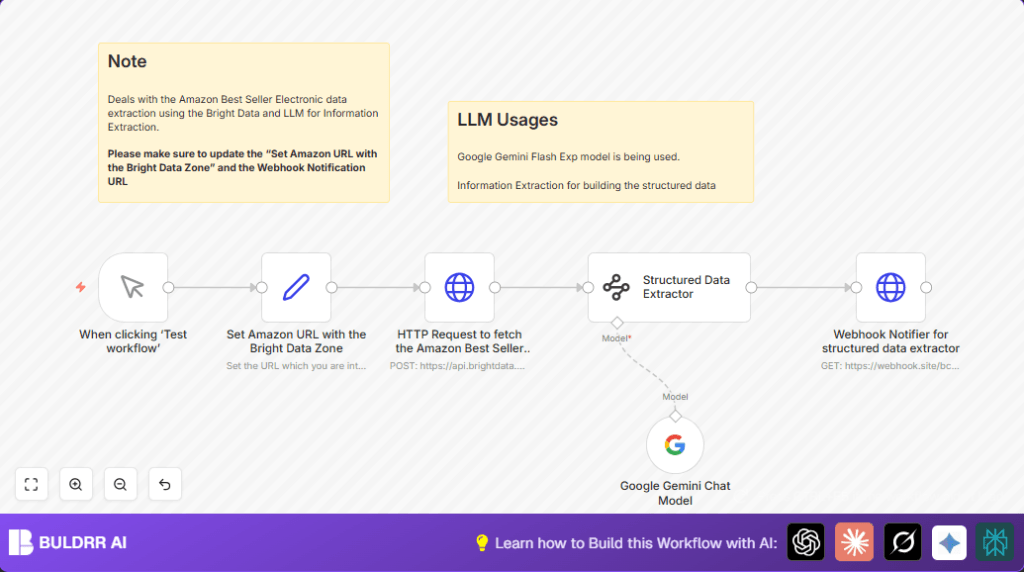
- Use Set node to define URL and scraping zone.
- HTTP Request node calls Bright Data to get raw HTML.
- Run raw HTML through Google Gemini AI via Information Extractor node with custom JSON schema.
- Transform data into structured JSON including each product’s rank, title, image link, rating details, offer text, and product URL.
- HTTP Request node sends extracted JSON data to a webhook or API endpoint for notifications or storage.
Outputs
Well-organized JSON object containing Amazon best seller electronics data, ready to use for reports, alerts, or further processing.
This data is accurate and quickly available for team or system use.
Who Should Use This Workflow
This is useful for business people or analysts who track Amazon product trends and prices.
If manually copying product info wastes hours each week and errors happen often, this workflow helps fix that.
Users with some n8n experience and API access can automate scraping without writing code.
It suits startups, marketing teams, or e-commerce analysts needing fresh competitor data fast.
Beginner Step-by-Step: How To Use This Workflow In Production
1. Download and Import Workflow
- Download the workflow file using the Download button on this page.
- Open the n8n editor where workflows are built.
- Choose “Import from File” in n8n and select the downloaded file.
2. Add Credentials and Change Settings
- Open each node that requires API keys.
- Paste your Bright Data API Key in the HTTP Request node headers.
- Enter Google Gemini API credentials in the Google Gemini Chat Model node.
- Adjust the Set node with your desired Amazon URL and Bright Data zone name.
- If sending to a webhook, update the webhook URL in the last HTTP Request node.
3. Test the Workflow
- Run the workflow manually using the Manual Trigger node.
- Check the output webhook or console logs to confirm data extraction and delivery.
4. Activate for Production Use
- Toggle the workflow status to active.
- You can later add time-based triggers if you want automatic runs.
- Monitor workflow executions in n8n to catch any issues early.
- Consider hosting this workflow on your own server using self-host n8n for full control and security.
Customizations You Can Make
- Change the Amazon URL in the Set node to scrape other product categories or different countries.
- Update the JSON schema in the Information Extractor node to pull more product details like brand or price history.
- Send data to new endpoints like Slack, email, or your company database by updating the webhook URL.
Troubleshooting Common Issues
Issue: “HTTP Request to Bright Data returns 403 Forbidden.”
Possible Cause: Wrong API Key or zone name.
Fix: Double-check your API Key and zone input in the Set node.
Issue: “Extraction returns empty or weird data.”
Possible Cause: JSON schema does not match HTML structure.
Fix: Update the schema in the Information Extractor node according to latest Amazon page layout.
Pre-Production Checklist
- Verify Bright Data API key is correct and subscription is active.
- Ensure Google Gemini API credentials are valid and authorized.
- Confirm the Amazon URL points to current bestseller lists.
- Test webhook endpoint receives POSTed JSON data properly.
- Perform a manual test run in n8n and verify all output steps work.
Summary of Benefits & Results
→ Amazon bestseller electronics data pulled live, no copying needed.
→ Product details extracted with AI for accuracy and speed.
✓ Saves 5+ hours of manual work weekly.
✓ Reduces errors from copying mistakes.
✓ Provides JSON outputs easy for teams or automation.
✓ Lets decision makers act faster on pricing and trends.
