

What this workflow does
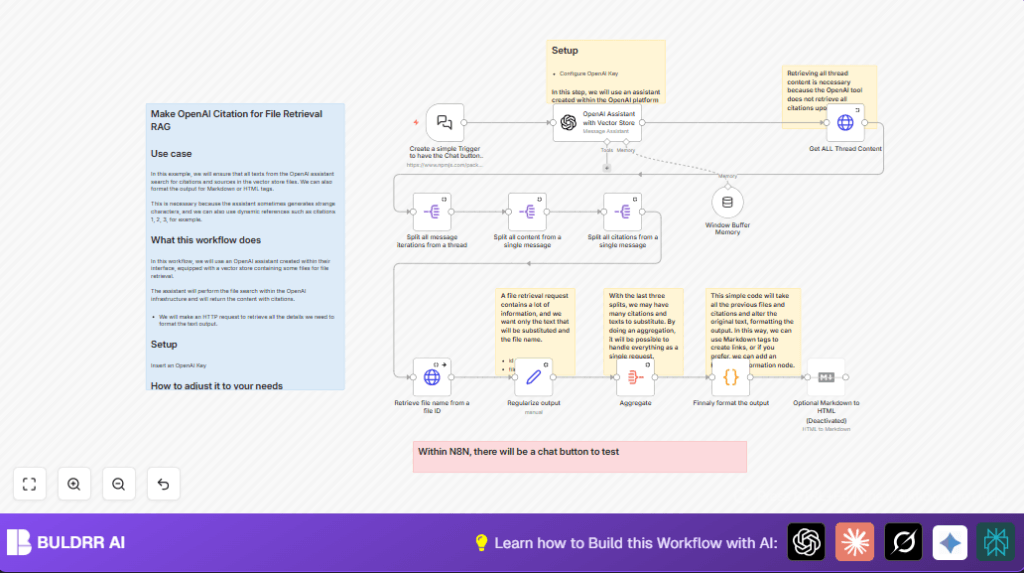
This workflow helps add clear citations to AI answers from files stored in an OpenAI vector database.
It solves the problem of missing or wrong citations when AI gives research info.
Users get answers with exact file links replacing strange text, making documents trustworthy.
The process starts with a chat trigger.
Then it talks to an OpenAI assistant that knows the files.
Next, it fetches the full chat thread to find all citations.
After splitting and reading citation info, it gets filenames from OpenAI.
Finally, it updates the output to show file names in a clear format.
Tools and services used
- n8n: Builds and runs the automation flow.
- OpenAI API: Handles the assistant chat, vector file retrieval, and file info.
- @n8n/n8n-nodes-langchain.chatTrigger: Starts the chat input.
- @n8n/n8n-nodes-langchain.openAi: Runs the AI assistant queries.
- HTTP Request node: Gets full chat threads and file details.
- Markdown node (optional): Converts markdown citations to HTML.
Inputs, processing, and output
Inputs
- User chat prompt sent to the chatTrigger node.
- Assistant with vector store that returns research text with citation clues.
Processing steps
- Fetch full chat messages via API so no citation is missed.
- Split the thread messages and annotation arrays to get citation pieces.
- Make API calls for each citation’s file ID to get file names.
- Structure citation data with file names and citation text.
- Aggregate all citations together.
- Run JavaScript code that replaces weird citation text with readable markdown references showing source file names.
- Optionally, convert markdown to HTML for web-friendly display.
Output
- Clean chat answer with exact citations shown as file name references.
- Markdown or HTML-formatted output ready for publishing.
Who should use this workflow
This workflow fits users who get AI answers from many documents and need real proof of the source.
It helps writers and researchers avoid wasting hours fixing wrong or missing file citations.
It works well with OpenAI assistants linked to vector stores containing research files.
People wanting better traceable and clear citations should use it.
Beginner step-by-step: How to use this workflow in n8n
Import the workflow
- Click the Download button on this page to get the workflow file.
- Open the n8n editor (cloud or self-host n8n instance).
- Use Import from File option in n8n to upload the downloaded workflow.
Configure credentials and IDs
- Go to each OpenAI node and add your OpenAI API key in credentials.
- Update the assistant ID in the OpenAI assistant node to your assistant’s ID.
- If needed, change emails, channels, or file IDs in settings or HTTP request URLs.
- Check the chat trigger node has the right webhook URL and note it for testing.
Test and activate
- Send a test message to the webhook URL to confirm the workflow runs correctly.
- Check the output for clean citations and correct file references.
- If tests pass, toggle the workflow to active for production use.
Customization ideas
- Change citation text format in the code node by editing the replacement string.
- Turn on markdown to HTML node to get HTML output instead of markdown citations.
- Add metadata fetching like file size or creation date in the HTTP file request.
- Connect notification nodes to alert when new files or citations appear.
Handling errors and edge cases
- If you get 401 errors, check OpenAI API key is correct in credentials.
- Empty assistant response means wrong assistant ID or missing vector integration.
- If replaceAll fails in code node, confirm citation text and output are strings.
- Use ‘Continue on error’ in HTTP nodes to skip bad file data and keep the flow running.
Pre-production checklist
- Confirm assistant ID and vector store setup is correct.
- Test chat webhook to verify it triggers on messages.
- Verify all HTTP requests return expected data with proper headers.
- Confirm code node changes output text correctly with citations.
- Save workflow backup before enabling live.
Deployment tips
Once ready, activate the workflow in n8n.
Watch executions for errors in the dashboard.
Add logging or error catching nodes for better monitoring.
Use the chat trigger webhook URL in internal tools for live queries.
Summary
✓ Workflow supplies accurate file citations in AI answers replacing unclear markers.
✓ Saves lots of time fixing missing or broken references.
✓ Fast, clear output suitable for publishing with trustworthy sources.
→ Works by fetching full chat thread, splitting citation data, and adding file names.
→ Easy to import, configure, test, and activate in n8n.
