

What this workflow does
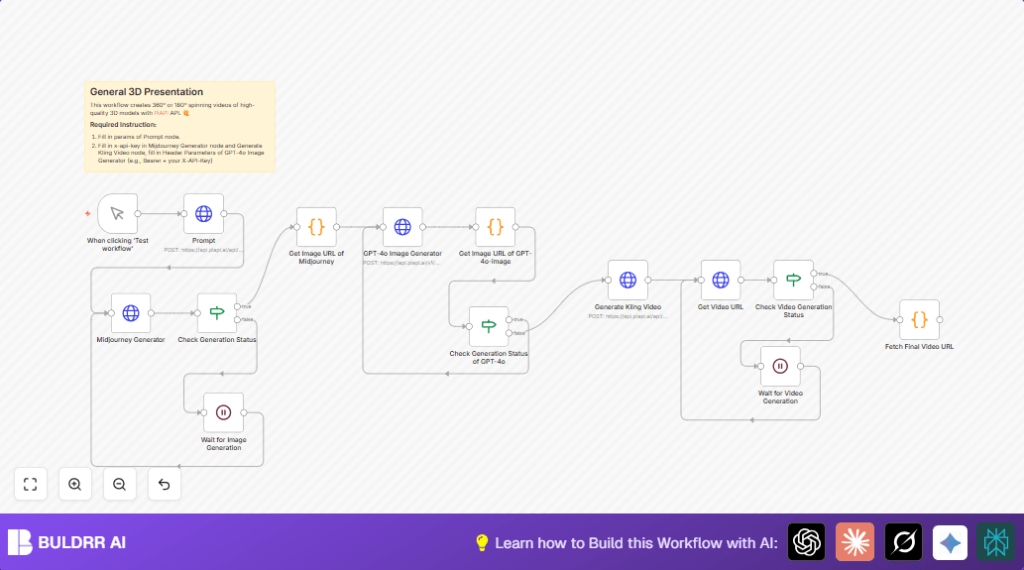
This workflow helps you create 3D spinning videos of characters from simple text descriptions. It stops lots of slow, manual work by making images and videos automatically. You get a neat 3D style image, a clear figurine front-view, and a rotation video without using hard 3D software or animation skills.
The process includes sending text to Midjourney to make images, waiting for them, refining one image with GPT-4o Image Generator, then making a rotating video with Kling model. All steps check status and wait for tasks to finish. You save many hours and avoid mistakes.
Tools and services used
- n8n: Workflow automation tool to connect APIs.
- PiAPI Midjourney model: Creates chibi-style 3D character images from text.
- GPT-4o Image Generator: Refines the selected image into detailed 3D figurine front-view.
- PiAPI Kling model: Produces a vertical spinning video from the refined image.
Inputs, processing steps, and output
Inputs
- Character description text prompt with style details.
- API keys for PiAPI Midjourney and Kling, and for GPT-4o Image Generator.
Processing Steps
- Trigger the process manually inside n8n.
- Send prompt to PiAPI Midjourney for initial 3D image generation.
- Check and wait for image generation to complete.
- Pick one random image URL from results.
- Send that image URL to GPT-4o Image Generator to get a better 3D figurine front image.
- Parse the streaming GPT response to get the refined image URL.
- Repeat refinement request if image URL not found.
- Send refined image URL to PiAPI Kling model to make a rotating video.
- Check video generation status and wait until done.
- Extract clean video URL without watermark.
Output
A ready-to-share 9:16 vertical video URL showing the refined 3D character spinning with details.
Beginner step-by-step: How to use this workflow in n8n
Step 1: Download and import the workflow
- Download the workflow file using the Download button on this page.
- Open n8n editor and click “Import from File” to load the workflow.
Step 2: Add your API keys
- Go to the imported workflow nodes needing credentials.
- Enter PiAPI API keys in nodes calling Midjourney and Kling model, using the
x-api-keyheader. - Set GPT-4o Image Generator node with HTTP Header Auth using Bearer token and your GPT API key.
Step 3: Update IDs or text if needed
- If your use case needs different prompts, edit the JSON “prompt” field in the Prompt node.
- Update any channels, emails, or IDs in notification nodes if added.
Step 4: Test the workflow
- Use the Manual Trigger node and click “Execute Workflow” to test.
- Watch each node output to confirm images and video URLs generate correctly.
Step 5: Activate for production
- After testing, activate the workflow inside n8n to run live.
- Trigger the workflow manually or via HTTP triggers as preferred.
- If self-hosting n8n, consider using self-host n8n for better control.
Customization ideas
- Change the character prompt text in the Prompt node JSON to make different images.
- Adjust the
aspect_ratioin image and video nodes to fit different viewing formats. - Tweak retry limits and wait times in the If nodes for generation checks to match your API performance.
- Replace simple header auth in GPT-4o node with OAuth if more security is needed.
- Add notification nodes (email or chat apps) to get alerts when the final video is ready.
Common problems and solutions
- API key unauthorized errors: Check all HTTP Request nodes have exact correct API keys in the headers. Update any outdated keys.
- Image generation stuck pending: Confirm the If node checking
data.statusis set to detect “completed” exactly. - No image URL from GPT-4o response: Use the given code snippet exactly for parsing streamed chunks. Add console logs to debug if needed.
- Video generation never finishes: Make sure If node for video status compares string “completed” exactly and wait time between retries is long enough (20 seconds).
Pre-production checklist
- Ensure all API keys are valid and entered correctly in each node.
- Run the workflow step by step in test mode, check outputs at each node.
- Test edge cases with unusual prompts or network disturbances.
- Save a backup of your workflow file before changes to allow rollback.
- Verify all wait and condition nodes fit the actual API response structure.
Summary
✓ Saves many hours by automating 3D model and video creation.
✓ Avoids manual errors and tedious waiting.
✓ Outputs clean 3D spinning videos ready to share.
→ Uses text prompts plus API keys to run fully automatic workflows in n8n.
→ Works well for creatives who want simple, fast 3D presentations without deep technical skills.
