
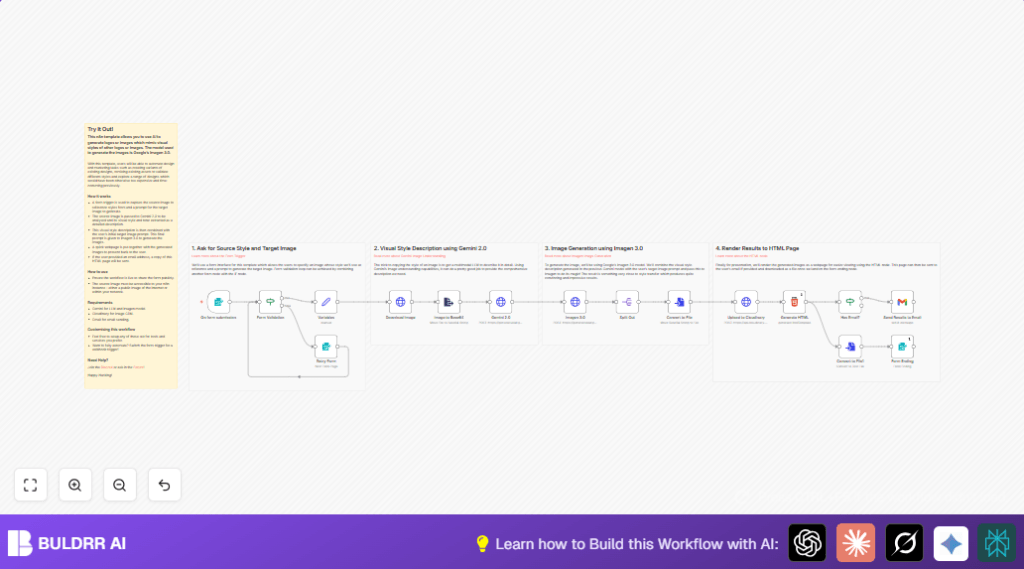

1. What This Automation Does
This workflow takes an image URL and a text description to copy the picture’s style.
It uses Google AI to describe the style and then makes new images based on that style plus your text.
The result is styled pictures hosted on Cloudinary, plus a web page showing them.
Optionally, you can get the results sent by email.
The goal is to save time by automatically copying styles instead of doing it manually.
2. Tools and Services Used
- Google Gemini 2.0 API: Analyzes and describes image style.
- Google Imagen 3.0 API: Creates new images based on style plus prompt.
- Cloudinary: Hosts and serves generated images.
- Gmail with OAuth: Sends emails of results.
- n8n Automation Platform: Runs the whole workflow setup.
3. Inputs, Processing, and Output
Inputs
- Source image URL to copy the style.
- Text prompt describing the new image to generate.
- Optional number of images to make (1 to 4).
- Optional email to receive results.
Processing Steps
- Validate the image URL is correctly formatted.
- Download the image from the URL.
- Convert that image to base64 for AI input.
- Send to Google Gemini 2.0 to get the style description.
- Combine style description with user prompt.
- Send to Google Imagen 3.0 to generate styled images.
- Split and convert each image from base64 to binary files.
- Upload each image to Cloudinary.
- Create an HTML gallery page showing images and style info.
- Optionally email the gallery to the provided address.
Output
- Images styled like the source image hosted on Cloudinary.
- HTML gallery page presenting those images with references.
- Email with the gallery page if an email was given.
4. Beginner Step-by-Step: How to Use This Workflow in n8n Production
Importing the Workflow
- Download the workflow file using the Download button on this page.
- Open n8n editor and select “Import from File” to load the workflow.
Configuration After Import
- Add all required credentials or API Keys for Google Gemini, Google Imagen, Cloudinary, and Gmail.
- Update any IDs, emails, folders, or URLs if the workflow needs specific destinations or senders.
- Check that the prompt and expressions are present in the Variables and HTTP Request nodes so the text used matches your needs.
Testing and Activation
- Run one test submission with valid inputs to verify the workflow works without errors.
- Check Cloudinary for uploaded images and Gmail for emails if used.
- Turn the workflow ON in n8n to activate it for regular use.
Make sure the webhook URL is publicly accessible to receive form submissions or API calls.
If using self hosting n8n, see self-host n8n for help.
5. Common Issues and How to Fix Them
- Image URL invalid or inaccessible:
Check the URL for typos and make sure the image is public. Use the Form Validation node to catch errors early. - Google APIs fail due to bad credentials:
Update API Key or OAuth tokens in n8n credentials and retry. - Cloudinary uploads fail:
Verify the upload preset is set for unsigned uploads. Confirm the API keys are correct. - Emails not sending:
Check Gmail OAuth setup and that the sending email address is authorized.
6. Customization Ideas
- Switch Cloudinary upload to a different CDN by adjusting the Upload to Cloudinary node URL and params.
- Allow more images by increasing max samples in the Variables node and adjusting Imagen API call.
- Use a Webhook node instead of the Form Trigger for auto runs based on external events.
- Replace Gmail node with other email services like SendGrid via HTTP Request nodes.
- Update Gemini prompt with more style details or artist references for tailored style descriptions.
7. Summary of Workflow Benefits and Outcome
✓ Quickly copy and recreate image styles from any source URL.
✓ Automatically generate one to four new images with the Google Imagen AI matching the original style.
✓ Host generated images on Cloudinary with CDN delivery.
✓ Create an HTML page gallery showing all results and style references.
✓ Optionally email the results to the user for easy sharing.
→ Saves hours of manual style work for designers or marketers.
→ Provides simple, ready-to-use automation inside n8n with clear setup steps.
