

What this workflow does
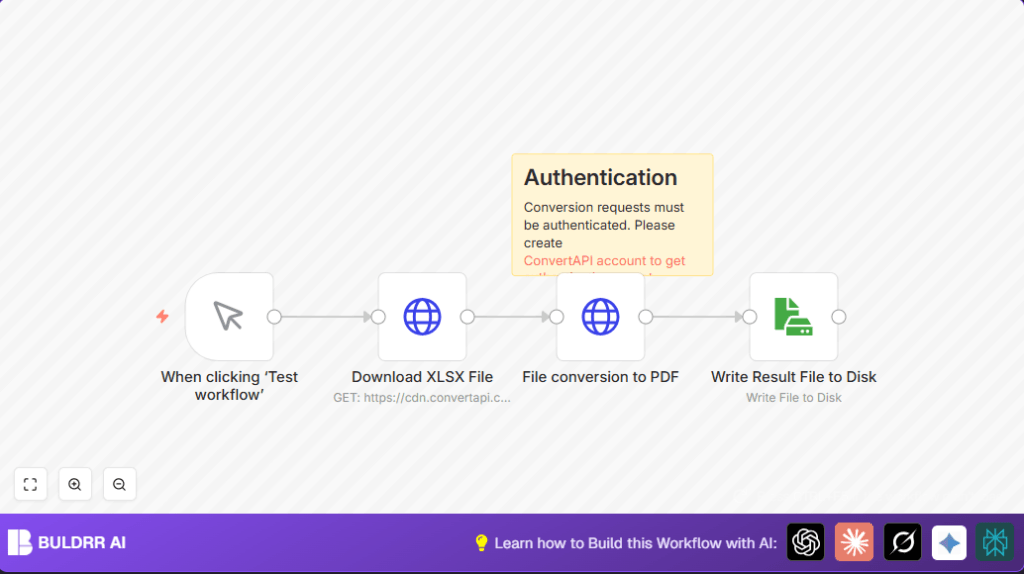
This workflow downloads an XLSX file from a public link.
Then it sends that Excel file to ConvertAPI to change it into a PDF.
Finally, it saves the PDF file on your local computer.
This helps avoid manual file work and saves time.
The main problem solved is slow and error-prone manual XLSX to PDF conversion.
This automated process is faster and reduces mistakes.
Who should use this workflow
This workflow fits people who handle XLSX files often and need PDFs fast.
Especially project managers or workers needing quick presentations or reports.
No deep technical skills required, just basic use of n8n editor and API keys.
Also helpful for people who want to save 15–20 minutes per file.
Tools and services used
- n8n: Automation platform to connect workflow steps.
- ConvertAPI: Online API that converts XLSX files to PDF format.
- HTTP Request nodes: To download files and call ConvertAPI.
- Read Write File node: To save the converted PDF locally.
Workflow inputs, processing, and outputs
Inputs
- URL to an XLSX file (public link in this example).
- ConvertAPI account API Key for authentication.
Processing steps
- Download XLSX file using HTTP request.
- Send this file via HTTP POST to ConvertAPI endpoint to convert to PDF.
- Receive PDF as response file data.
- Save the PDF file to disk with given name.
Outputs
- Local PDF file named
document.pdfready for use.
Beginner step-by-step: How to use this workflow in n8n production
Step 1: Download and import workflow
- Click the Download button on this page to get the workflow JSON file.
- Open your n8n editor where you want to use the workflow.
- Use the menu option “Import from File” and select the downloaded JSON.
Step 2: Configure imported workflow
- Open the credentials panel and add your ConvertAPI API Key as a Query Auth credential.
- Check nodes that may need updates like file paths or URLs if you have different sources.
- Make sure the HTTP Request nodes have the correct API endpoint and file mapping.
Step 3: Test the workflow
- Run the workflow manually by clicking “Execute Workflow” inside n8n editor.
- Watch for errors and verify the PDF is saved correctly.
Step 4: Activate workflow for production
- Turn on the workflow trigger node for automatic or manual running.
- If desired, replace the manual trigger with a Cron node for scheduled runs.
- Monitor logs in n8n to make sure conversions run smoothly.
This simple process helps beginners get the workflow running quickly without building from scratch.
Edge cases and common errors
- 401 Unauthorized error: This means the API Key in credentials is wrong or missing.
- File not found or empty response: Check the XLSX file URL is correct and accessible.
- Disk write failed: Ensure the computer or server running n8n has permission to write files.
- Binary data not mapped: Confirm previous node’s file data is connected to the ConvertAPI HTTP node.
Customization ideas
- Change the XLSX file URL in Download node to convert different files.
- Replace the local save node with Google Drive or Amazon S3 nodes to store PDFs in cloud.
- Use expressions to dynamically rename output PDF file by date or original name.
- Use Cron node to automate conversion daily or weekly.
- Try converting other formats like DOCX to PDF by changing the ConvertAPI endpoint URL.
Quick summary
✓ Downloads XLSX file from internet.
✓ Converts XLSX to PDF with ConvertAPI using API Key.
✓ Saves PDF file on local disk automatically.
✓ Removes manual work and errors in file conversion.
✓ Saves roughly 15–20 minutes each time.
Authentication reminder
Conversion requests must be authenticated. Please create
ConvertAPI account to get authentication secret.
Self-hosted n8n note
If running this workflow on your own server or VPS, ensure the file system allows write access for the PDF output.
For help with running or hosting n8n, see self-host n8n resources.
