

What This Workflow Does
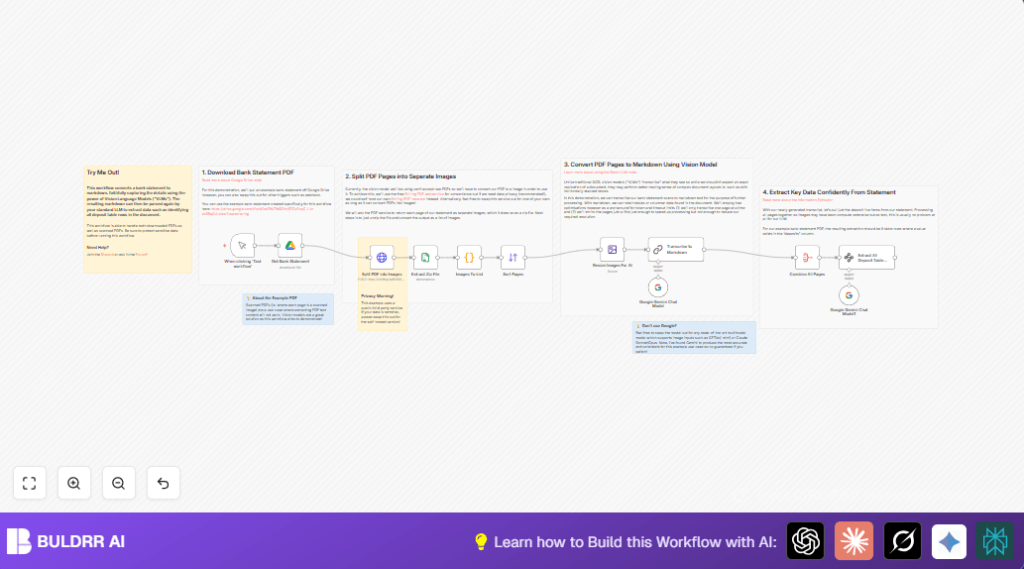
This workflow downloads bank statement PDFs from Google Drive by file ID automatically.
It breaks each PDF page into images.
Then, a Google Gemini vision model reads each page and transcribes it into markdown, keeping tables and layouts intact.
The markdown pages combine into one text.
Finally, the workflow extracts deposit data from the markdown as structured JSON with date, description, and amount.
This stops the need for manual copy-pasting and checking, saving time and reducing mistakes.
Who Should Use This Workflow
Anyone who handles scanned bank statements in PDF form and needs clean text or structured data from them.
Users who want to avoid manual extraction and errors when working with complex or scanned financial documents will find this useful.
Tools and Services Used
- Google Drive: Downloads PDFs via OAuth in n8n.
- Stirling PDF API: Converts PDFs to page images.
- Compression Node: Unzips image files.
- Code Node: Splits multiple images into separate items.
- Edit Image Node: Resizes images for faster AI reading.
- Google Gemini Chat Model (ChainLLM Node): Transcribes images into markdown.
- Aggregate Node: Combines markdown from all pages.
- Information Extractor Node: Extracts deposit lines as JSON.
Inputs, Processing Steps, and Outputs
Inputs
- Google Drive file ID of a scanned bank statement PDF.
Processing Steps
- Download PDF from Google Drive.
- Send PDF to Stirling PDF API to convert to JPG images.
- Unzip image files.
- Split images into separate workflow items.
- Sort images by filename to ensure page order.
- Resize images to 75% using Edit Image node for speed.
- Use Google Gemini vision chat model to transcribe each image to markdown.
- Aggregate markdown texts into one blob.
- Run Information Extractor to pull out deposit rows as structured JSON.
Outputs
- Markdown text preserving tables and layout from the entire statement.
- JSON array listing deposits with date, description, and amount fields.
Beginner Step-by-Step: How to Use This Workflow in n8n
Import the Workflow
- Download the workflow file using the Download button on this page.
- Go to your n8n editor, click on “Import from File”, and select the downloaded file.
Configure Credentials and IDs
- Add or update Google Drive OAuth credentials in the Google Drive node.
- Make sure to enter the correct Google Drive file ID for the bank statement.
- Check the Stirling PDF API URL is accessible or update if self-hosting.
- Confirm Google Gemini (PaLM API) credentials are set properly in the ChainLLM nodes.
- If there is any code or prompt in code nodes, copy-paste them carefully; they are ready to use.
Test and Activate
- Run the workflow once with Manual Trigger to test if all steps work.
- Check for any errors especially at download, PDF splitting, or transcribing.
- If all works, activate the workflow in n8n for production.
Follow any error messages and adjust settings or credentials as needed.
For better privacy, consider self-host n8n and Stirling PDF instances.
Common Issues and How to Fix Them
Google Drive File Download Fails
Check if the file ID is correct.
Make sure Google Drive OAuth credentials allow access.
Stirling PDF Conversion Fails
Verify if the Stirling API URL is reachable.
Check network and proper sending of PDF binary data.
Inaccurate or Incomplete Transcription
Try increasing the image resize percentage.
Adjust the transcription prompt wording in the ChainLLM node.
Customization Ideas
- You can replace the Google Drive node with a Webhook node to accept PDF uploads from other apps.
- Swap Google Gemini chat models with GPT4o or Claude Sonnet for transcription.
- Change the extraction prompt to find withdrawals, balances, or other data instead of deposits.
- Use local PDF-to-image tools instead of Stirling PDF for privacy.
- Tweak image resizing or add enhancements to improve reading on low-quality scans.
Summary of Benefits and Results
✓ Saves many hours of manual data copying and correcting.
✓ Transforms difficult scanned bank statements into clean markdown.
✓ Automatically extracts deposits into structured JSON for reporting.
✓ Reduces manual errors in transcription.
→ Provides easy input for further finance automation or analysis.
