
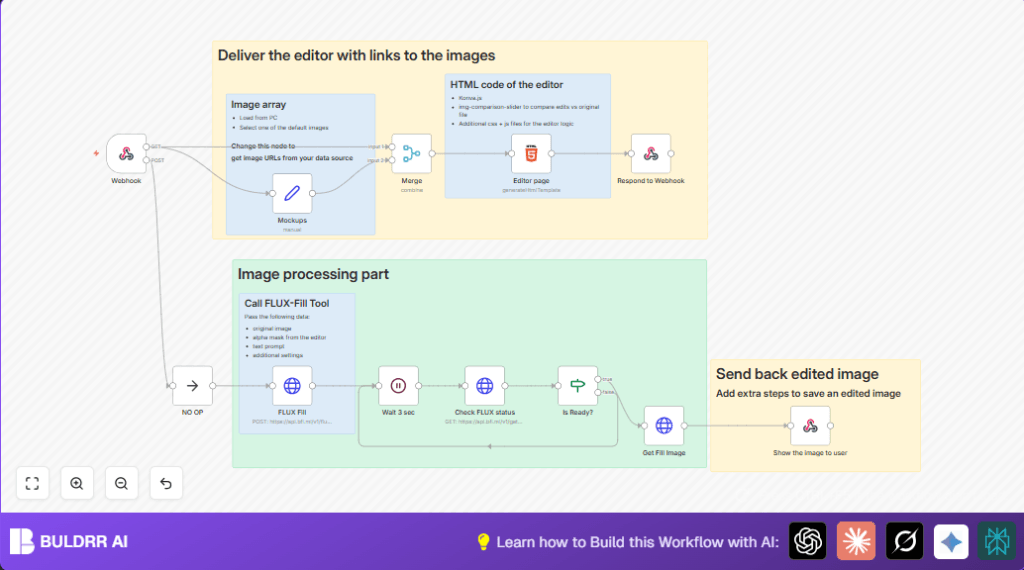

What this workflow does
This workflow automates image editing using the FLUX-fill API. It takes pictures, masks, and text instructions from a user. Then it sends them to the FLUX-fill service to fill or change parts of the image. The workflow waits until the edited image is ready. After that, it sends the finished picture back to the user quickly.
This helps save time and stops errors from manual editing. Users get their edited images fast without using complex software.
Who should use this workflow
This workflow fits people who work with editing images often. It works well for freelancers or small teams who want fast results. It is good for those who want to avoid slow, manual steps when filling or editing images with text prompts and masks.
If someone wants a simple way to receive images, add custom fills from AI, and send results directly back, this workflow is useful.
Tools and services used
- n8n: This is the tool to build and run the workflow with different connected steps.
- FLUX-fill API: Service that fills images based on prompts and masks with AI.
- Webhook node: To receive image and mask data from the client’s editor.
- Set node: To store and deliver image URLs for the editor interface.
- Merge node: Combines input data and image lists for the editor.
- HTML node: Hosts the image editor UI using Konva.js and other libraries.
- HTTP Request nodes: Send data to FLUX-fill and check editing job status.
- IF node: Checks if the FLUX-fill job is finished or not.
- Respond to Webhook nodes: To send back HTML UI and final images to the user.
Inputs, processing steps, and outputs
Inputs
- User sends image, mask data, and text prompts via a webhook call.
- Image URLs from the Set node provide sample images to the editor.
Processing Steps
- Webhook node receives image and prompt data.
- Set node holds image list for user selection inside editor.
- Merge node combines images and input data for editor display.
- HTML node serves an interactive editor UI where mask drawing and prompt editing happen.
- HTTP Request node sends the images, masks, and prompts to FLUX-fill API, starting the fill job.
- HTTP Request node regularly checks job status using the returned job ID.
- IF node decides to wait or continue based on job readiness.
- HTTP Request node downloads the final filled image once ready.
Outputs
- The final edited image is sent back as binary data in the webhook response.
- The editor UI is served as HTML to users for interaction.
Beginner step-by-step: How to use this workflow in n8n
Download and import
- Use the Download button on this page to save the workflow file to your computer.
- In the n8n editor, go to the top menu and click the gear icon.
- Choose “Import from File” and select the saved workflow file.
Configure credentials and settings
- Provide the FLUX-fill API Key in the HTTP Request node credential settings.
- Review any IDs, URLs, or email addresses and update them if your use case needs it.
Test and activate
- Run the workflow once in n8n to make sure it works without errors.
- If the test is successful, activate the workflow to make it live and ready to receive requests.
For users running self-host n8n, remember to confirm the webhook URL is reachable publicly or via your network. See self-host n8n for help.
Customization ideas
- Change the image list URLs in the Set node to load different images.
- Adjust prompt parameters like steps, guidance, or safety tolerance in the FLUX-fill nodes to try different fill styles.
- Modify the HTML editor page to change brush sizes or add new buttons.
- Expand the workflow to save finished images to cloud storage using more nodes.
- Add AI prompt suggestions by connecting external APIs to improve text inputs automatically.
Common issues and quick fixes
Problem: FLUX-fill API authentication error
Check if the API Key in HTTP node credentials is correct and not expired. Test key independently before retrying here.
Problem: Editor UI does not load fully
Make sure the HTML node contains correct links to Konva.js and other required libraries. Fix any broken URLs.
Problem: Workflow gets stuck waiting for FLUX-fill job
Confirm network connection and that the FLUX API server is working. Adjust wait times or add error handling if needed.
Summary of results
✓ Saves hours by automating image filling and editing with AI.
✓ Removes errors from manual editing with masks and prompts.
✓ Delivers filled images instantly as they finish processing.
→ Provides a simple interface for users to draw masks and send prompt details.
→ Works inside n8n, letting you customize easily and run repeated jobs.
→ Ready to extend with saving options or AI prompt improvements.
