

What this workflow does ⚙️
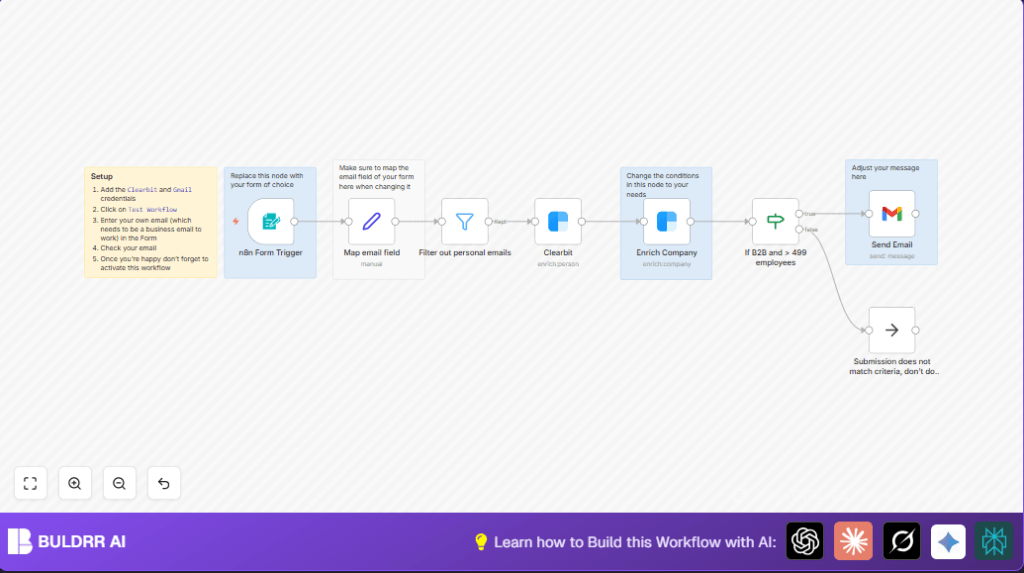
This workflow takes contact form submissions and picks only good business leads.
It filters out personal email addresses like @gmail.com.
It uses Clearbit APIs to find details about the person and company behind the email.
Then it checks if the company is big and B2B, with more than 499 employees.
If yes, it sends a thank-you email to the lead.
If no, it does nothing.
This saves time and helps sales teams react fast to important leads.
Who should use this workflow
Teams that get many contact form leads and need to focus on big business clients first.
Sales operations, marketing teams, or anyone handling lead qualification manually will find this useful.
It helps avoid wasting time on personal emails or small companies.
It works best if you want fast, automated replies for qualified enterprise prospects.
Tools and services used
- n8n Form Trigger: Captures form submissions automatically.
- Filter node: Removes personal email domains like @gmail.com, @yahoo.com, etc.
- Clearbit Person API: Finds person details from business email.
- Clearbit Company API: Gets company info such as employee count and tags.
- If node: Checks if company is B2B and has more than 499 employees.
- Gmail node: Sends personalized follow-up email to qualified leads.
- NoOp node: Silently ignores leads that fail qualification.
Input → Process → Output
Input
- Contact form submission including business email and role.
Processing Steps
- Map email field for consistent data.
- Filter out personal email domains.
- Use Clearbit Person API to enrich person info.
- Use Clearbit Company API to enrich company info.
- Check if company is B2B and has >499 employees.
- If qualified, send thank-you email.
- If not qualified, end workflow silently.
Output
- Personalized email sent to qualified enterprise leads.
- No email sent for personal or small company leads.
Beginner step-by-step: How to use this workflow in n8n
1. Download and import the workflow
- Click the Download button on this page to get the workflow file.
- Open your n8n editor where you manage workflows.
- Choose Import from File and upload the downloaded workflow file.
2. Configure credentials and settings
- Add your Clearbit API Key in the Clearbit credentials section.
- Set Gmail OAuth2 credentials for sending emails.
- Update any IDs, emails, or channel info if the workflow uses hardcoded values.
3. Test and activate the workflow
- Submit a test form entry with a business email to make sure all nodes run correctly.
- Check execution logs for errors and fix if needed.
- Switch the workflow status to Active to start live processing.
You are now ready to use this workflow to screen leads automatically and respond to qualified ones fast.
If you want full control over server resources, consider self-host n8n.
Customization ideas ✏️
- Change the employee count in the If node to target different sized companies.
- Modify the Gmail message to add calendar invites or HTML formatting.
- Add more personal email domains to the filter node to block additional non-business leads.
- Include extra Clearbit fields like company revenue or funding for richer qualification.
- Replace Form Trigger with other form providers by updating webhook URL and field mapping.
Common issues and solutions ????
Issue: No data from Clearbit Person API
The email address may be personal or invalid.
Check personal email filtering and Clearbit API key validity.
Issue: Emails not sending
Check Gmail OAuth2 credentials and daily send limits.
Try reauthorizing Gmail credentials in n8n.
Issue: Workflow not triggering on form submission
Verify webhook URL in Form Trigger node matches the form submission URL.
Test webhook manually to confirm connection.
Pre-production checklist ✅
- Test Clearbit API calls with your API Key.
- Submit test forms with different emails to verify filtering.
- Send test emails through Gmail node to confirm setup.
- Review If node logic for correct qualification.
- Export and back up the workflow and credentials before live use.
Deployment guide
Enable all nodes.
Switch workflow to Active.
This opens webhook to receive real form submissions.
Monitor executions regularly for errors.
If using self-host n8n, set up alerts for uptime.
Summary
✓ This workflow takes contact form emails and finds good business leads.
✓ It filters out personal emails from free providers.
✓ It uses Clearbit APIs to get info about leads fast.
✓ It sends thank-you emails only to big, B2B companies.
→ You save hours every week and reply quickly to important leads.
→ Your sales team can focus on valuable prospects.
