

What this workflow does
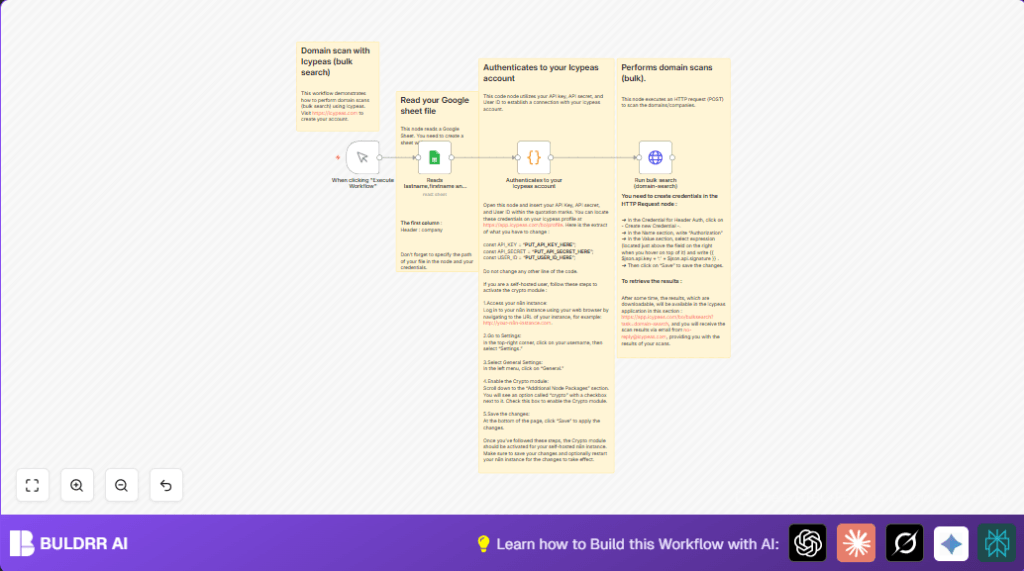
This workflow reads domain names from a Google Sheet.
It creates a secure signature to connect to Icypeas API.
Then it sends all domain names to Icypeas for a bulk scan.
The scan results get emailed to the user and shown in the Icypeas app.
Who should use this workflow
This is for people who manage many domains daily.
It helps reduce time spent manually entering domains on Icypeas.
Users want fast, error-free domain scanning reports.
Tools and services used
- Google Sheets: Holds the domain list.
- Icypeas API: Runs the bulk domain scan.
- n8n: Runs the automation workflow.
- Crypto module: Creates HMAC SHA1 signature for security.
How the workflow works
Inputs
The input is a Google Sheet with a first column named company.
The company column contains domain names to scan.
Process steps
The workflow starts with a manual trigger.
Next, the Google Sheets node reads the domain names.
A Code node uses the API secret to make a secure HMAC SHA1 signature with a timestamp.
This node organizes all domains into a JSON structure and adds API info.
Then an HTTP Request node sends a POST request to Icypeas with all domains and the signature.
The request includes headers for authentication and timestamp.
Outputs
When the request succeeds, Icypeas sends the scan results by email.
Users can also see results in the Icypeas application dashboard.
Beginner step-by-step: How to use this workflow in n8n
Step 1: Import the workflow
- Download the workflow file using the Download button on this page.
- In the n8n editor, click on “Import from File”.
- Select the downloaded workflow file.
Step 2: Add your credentials and configuration
- Open the Code node named Authenticates to your Icypeas account.
- Replace
PUT_API_KEY_HERE,PUT_API_SECRET_HERE, andPUT_USER_ID_HEREwith your real Icypeas API Key, Secret, and User ID. - In the Google Sheets node, set the Document ID and Sheet Name for your domain list spreadsheet.
- Make sure you have Google Sheets credentials added and authorized.
- Create an HTTP header authorization credential in n8n for the HTTP Request node, using the template
{{ $json.api.key + ':' + $json.api.signature }}.
Step 3: Test the workflow
- Click on the Manual Trigger node.
- Choose “Execute Workflow” to run it once.
- Verify the run reads domains, authenticates, and sends the HTTP request.
- Your email should receive the domain scan report from Icypeas.
Step 4: Activate the workflow
- If the test runs well, switch the workflow from draft to active mode.
- You can trigger it manually or replace the Manual Trigger node with a Cron node for scheduled runs.
Note: If using self-host n8n, enable the Crypto module to allow signature creation.
Customization ideas
- Change the Google Sheet to scan different domains by updating Document ID or Sheet Name.
- Modify the “name” field in the HTTP Request node to label scans (e.g., “weeklyScan”).
- Add more columns from Google Sheets by editing the Code node map function.
- Use a Cron node instead of Manual Trigger for automatic scheduling.
- Add nodes after the HTTP request to process scan results programmatically.
Common problems and fixes
- Invalid API signature: Check API Key, Secret, and timestamp in Code node.
- Empty Google Sheets data: Verify exact “company” header, correct Document ID and Sheet Name.
- HTTP Request 401 error: Confirm HTTP header authorization credential is correct and linked.
Summary and results
✓ Reads domains from Google Sheets automatically.
✓ Uses safe HMAC SHA1 signing for Icypeas API calls.
✓ Sends one bulk request to scan all domains at once.
✓ Sends scan results by email and makes them viewable in Icypeas app.
→ Saves hours of manual work every day.
→ Reduces errors from manual entry and speeds up domain vulnerability tracking.
