
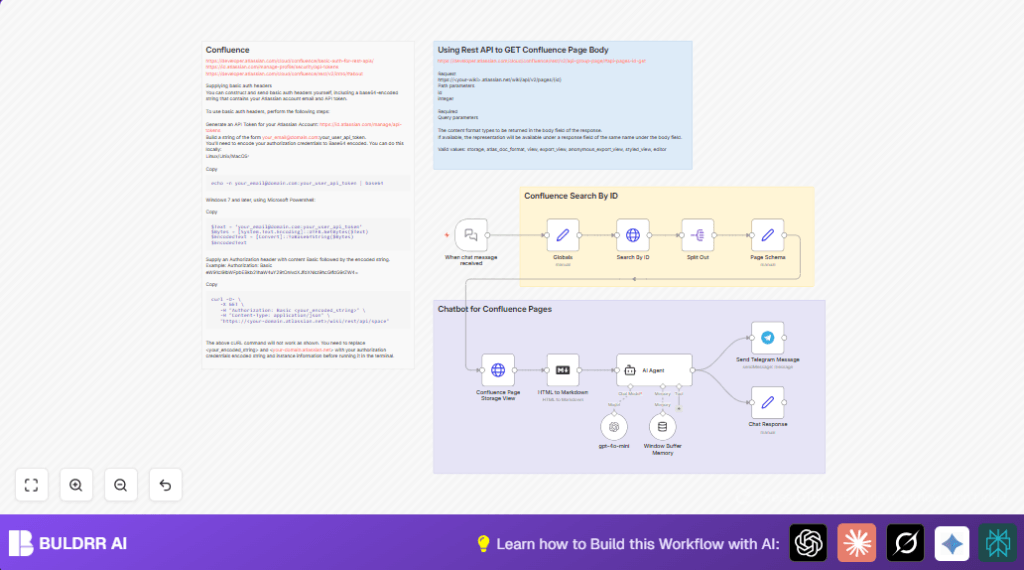

What This Workflow Does
This workflow answers questions from Confluence pages through chat. It helps users find the right info fast. It stops wasting time scrolling or guessing. The chatbot reads Confluence content, understands questions, and replies with good answers in chat.
It works by connecting chat messages to Confluence API calls, changing content to markdown, and using GPT-4o-mini AI to answer. The process keeps chat history so answers feel natural.
Tools and Services Used
- Confluence Cloud API: Gets page data and content.
- OpenAI GPT-4o-mini: Understands chat questions and Confluence text.
- Telegram Bot API: Receives user messages.
- n8n automation platform: Runs nodes and connects all steps.
Inputs, Processing, and Output
Inputs
- User chat message with a question.
- Confluence page IDs defined in the workflow.
- Confluence API credentials (email + API key).
- OpenAI API key for GPT-4o-mini.
- Telegram bot credentials and chat ID.
Processing Steps
- When chat message received triggers on new messages.
- Globals Set node sets Confluence page IDs to use.
- Search By ID HTTP request gets page metadata using page ID.
- Split Out separates search results array for processing single page.
- Page Schema Set node maps important page details for next call.
- Confluence Page Storage View HTTP request fetches full page content in rich storage HTML format.
- HTML to Markdown converts the page HTML to markdown text that AI understands better.
- Window Buffer Memory stores recent chat history to keep context.
- gpt-4o-mini generates answers from the user question plus page context.
- AI Agent reinforces answers only from fetched content, replying “I don’t know.” when no info exists.
- Chat Response Set collects AI output for sending.
- Send Telegram Message sends answer back to user chat.
Output
Final text reply with accurate Confluence page information sent as chat message.
Who Should Use This Workflow
This workflow fits teams who use Confluence to store docs. It is made for project managers, developers, or anyone who wastes time searching pages. It helps to get instant answers in chat, reducing mistakes from outdated or hard-to-find info.
If already using n8n and APIs, this boosts productivity by combining Confluence and AI chats.
Beginner Step-by-Step: How to Use This Workflow for Production
Import the Workflow
- Download the workflow file using the Download button on this page.
- Open the n8n editor where you manage workflows.
- Go to the main menu and choose “Import from File.”
- Select the downloaded workflow file and import it.
Configure Credentials and Settings
- Open the workflow and find all credential nodes.
- Add your Confluence API Key credentials. Remember to base64 encode email:apiKey as in docs.
- Add your OpenAI API Key to the gpt-4o-mini node.
- Set your Telegram bot token and chat ID in the Send Telegram Message node.
- Update the Globals Set node with page IDs from your Confluence site.
- Double check URLs in HTTP request nodes match your Confluence instance domain.
Test and Activate
- Manually run the workflow once using a test chat message.
- Check that each node executes successfully and outputs what you expect.
- Send a message to the Telegram bot to confirm a reply comes back.
- When tests pass, toggle the workflow status to active to listen for all chats.
Now the bot will reply instantly to user questions with Confluence page content in chat.
If using self hosting options, see self-host n8n for help running this smoothly.
Customizations and Enhancements
- Add more Confluence page IDs to the Globals Set node to widen the knowledge base.
- Change the final message node from Telegram to Slack, Email, or other platforms by swapping nodes.
- Adjust GPT parameters like temperature or max tokens for different reply styles.
- Switch Confluence content format in the HTTP request query param depending on the needed output (like “view” instead of “storage”).
- Improve conversation memory by changing the Window Buffer Memory node session size or replacing it with deeper LangChain memory techniques.
Common Issues and Fixes
- Authentication errors on Confluence API calls: Usually wrong API token or missing base64 encoding. Recheck and regenerate keys as needed.
- Empty or ‘Page not found’ API responses: Check all page IDs in Globals Set node. They must match exact Confluence page IDs.
- Chatbot replies “I don’t know.” incorrectly: Make sure HTML to Markdown conversion sends proper content. Check AI prompt uses correct page text variable.
- No response in chat: Verify Telegram bot credentials and chat ID; test sending message directly with Telegram API if unsure.
Pre-Production Checklist
- Test Confluence API token separately using Postman or curl.
- Make sure When chat message received node triggers on messages.
- Confirm page IDs and URLs return data in HTTP request nodes.
- Trial run GPT node with sample input for relevant answers.
- Set Telegram chat ID and bot token correctly.
- Backup workflow and API credentials before activating.
Summary of Benefits
✓ Saves time finding info in Confluence.
✓ Gives quick answers inside chat, no manual searching.
✓ Reduces errors from outdated docs by using live API content.
✓ Keeps conversation context for clearer replies.
→ Easily extend or switch messaging platforms.
→ Works with your existing n8n and API setup.
