
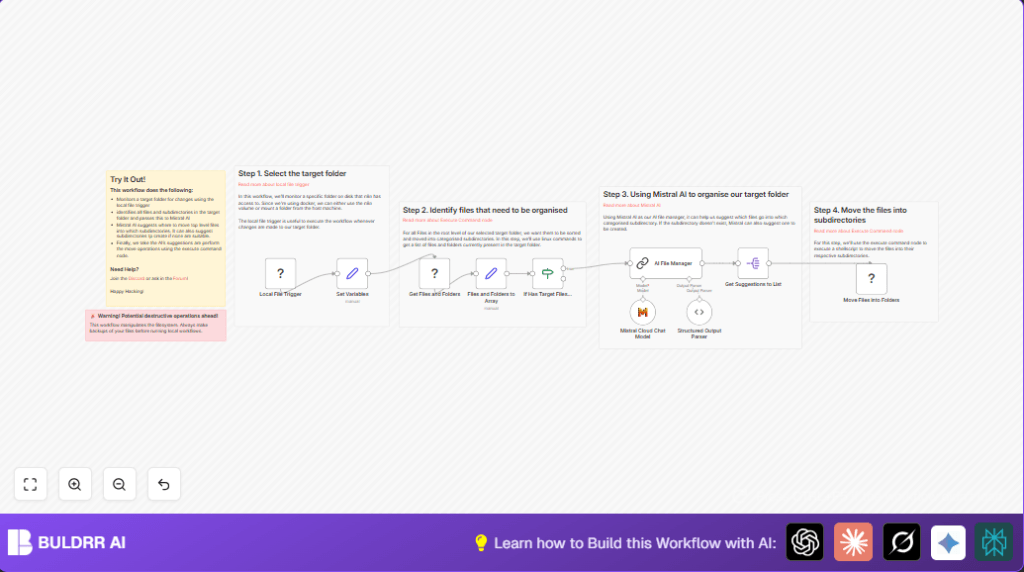

What This Workflow Does
This workflow watches a Linux folder for new files and organizes them automatically.
It solves the problem of messy files by using AI to decide where each file should go.
The result is a neat folder structure without needing manual sorting.
Who Should Use This Workflow
This is for anyone who handles many files in one folder and wants to save time organizing them.
You need basic Linux knowledge and access to your folder through n8n.
Also, a Mistral Cloud account is needed for the AI part.
If you run n8n yourself, make sure your Linux folder is properly linked to the system.
Tools and Services Used
- n8n Local File Trigger node: Monitors the target folder for new files.
- Execute Command node: Runs Linux commands to list, move files and create folders.
- Set node: Stores folder paths and splits data for processing.
- Mistral Cloud Chat Model node: Uses AI to suggest how to organize files into folders.
- LangChain node: Formats and sends prompt to Mistral AI for folder and file grouping.
- Split Out node: Breaks AI’s suggestion list into separate instructions.
How This Workflow Works
Inputs
The input is any new file added to the monitored Linux directory.
Processing Steps
First, the Local File Trigger detects new files in the folder.
Then, the Execute Command node lists files and folders separately using Linux shell commands.
The list output is split into two arrays: files and folders, using a Set node.
If there are files to sort, the workflow sends the lists to Mistral AI through the Mistral Cloud Chat Model and a LangChain node.
The AI suggests where each file belongs and names folders, including new ones if needed.
A Split Out node breaks down the AI’s groupings for separate processing.
Finally, another Execute Command node creates new folders and moves files to the right folders.
The shell script also renames files if a name conflict occurs to avoid overwrite.
Output
The output is a tidy directory with files sorted into proper folders, and new folders created if required.
Beginner Step-by-Step: How to Use This Workflow in n8n
Step 1: Import the Workflow
- Download the workflow file using the Download button on this page.
- Open n8n editor and choose Import from File.
- Select the downloaded workflow file.
Step 2: Configure Credentials and Settings
- Add valid API Key for Mistral Cloud in the Mistral Cloud Chat Model node.
- Check the path in the Local File Trigger matches your target directory.
- If needed, update folder names or variables inside nodes for your environment.
Step 3: Test the Workflow
- Ensure the workflow is active but not yet fully enabled.
- Drop a test file into the monitored folder.
- Watch the workflow run and check file moving results.
Step 4: Activate for Production Use
- Turn on the workflow with the toggle in n8n editor.
- Leave running to automate file sorting continuously.
- Monitor run logs for errors or misplacements.
- Consider setting notifications if needed (optional configuration).
For direct access to your Linux folder in n8n, consider self-host n8n.
Inputs, Processing, and Outputs Summary
- Input: New files added to the watched folder.
- Processing: List and split files/folders; send to AI for sorting suggestions; create folders; move files safely.
- Output: Cleared, organized folder structure with files in their suggested locations.
Edge Cases and Common Issues
- If the Local File Trigger never fires, check folder mounting or permissions in your n8n environment.
- If AI suggestions are empty or invalid, confirm your Mistral API Key and prompt formatting.
- File name conflicts are handled by renaming files with a random number suffix before moving.
- Verify all shell commands run well manually to avoid workflow failure.
Customization Ideas
- Change the monitored folder path in the Local File Trigger node to any Linux folder you want.
- Switch Mistral AI model in the Mistral Cloud Chat Model node to get different file sorting styles.
- Add filters after file listing to organize only specific file types, such as PDFs or images.
- Modify the rename and move behavior in the shell script to copy instead of move, or add detailed logs.
Summary
✓ Saves time by automatically organizing files on Linux.
✓ Uses AI to suggest folders based on filenames.
✓ Creates folders and moves files safely, avoiding overwrite.
→ Keeps shared folders tidy and easy to navigate.
