
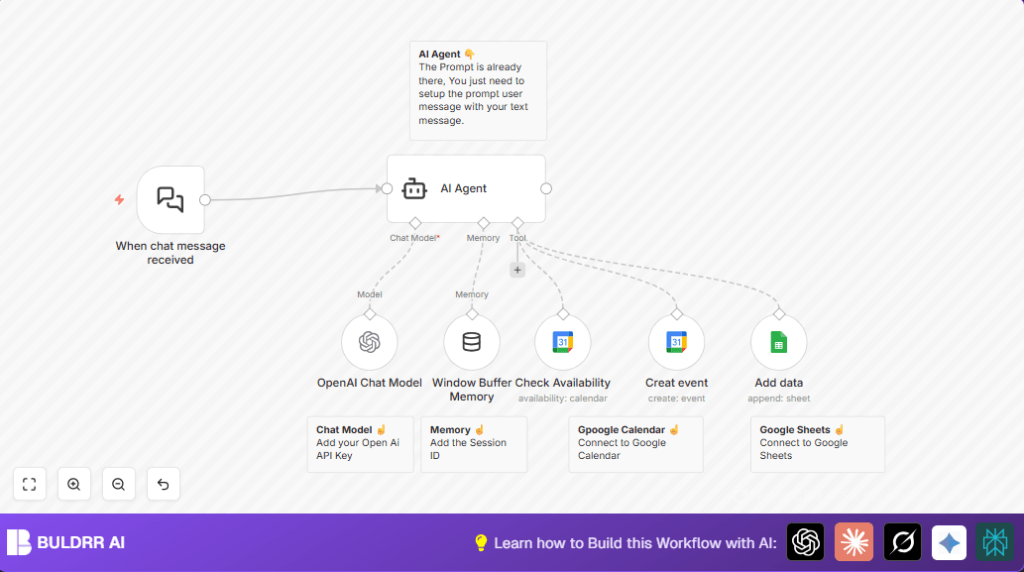

1. Workflow overview and problem solved
This workflow helps clinics handle appointment requests coming by chat without mistakes.
It stops double bookings by checking if the doctor is free before making an event.
This saves time for clinic workers and gives patients quick answers.
The outcome is automatic booking done right, with all data saved in Google Calendar and Sheets.
It makes appointment scheduling simpler for everyone.
2. What this workflow does — inputs, processing, outputs
Inputs: It gets patient messages from chat via the When chat message received node.
Processing: An AI agent reads patient messages to ask for full name, phone number, and desired date/time of appointment.
It checks Google Calendar to see if the doctor is available then suggests open slots if needed.
The AI confirms the appointment with patient by chat.
Outputs: Once confirmed, it creates a Google Calendar event and adds a new row in a Google Sheet with patient info and appointment time.
3. Tools and services used
- LangChain Chat Trigger: Receives chat messages from patients.
- OpenAI GPT-4o-mini model: Understands and replies to patient messages.
- Google Calendar API: Checks doctor availability and books appointments.
- Google Sheets API: Saves appointment details for records.
- n8n Platform: Runs the workflow automation and links all nodes.
4. Beginner step-by-step: How to use this workflow in n8n
Download and Import Workflow
- Download the workflow file using the Download button on this page.
- Open n8n editor where you want to run the automation.
- Click “Import from File” and load the downloaded workflow file.
Configure Credentials and IDs
- Add your Google API credentials for Calendar and Sheets in the credential manager.
- Set OpenAI API Key in the OpenAI Chat Model node.
- Check the Google Calendar and Google Sheets node settings to update calendar ID, sheet ID, and sheet name to match your accounts.
- Update the webhook URL from When chat message received node in your chat platform to connect incoming messages with n8n.
Test the Workflow
- Send a test chat message with sample patient info and preferred appointment time.
- See if the AI asks for missing details or confirms booking.
- Check that a new event appears on Google Calendar and a new row is added in Google Sheets.
Activate Workflow for Production
- Turn the workflow switch ON in n8n to start processing real patient requests.
- Monitor the executions on n8n dashboard to catch any issues early.
You can visit self-host n8n if running the automation on own server is wanted.
5. Inputs, process, and outputs detailed
Inputs: Text messages from patient chats containing appointment requests.
Process: The AI agent parses patient messages to request missing info and confirm booking.
The AI asks the Google Calendar if requested times fit Dr.’s office hours and are not busy.
If the slot is blocked, the AI offers other free slots.
The patient’s confirmation triggers booking.
Outputs: An event named with patient name and phone is created on Google Calendar.
A row is added to Google Sheets with patient name, phone, and appointment details for tracking.
6. Handling errors and edge cases
- If the AI does not answer after message, check OpenAI API key validity and usage limits.
- If calendar event fails, verify Google OAuth credentials and calendar ID in Creat event node (typo may exist but important to keep exact).
- If patient info is not logged, confirm Google Sheets document ID and sheet name in Add data node are correct.
- When booking is requested outside office hours, the AI suggests available times following doctor’s schedule strictly.
7. Customization ideas
- Change working days and hours in the system message of the AI agent to update office schedule.
- Adjust consultation length and break times via the AI prompt for new appointment rules.
- Try different OpenAI models (GPT-3.5, GPT-4o-mini) by changing the OpenAI Chat Model node settings.
- Add more patient data requests such as email or visit reason in the AI agent prompt text.
- Modify confirmation message tone to be more casual or formal inside AI system instructions.
8. Running this workflow in production
Activate the workflow in n8n by switching ON and ensuring the When chat message received node is enabled.
Set up monitoring on the n8n dashboard to watch flow status and errors.
Add alerts for failures to fix problems early.
Backup Google Sheets frequently to avoid losing appointment data.
Test unusual cases like requests outside work hours to verify the AI handles them well.
9. Results summary
✓ Saves staff time by automating chat appointment booking with AI.
✓ Reduces double bookings and errors by checking Google Calendar.
✓ Improves patient experience with fast replies and clear options.
✓ Keeps accurate records in Google Sheets for easy review.
→ You get an easy, automated way to manage doctor appointments from chat requests.
