

What this workflow does
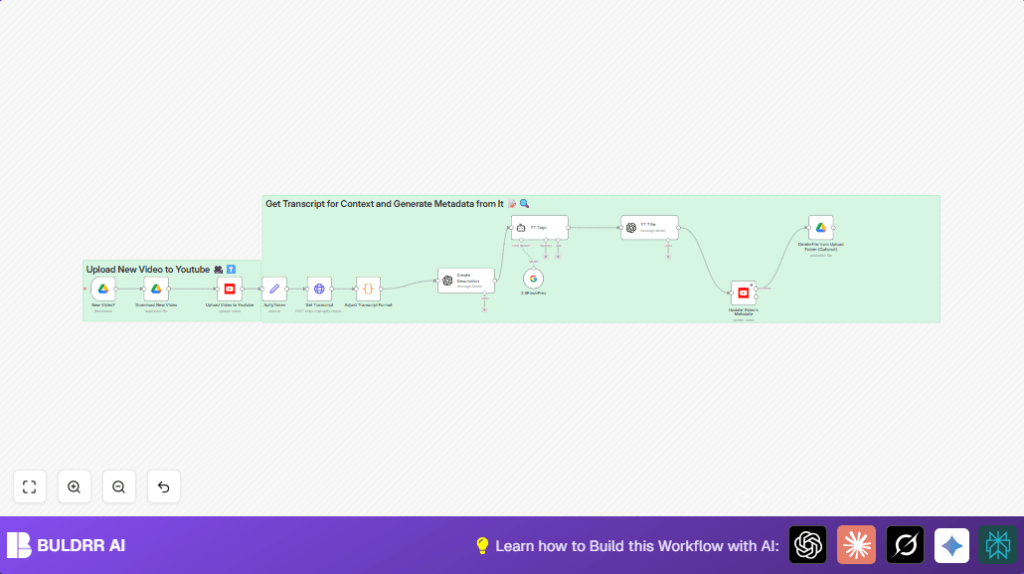
This workflow watches a Google Drive folder for new video files and then uploads those videos to YouTube with added AI-generated descriptions, titles, and tags. It saves time spent manually downloading, transcribing, writing, and uploading videos. The final result is a YouTube video uploaded with SEO-friendly metadata, ready to reach viewers.
The workflow triggers when a new video is placed in a Google Drive folder. It takes the video, fetches the transcript, uses AI to write a professional description and SEO titles, then uploads the video and updates its metadata on YouTube.
Who should use this workflow
This workflow fits creators or marketers who upload many videos to YouTube from Google Drive and want to avoid repetitive manual tasks. It helps users who want better SEO with AI-generated titles and descriptions but do not want to spend hours on each upload.
Tools and services used
- Google Drive Trigger: To detect new video files uploaded to a specific folder.
- Google Drive node: To download and optionally delete video files.
- Apify YouTube Transcript Scraper API: To extract video transcripts.
- Code node: To format transcript text for AI processing.
- OpenAI GPT-4.1-nano model: To generate detailed video descriptions and SEO titles.
- Google Gemini model: To create relevant YouTube tags based on transcript content.
- YouTube node: To upload videos and update their metadata.
How the workflow works: Inputs → Process → Outputs
Inputs
- New video files added in a designated Google Drive folder.
- OAuth2 credentials for Google Drive and YouTube.
- API keys for OpenAI, Google Gemini, and Apify transcript service.
Processing steps
- Google Drive Trigger detects new video files in a set folder every minute.
- Google Drive node downloads the new video file.
- HTTP Request node calls Apify’s YouTube Transcript Scraper API to fetch the video transcript.
- Code node formats the transcript text by joining segments into one block.
- OpenAI node generates a detailed, clear, professional video description using the transcript.
- Another OpenAI node creates a short SEO-optimized video title.
- Google Gemini node creates relevant YouTube tags from the transcript.
- YouTube node uploads the video with initial metadata.
- Second YouTube node updates the video with AI-generated title, description, and tags.
- Optional Google Drive node deletes the original video file from Drive to keep folder clean.
Outputs
- A video uploaded on YouTube.
- Video metadata includes an AI-written description, SEO title, and optimized tags.
- Optionally, cleaned Google Drive folder with removed uploaded files.
Beginner step-by-step: How to use this workflow in n8n
Import and setup
- Download the workflow file using the Download button on this page.
- Open the n8n editor and choose Import from File.
- Select the downloaded workflow file to import it into n8n.
- Open each node and add your OAuth2 credentials for Google Drive and YouTube.
- Enter API keys for OpenAI GPT-4.1-nano model and Google Gemini where required.
- If folder IDs or channel IDs differ from defaults, update those values in the Google Drive Trigger and YouTube nodes.
- Check the API token for Apify in the HTTP Request node query parameters and change if needed.
Testing and activation
- Upload a test video file to your watched Google Drive folder.
- Trigger the workflow manually or wait for the scheduled run to see if it downloads and uploads correctly.
- Check if the transcript is fetched and AI nodes generate title, description, and tags.
- If all looks good, activate the workflow to run automatically every minute.
- Monitor workflow executions for errors in the n8n editor and fix any configuration issues.
To run n8n on your own server with full control and security, consider self-host n8n.
Customization ideas
- Change video privacy on YouTube from private to public or unlisted in the upload node.
- Edit the transcript formatting code to add timestamps or clean filler words before sending to AI.
- Add a YouTube API step to set custom thumbnails after upload.
- Include translation APIs to make titles, descriptions, and tags in multiple languages.
Handling common problems
- Trigger node not detecting new files: Make sure the folder ID and Drive permissions are correct.
- OpenAI output is empty or generic: Check if prompts map transcript correctly and system instructions are clear.
- YouTube upload fails or does not update metadata: Verify OAuth2 tokens are valid and outputs connect to the update node properly.
Results from using this workflow
✓ Saves hours of manual work on each video upload
✓ Provides consistent, professional video descriptions with AI
✓ Creates SEO optimized titles and tags to improve video visibility
✓ Keeps Google Drive folder clean with optional deletion step
✓ Automates repetitive tasks so users can focus on content creation
