
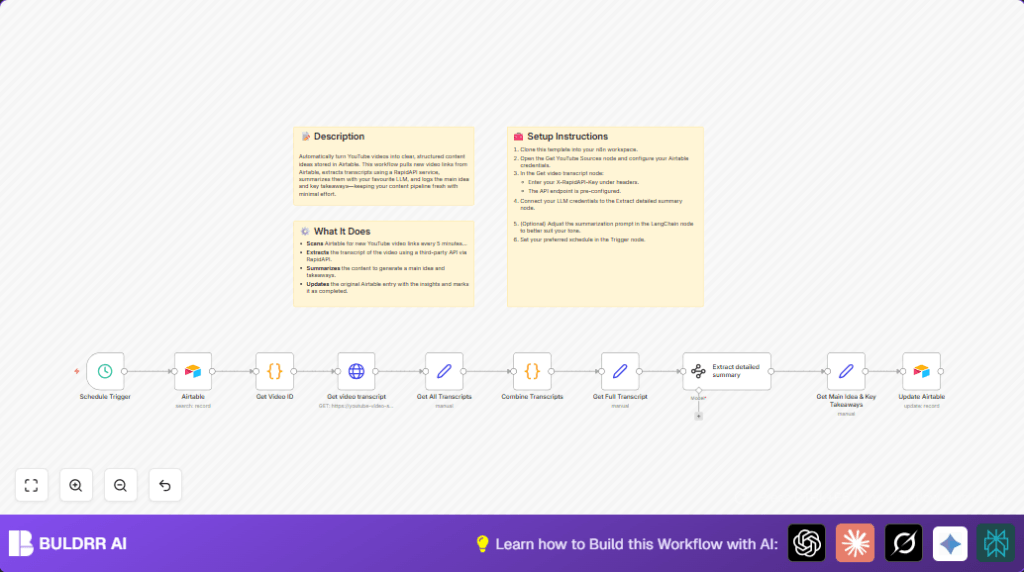

What This Automation Does
This workflow gets YouTube video links from Airtable and makes summaries automatically.
It finds new videos without summaries and writes the main points in Airtable.
This saves time and avoids mistakes from doing it by hand.
You end with an Airtable full of clear video summaries you can read fast.
No need to watch or copy the videos yourself.
Inputs → Processing → Outputs
Inputs
- Airtable entries: New YouTube video URLs marked for processing.
- RapidAPI key: Access to YouTube transcript service.
- AI LLM credentials: For LangChain node to summarize transcripts.
Processing Steps
- Fetch new YouTube video URLs from Airtable with empty status.
- Extract video ID from full URL using code node.
- Call RapidAPI to get full transcript using the video ID.
- Combine transcript parts into one text string using code.
- Send combined transcript to LangChain for summary.
- Extract summarized main idea and takeaways with Set node.
Output
- Update Airtable with clear main idea and key takeaways.
- Mark status as complete for each processed record.
Tools and Services Used
- n8n: Workflow automation platform.
- Airtable: Stores YouTube URLs and summaries.
- RapidAPI YouTube Transcript API: Retrieves video transcripts.
- LangChain Information Extractor node: Uses AI to summarize text.
Beginner Step-by-Step: How to Use this Workflow in n8n
1. Import the Workflow
- Download the workflow file using the Download button on this page.
- In n8n editor, select Import from File.
- Pick the downloaded workflow file to load it inside n8n.
2. Configure Credentials and IDs
- Add Airtable Personal Access Token in the Airtable nodes.
- Input RapidAPI Key in the HTTP Request node headers exactly as given.
- Connect your AI LLM provider credentials to the LangChain Information Extractor node.
- Change Airtable base and table IDs to match your own data if needed.
- Check the URL or prompt text in nodes for correctness, copy-paste given code or prompt if it appears.
3. Test and Activate
- Run workflow manually once to check data flow and that no errors occur.
- Inspect outputs to confirm video ID extraction, transcript retrieval, and summary generation work.
- Activate the workflow toggle to run on schedule for automatic processing.
Customizations
- Change LangChain prompt text to adjust summary style or add details.
- Increase Airtable query limit from 1 to bigger numbers to process multiple videos at once.
- Swap transcript API to another provider by editing HTTP Request node settings.
- Use different status values in Airtable update node, instead of true/false.
- Add code to extract video titles or dates from Airtable to enrich records.
Troubleshooting
- No data fetched from Airtable: Check API key, base/table IDs, and filter formula.
- videoId field is null: Inspect YouTube URLs to match supported formats.
- HTTP Request errors: Verify RapidAPI key and host headers.
- LangChain node fails: Check AI credentials and connection status.
Pre-Production Checklist
- Confirm Airtable API token has permission to read and write.
- Verify RapidAPI key is active with proper subscription.
- Test Schedule Trigger and stepwise execution in n8n.
- Check Code node outputs for correct video IDs.
- Check HTTP Request node gives transcript JSON.
- Ensure LangChain produces JSON summary output.
- Backup Airtable data before any automatic updates.
Deployment Guide
Turn the workflow live in n8n after tests pass.
Watch runs in execution logs for errors or delays.
Schedule Trigger runs every few minutes to find new videos and update Airtable automatically.
Adjust frequency based on API limits and video volume.
For better control and privacy consider self-host n8n.
Summary
→ This workflow finds new YouTube videos from Airtable and writes clean summaries automatically.
→ Saves hours daily by removing manual transcript work.
✓ Gives a clear main idea and key points in the Airtable for each video.
✓ Runs on schedule to keep content fresh without human work.
✓ Simple to configure with API keys and known node setup.
Example Code Snippet (Video ID Extraction)
Use this JavaScript code in Code node named “Get Video ID” to get the video ID from URL.
// Loop over input items
for (const item of $input.all()) {
    const Source = item.json.Source;
    const videoIdMatch = Source.match(/(?:v=|\/)([a-zA-Z0-9_-]{11})/);
    const videoId = videoIdMatch ? videoIdMatch[1] : null;
    item.json.videoId = videoId;
}
return $input.all();
Example AI Summary Prompt for LangChain Node
Paste this prompt into LangChain Information Extractor node prompt field.
Your job is to generate detailed summary of "{{ $json.Transcript }}".

Always output your answer in the following format:

- Main Idea
- Takeaways
