

What This Workflow Does
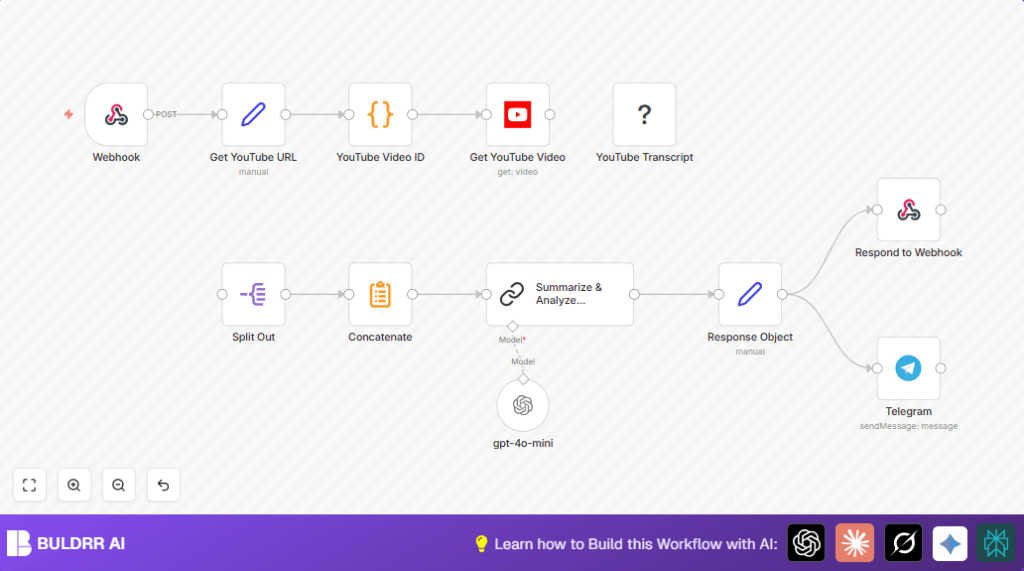
This workflow takes YouTube video links sent through a webhook and creates a quick summary of each video’s transcript.
It solves the problem of copying URLs, getting transcripts, and writing summaries by hand.
The result is a neat JSON summary sent back instantly and a message posted to Telegram for fast updates.
Who Should Use This Workflow
Users who review and share YouTube videos daily and want to save time on manual transcript work.
It suits bloggers, content creators, and social media managers needing quick video summaries without errors.
Tools and Services Used
- n8n platform: To automate and connect nodes.
- YouTube API: To get video details like title and description.
- YouTube Transcript node: To download video subtitles text.
- OpenAI with Langchain: To make AI create readable transcript summaries.
- Telegram Bot API: To send messages about new summaries.
Inputs, Processing, and Outputs
Inputs
A webhook receives a POST request containing a JSON with the field youtubeUrl.
Processing Steps
- Extract the YouTube video ID from the URL using a JavaScript regular expression.
- Use YouTube API node to get video title and description by video ID.
- Fetch the transcript through the YouTube Transcript node, returning an array of transcript segments.
- Split transcript segments into single items for easier processing.
- Concatenate all transcript text together into a single block.
- Send full transcript text to the Langchain node with GPT-4o Mini using a prompt to create a detailed summary and topics list.
- Format a clear JSON object that includes summary, topics, video metadata, and URL.
- Return the JSON response to the webhook requester.
- Send a message to Telegram chat with video title and link.
Outputs
Outputs include a JSON summary object sent via webhook and a Telegram message notification sent in real time.
Beginner Step-by-Step: How to Use This Workflow in n8n
Step 1: Import Workflow
- Download the workflow file provided on this page.
- Open the n8n editor and use the Import from File option to load the workflow.
Step 2: Add API Credentials
- Set up YouTube API credentials in the YouTube node.
- Add OpenAI API Key in the Langchain node to use GPT-4o Mini.
- Enter Telegram Bot API token and target chat ID in the Telegram node.
Step 3: Check Workflow Settings
- Make sure the Webhook node method is set to POST with path ‘ytube’ (or another custom path).
- Verify code in the Code node is unchanged, especially the YouTube video ID regex.
Step 4: Test and Activate
- Send a POST request with JSON body containing a
youtubeUrlfield to the webhook URL. - Check the response JSON for the summarized transcript.
- Look at Telegram for the notification message.
- When everything works, toggle the workflow switch to activate it for production.
Common Edge Cases and Failures
- If the transcript is missing, the YouTube Transcript node shows “No transcript available” because the video does not have captions.
- Wrong video ID means the code node regex did not match; check the URL format and adjust the code if needed.
- Telegram messages may fail if API token or chat ID is invalid; re-check credentials.
Ideas for Customization
- Change the AI prompt in the Langchain node for shorter or more detailed summaries.
- Post updates to Slack or Discord by replacing the Telegram node.
- Add a node to ignore videos longer than a set limit after fetching metadata.
- Store all summaries into a database before sending response for later review.
Summary of Benefits
✓ Saves hours by automating transcript fetching and summarization.
✓ Reduces manual errors from copying URLs and text.
✓ Sends fast notifications to Telegram with video summaries.
✓ Provides clear JSON output for integration or further processing.
Helpful Notes
Make sure the webhook URL is public and accessible.
Check YouTube API quota and OpenAI usage to avoid limits.
Test each step carefully in the n8n UI before activation.
If running self-host n8n, confirm all external nodes and APIs are reachable.
