

What This Workflow Does
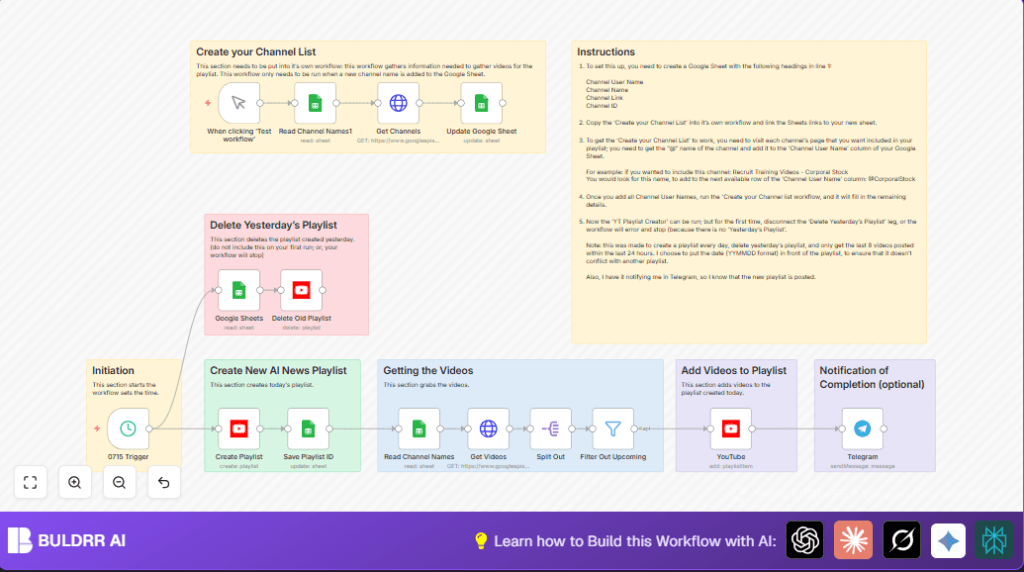
This workflow reads a list of AI news YouTube channels from Google Sheets, fetches their latest 5 videos from the past 24 hours using YouTube API, and avoids upcoming live streams.
It deletes yesterday’s playlist, creates a new dated AI news playlist, adds the new videos to it, saves the new playlist ID back to Google Sheets, and can notify via Telegram.
This process runs automatically daily at 7:15 AM, saving time and reducing errors in playlist management.
Who Should Use This Workflow
If you manage daily YouTube playlists for AI news and feel the manual updates take too long or cause mistakes, this workflow is for you.
It also helps if you want to use Google Sheets to keep your list of channels updated easily and want notification alerts after playlist updates.
Tools and Services Used
- Google Sheets API: Holds the AI news channel list and the playlist tracking data.
- YouTube Data API: Fetches videos, creates and deletes playlists, adds videos to playlists.
- Telegram Bot API: Sends optional notifications after playlist update.
- n8n Automation Platform: Orchestrates nodes and scheduling.
How This Workflow Works
Inputs
- Google Sheet containing AI news channels with username, channel name, link, and channel ID.
- YouTube API key with permission to list videos and manage playlists.
- Optional Telegram bot credentials for sending messages.
Processing Steps
- Read the channel list from Google Sheets.
- Use YouTube API to get the last 5 videos published in the last 24 hours per channel, sorted by date.
- Filter out live streams that are upcoming.
- Delete the previous day’s playlist using saved playlist ID.
- Create a new playlist titled with today’s date + “AI News”.
- Add the fetched videos to the new playlist.
- Save the new playlist ID back to Google Sheets for tracking.
- Optionally send a Telegram message to notify completion.
Output
One new daily AI news YouTube playlist with fresh videos added.
Updated Google Sheets data with the current playlist ID.
Optional Telegram message indicating success.
Beginner Step-by-Step: How to Use This Workflow in n8n Production
Import the Workflow
- Download the workflow file using the Download button on this page.
- Open your n8n editor and click “Import from File”.
- Choose the downloaded workflow file.
Configure Credentials and Settings
- Add your Google Sheets API credentials with read/write access.
- Add your YouTube API OAuth2 credentials for playlist management.
- Enter your YouTube Data API key in the “Get Videos” HTTP Request node.
- If using Telegram notifications, configure the Telegram bot credentials in the Telegram node.
- Update Google Sheet IDs or tab names in the Google Sheets nodes if your sheets differ.
- Adjust channel list or playlist naming if needed, using expression fields.
Test and Activate
- Run the workflow once manually with the Manual Trigger node.
- Check that the playlist gets created, videos are added, old playlist is deleted, and Telegram message is sent (if configured).
- If all works, activate the workflow to run daily at 7:15 AM using the Schedule Trigger node.
Customization Ideas
- Update your Google Sheet anytime to add or remove AI news channels.
- Change the “maxResults” number in the HTTP Request node to get more or fewer videos.
- Edit the playlist title expression for different naming conventions.
- Remove or disable the playlist deletion step if you want to keep old playlists.
- Add Slack or email notification nodes instead of Telegram if preferred.
Common Issues and Fixes
- API key errors usually mean the key is invalid or quota is used up. Check Google Cloud Console.
- Deleting old playlist might fail on the first run if no previous playlist ID is saved. Disable that step first.
- No videos added could mean video IDs were not passed properly. Verify the filtering step outputs correct video IDs.
Production Preparation
- Verify Google Sheets credentials can read and write as needed.
- Ensure YouTube OAuth credentials allow playlist creation and deletion.
- Test YouTube API separately with tools like Postman if uncertain.
- Keep Google Sheet channel usernames accurate and updated.
- Run the separate “Create your Channel List” workflow initially to fill metadata.
- Test the full workflow manually before scheduling.
- Backup Google Sheets data regularly to prevent data loss.
Deployment Guide
Activate the workflow scheduling at 7:15 AM daily inside n8n.
Make sure the workflow stays active in n8n editor.
Watch the first few runs to catch any issues early.
Enable n8n error notifications to get alerts if something breaks.
For more control and reliability, consider self-host n8n on your own server.
Summary
✓ Automatically reads channel list from Google Sheets daily.
✓ Fetches latest 5 videos per AI news channel, skipping upcoming livestreams.
✓ Deletes yesterday’s playlist to keep things clean.
✓ Creates a fresh playlist named with today’s date.
✓ Adds new videos to this new playlist.
✓ Saves the new playlist ID in Google Sheets.
✓ Sends optional Telegram notification.
