
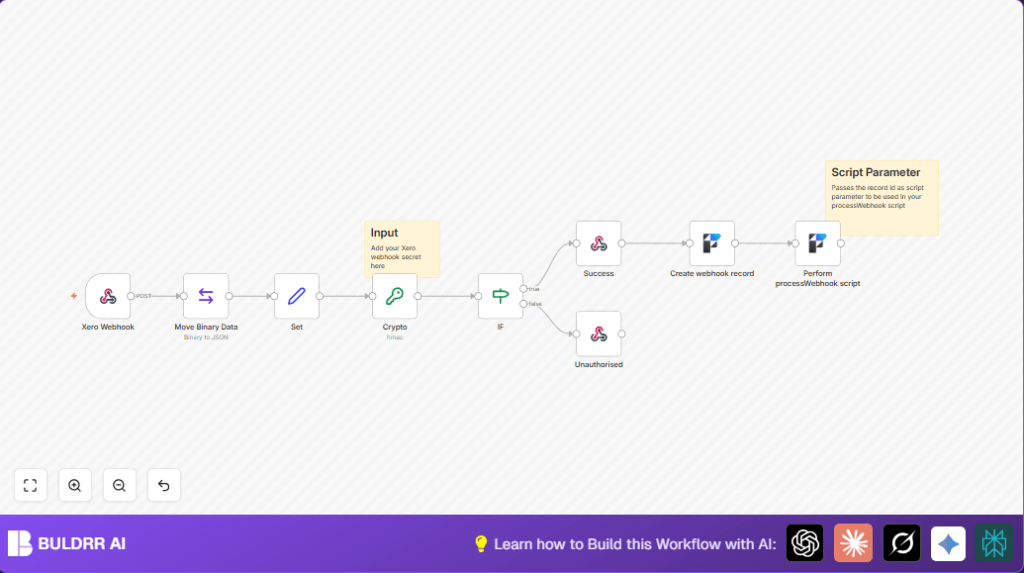

What This Automation Does
This workflow checks Xero webhook messages to make sure they are real and safe. It does this by using a secret key and a special math formula called HMAC SHA256. After checking, it saves the data into a FileMaker database and runs a script there to do more work. This helps stop fake data and saves time on manual checks.
The workflow gets the webhook from Xero, reads the exact data sent, and makes a secret code using the webhook secret key. Then it compares this code with the code sent by Xero. If both match, the webhook is true and accepted. If not, it rejects the webhook. The true webhooks are saved in FileMaker and a script is run to process them further.
Inputs, Processing, and Output
Inputs
- Xero webhook POST request: Incoming financial transaction notifications.
- Xero webhook secret key: Used to check message validity.
- FileMaker API credentials: To access and update FileMaker database.
Processing Steps
- Receive webhook via Webhook node, with raw body enabled to get exact data.
- Extract the raw binary data using Move Binary Data node.
- Prepare data with a Set node to keep only the raw data for signature calculation.
- Compute HMAC SHA256 hash with the secret key in Crypto node, encode in Base64.
- Compare the computed signature with the Xero signature header in an IF node.
- Send back a success (200) or unauthorized (401) response using Respond to Webhook nodes.
- If valid, save webhook JSON data as new record in FileMaker via FileMaker node.
- Trigger FileMaker script “processWebhook” passing new record ID for further action.
Output
- HTTP response confirming or rejecting Xero webhook.
- New FileMaker record with webhook data.
- FileMaker script runs to continue processing.
Tools and Services Used
- Xero: Sends webhook notifications about financial transactions.
- n8n: Automates the workflow with nodes for webhook, crypto, and FileMaker integration.
- FileMaker: Stores webhook data and runs backend scripts.
Beginner step-by-step: How to use this workflow in n8n
Import and Setup
- Click the Download button on this page to get the workflow file.
- Open the n8n editor, click on the menu, and select “Import from File”.
- Choose the downloaded workflow file to import it.
- After import, add your Xero webhook secret key in the Crypto node where the secret “1” is shown.
- Configure your FileMaker API credentials in the FileMaker nodes.
- Update the FileMaker layout and field names if your database uses different names.
- Check and update the Webhook node path if needed.
Test and Activate
- Send a test webhook from Xero or use Postman to simulate.
- Watch the workflow execution in n8n to see if it passes all nodes without error.
- If everything works, toggle the workflow to “Active” for live production use.
- Make sure the webhook URL in Xero matches the active Webhook node URL.
- For running the workflow on your own server, consider self-host n8n for better control.
Common Problems and Fixes
- Mismatch in computed and header signature: Check exact webhook secret in Crypto node and make sure raw body is enabled.
- FileMaker record creation fails: Confirm correct layout and field names plus valid API credentials.
- No response returned to Xero: Ensure Respond to Webhook nodes are linked on both true and false branches of the IF node.
Customization Ideas
- Change the webhook secret key in the Crypto node to match your Xero configuration.
- Modify FileMaker layout or fields in the FileMaker nodes for your database.
- In the Set node, add more webhook header info to save richer data.
- Adjust HTTP response codes in the respond nodes to fit your API needs.
- Pass extra parameters to the FileMaker script if needed.
Summary
✓ This workflow safely checks every Xero webhook using HMAC SHA256 and the secret key.
✓ Webhooks that pass validation get saved in FileMaker with all their data.
✓ FileMaker runs a custom script on each new webhook record for further handling.
→ This saves time, stops fake data, and makes financial records more reliable.
