
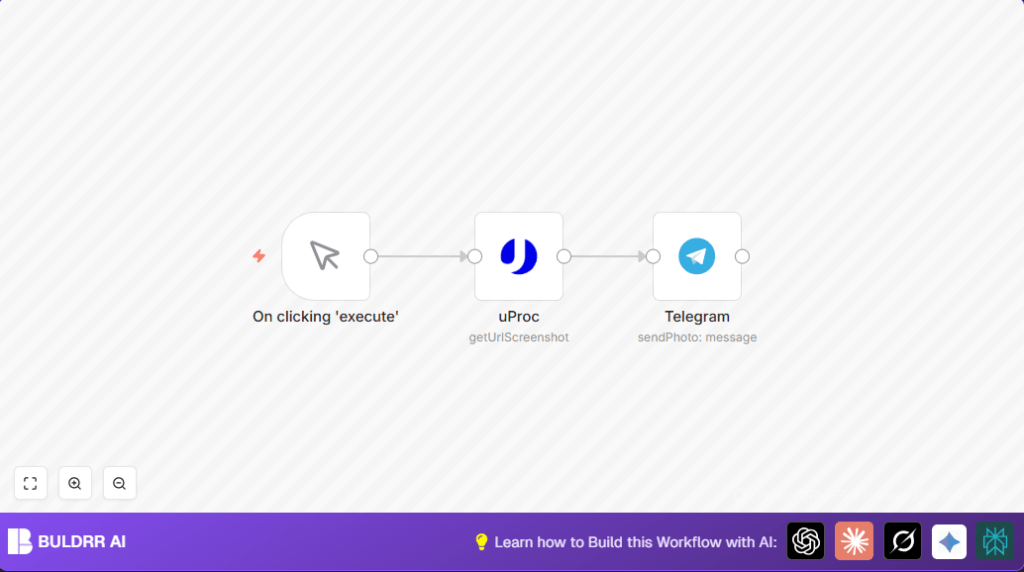

What this workflow does
This workflow captures a full webpage screenshot automatically and sends that image as a photo to a Telegram chat or channel.
It stops the need to open sites, save screenshots, and upload them manually.
Every time the workflow runs, it gets fresh screenshots and shares them fast in Telegram.
Who should use this workflow
This workflow is for people who regularly check websites and share updates with teams using Telegram.
If you need to monitor many sites or send screenshots without errors, this workflow helps save time and avoid mistakes.
Tools and services used
- n8n: Automates building and running the workflow.
- uProc API: Captures full webpage screenshots from URLs.
- Telegram Bot API: Sends photo messages to specified Telegram channels or chats.
Inputs, processing steps, and outputs
Inputs: Website URL to capture, Telegram chat ID to send the screenshot.
Processing steps: Manual trigger starts the workflow. The uProc node takes a full-page screenshot from the URL with specific width and settings. The Telegram node sends the screenshot file as a photo message to the chat ID.
Outputs: A screenshot image appears in the Telegram chat or channel.
Beginner step-by-step: How to run this workflow in n8n
Step 1: Import the workflow
- Download the provided workflow file using the Download button on this page.
- Open the n8n editor where you want to run the workflow.
- Use the “Import from File” option in n8n to load the downloaded workflow.
Step 2: Add credentials and change settings
- Enter your uProc API Key inside the uProc node credentials.
- Put your Telegram bot credentials in the Telegram node credentials.
- Update the Telegram chat ID or channel username in the Telegram node where the image will be sent.
- If needed, update the website URL in the uProc node to the page you want to capture.
Step 3: Test and activate
- Run the workflow once by clicking Execute on the Manual Trigger node to check the screenshot sending.
- If everything works, save and activate the workflow for production use.
- Optionally, to automate, replace the Manual Trigger with a Cron node for scheduled runs.
For users running self-host n8n on a server, please make sure API credentials and network settings are configured properly. self-host n8n users have the flexibility to adjust workflow execution as needed.
Common errors and how to fix them
- Telegram node error “chat not found”: Check chat ID format; it should start with ‘@’ for channels or be a numeric ID. Confirm bot is added to the chat and has permission to send photos.
- uProc returns empty or error: Verify that uProc API Key is active and correctly entered. Check URL format for issues and ensure API rate limits are not exceeded.
Customizations to consider
- Change the website URL in the uProc node to monitor different pages.
- Adjust screenshot width for better image resolution.
- Copy the Telegram node multiple times and set different chat IDs to send screenshots to several channels or chats.
Summary of benefits and results
✓ Saves 15-30 minutes per website by removing manual screenshot capture and upload.
✓ Ensures consistent, fresh website images get sent to Telegram every run.
✓ Reduces errors like forgetting full capture or sending wrong images.
✓ Easy to change website, chat, and screenshot sizes without rebuilding.
→ Outcome: Faster website checks and better team communication using Telegram.
