

What this workflow does
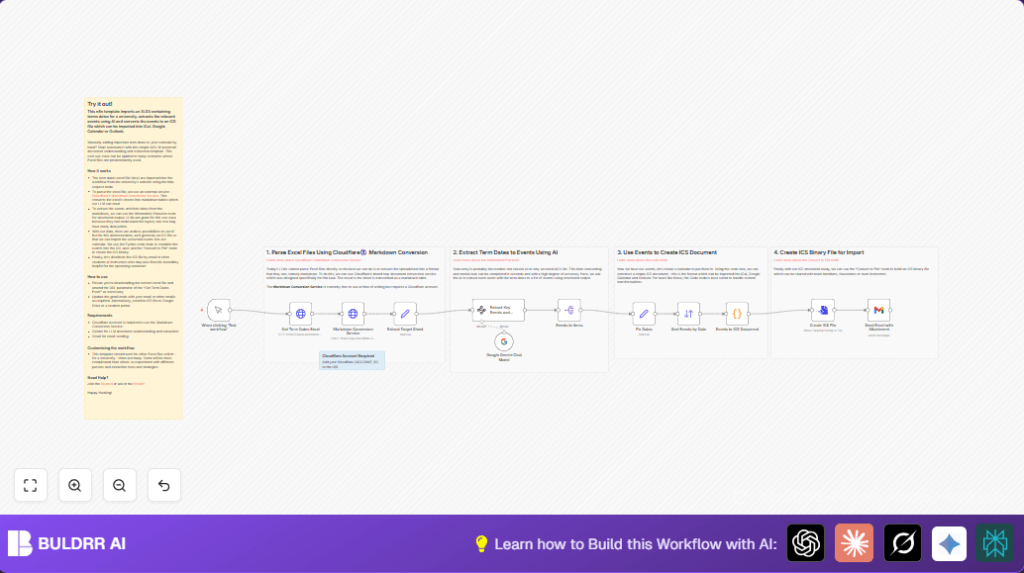
This n8n workflow gets an Excel file of university term dates, turns it into a calendar file, and sends it by email automatically.
It solves the problem of manually entering many dates from Excel into a calendar and missing important events.
The result is a ready-to-use ICS calendar file sent by email, which users can import easily into Google Calendar, Outlook, or iCal.
The input is an official university Excel sheet from a URL.
The process converts the sheet into markdown, uses AI to read key dates, fixes dates, and makes an ICS file.
Finally, it sends the ICS file as an email attachment.
Tools and services used
- n8n nodes: HTTP Request, Code, Gmail, Set, SplitOut.
- Cloudflare Markdown Conversion Service: Converts Excel sheets to markdown format.
- Google Gemini AI: Extracts structured events from markdown tables.
- Gmail OAuth2: Sends email with calendar attachment.
Beginner step-by-step: How to use this workflow in n8n production
Import the workflow
- Download the workflow file using the Download button on this page.
- Open n8n editor and choose “Import from File”.
- Select the downloaded workflow file to import.
Configure credentials and inputs
- Add your Cloudflare API Key and Account ID to the HTTP Request node calling the Markdown Conversion Service. Update the URL:
https://api.cloudflare.com/client/v4/accounts/{ACCOUNT_ID}/ai/tomarkdown - Set Google Gemini API credentials in the “Extract Key Events and Dates” node.
- Update the Gmail OAuth2 credentials in the Gmail node.
- Check recipient email address (e.g.,
[email protected]) in the Gmail node. - Confirm the Excel URL in the HTTP Request “Get Term Dates Excel” node is correct.
Test the workflow
- In n8n editor, trigger the workflow manually using the “Test workflow” button.
- Review the nodes’ output to ensure the Excel file downloads, markdown conversion succeeds, AI extraction returns JSON events, and email sends.
Activate for production
- After confirming all steps succeed, enable the workflow to run on demand or schedule.
- Optionally, for privacy or control, deploy the workflow on a server with self-host n8n.
Inputs, processing steps, and outputs
Inputs
- Official university term dates Excel file from a fixed URL.
- Cloudflare API credentials for markdown conversion.
- Google Gemini API credentials for AI data extraction.
- Gmail OAuth2 credentials for sending email.
Processing steps
- Download Excel using the HTTP Request node.
- Convert Excel to markdown format using the Cloudflare Markdown Conversion Service.
- Extract the target sheet markdown using a Set node.
- Run the markdown through the Google Gemini AI model to get structured JSON of week numbers, dates (as Excel serial numbers), and event titles.
- Split extracted events into separate items with SplitOut node.
- Fix Excel serial dates to ISO date strings in a Set node.
- Sort all events by date for order.
- Convert structured events into ICS calendar format using a Python Code node.
- Encode ICS text and convert it to a binary file.
- Send the ICS file as an attachment in an email via the Gmail node.
Outputs
- ICS file with term dates and events.
- Email sent to configured address containing ICS attachment.
Customizations
- Change the Excel file URL in the HTTP Request node to another source.
- Add fields (like description or location) by updating the Google Gemini node’s extraction schema.
- Send the ICS calendar file to Google Drive or other storage services instead of email.
- Replace Google Gemini AI with other supported language models if desired.
- Improve the “Fix Dates” node to handle different date formats or timezones.
Troubleshooting common issues
- HTTP Request node download failure: Check URL correctness and network.
- Cloudflare API authentication failure: Verify API Key and Account ID credentials.
- Google Gemini AI returns empty or bad JSON: Adjust the system prompt or verify markdown data input.
- Gmail sending fails: Re-authorize OAuth2 credentials and check email API permissions.
Summary
✓ Automatically download and convert university term dates Excel files.
✓ Use AI to extract structured event information without manual reading.
✓ Produce a ready ICS calendar file instantly.
✓ Email the calendar file automatically to users.
✓ Save time and reduce errors in academic planning.
