
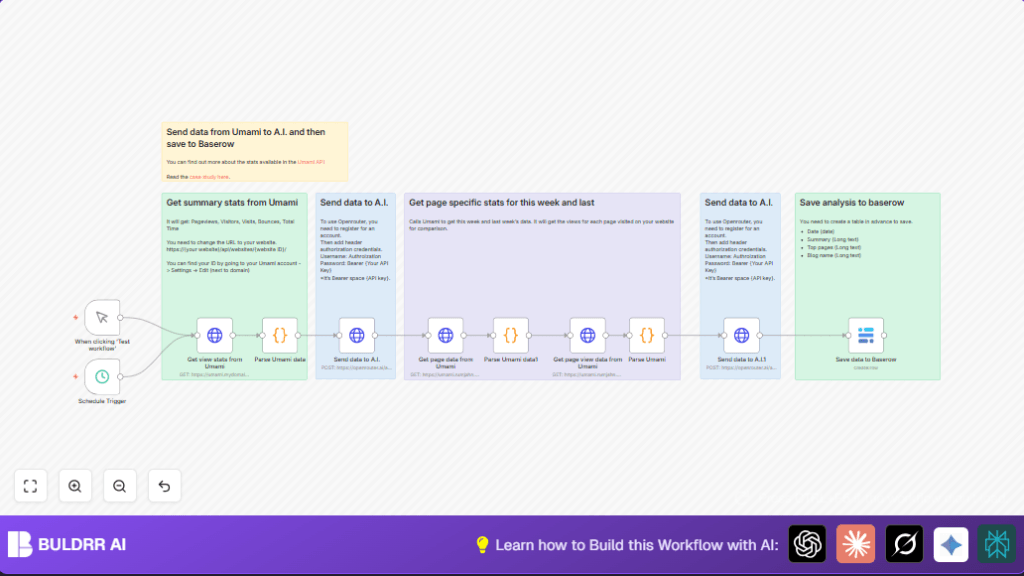

What this workflow does
This workflow pulls website data from Umami every week and sends it to an AI for SEO advice.
It gets stats like pageviews and visitors from the last and current week, compares them, and makes a readable SEO report.
Then it saves the AI’s summary and suggestions in a Baserow database for easy tracking.
This stops you from copying data by hand and saves about four hours weekly.
Tools and services used
- Umami Analytics API: To fetch website metrics like pageviews, visits, and time spent.
- Openrouter AI (Meta LLaMA Model): To generate SEO markdown summaries and suggestions.
- Baserow Database: To store AI results and raw data for history and reporting.
- n8n Platform: For automation via HTTP requests, code nodes, and triggers.
- HTTP Header Auth: Secures the API calls to Umami and AI services.
Who should use this workflow
If you spend hours manually copying Umami stats every week, this is for you.
It works best if you have API access to Umami and want SEO insights fast.
No deep technical skills needed, but some familiarity with n8n helps.
It suits digital marketers or blog owners who want errors gone and time saved.
Inputs, processing, and outputs
Inputs
- Umami API credentials and website ID.
- Openrouter AI API key.
- Baserow database details like table and field IDs.
Processing steps
- Schedule or manual trigger starts the workflow.
- HTTP nodes fetch summary stats and page data from Umami for current and previous weeks.
- Code nodes simplify and URL encode key metric data for AI prompts.
- HTTP nodes send data prompts to Openrouter AI for SEO summaries and improvement suggestions.
- Baserow node saves AI results, reports, and dates for tracking.
Outputs
- AI-generated SEO markdown tables and suggestions comparing weeks.
- Stored records in Baserow with raw and AI-processed data.
- Time and error reduction for weekly SEO reporting.
Beginner step-by-step: How to use this workflow in n8n
Import the workflow
- Download the workflow file using the Download button on this page.
- Open n8n editor where you work on automations.
- Choose the option “Import from File” and select the downloaded workflow file.
Configure required settings
- Enter your Umami API credentials and website ID in the HTTP Request nodes.
- Add your Openrouter AI API key in the HTTP Header Auth for AI nodes.
- Update the Baserow node with your database table ID and field IDs for date, summary, top pages, and blog name.
- Check and adjust any timezone or URL parameters to fit your region or site.
Test and activate
- Run the workflow once manually with the Manual Trigger. Check all steps and output data looks correct.
- If all is good, activate the schedule trigger node to run automatically every week.
- If self hosting n8n, ensure your server runs reliably by visiting self-host n8n.
Common edge cases and errors
- Unauthorized (401) errors: Usually bad or missing API keys for Umami or Openrouter AI.
Check your keys and update credential nodes. - Empty AI responses or errors: May happen if prompt format is wrong or Openrouter quota is reached.
Simplify the prompt or confirm API limits in your account. - Data saving fails in Baserow: Happens when table or field IDs are wrong or missing.
Confirm IDs exactly match your Baserow setup and re-test. - No data from Umami API: Incorrect website ID, wrong dates, or timezone mismatch causes empty results.
Check API URLs and timezone strings carefully.
Customization ideas
- Change the timezone in Umami API calls to your preferred region by adjusting the “timezone” param.
- Switch the AI model in HTTP nodes to others supported by Openrouter if desired.
- Modify date ranges in API call parameters for monthly or custom periods instead of weekly.
- Update Baserow node to save to different tables or add fields for more details.
- Add a Gmail node after saving data to send email alerts about new SEO reports.
Summary of the workflow benefits
✓ Saves about 4 hours weekly by automating Umami data collection and SEO reporting.
✓ Removes manual copy-paste errors and messy formatting.
✓ Provides easy-to-read SEO markdown reports and improvement tips powered by AI.
✓ Stores historical data and AI insights in Baserow for future review.
✓ Can run manually or on a weekly schedule.
