

Automate Two-Way Sync Between Pipedrive and MySQL with n8n

Struggling to keep your Pipedrive CRM contacts in sync with your MySQL database? This detailed n8n workflow automates two-way synchronization, ensuring your sales and database teams always have updated contact details without manual errors or delays.
Schedule Trigger
MySQL
Pipedrive
+10
Workflow Identifier: 1032
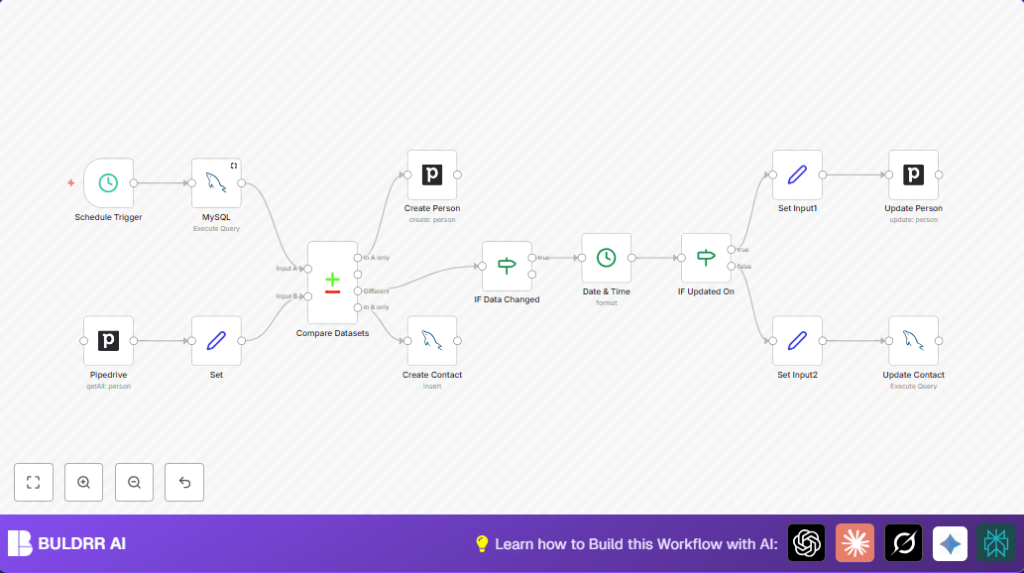
NODES in Use: Schedule Trigger, MySQL, Pipedrive, Set, Compare Datasets, Create Person, Create Contact, IF, Date & Time, Set Input1, Set Input2, Update Person, Update Contact
Automate Pipedrive sync with MySQL and n8n

Press CTRL+F5 if the workflow didn't load.

Learn how to Build this Workflow with AI:

What This Automation Does ⚙️

This workflow connects Pipedrive with a MySQL database to sync contact information both ways.
It solves the problem of having different contact data in both places.
When it runs, the contact info gets updated so both systems have the same details.
This stops errors and saves time on manual syncing.


Inputs, Processing, and Output

Inputs

  • Contacts from MySQL: Fetches list of contact records including id, name, email, phone, and updated_on timestamp.
  • Persons from Pipedrive: Retrieves all person records with name, email, phone, and last update time.

Processing Steps

  1. Compare contacts by email to find missing or updated entries.
  2. Create new contacts where missing on either side.
  3. Check if records need updating by comparing name and phone fields.
  4. Decide which record is newer using updated_on timestamps.
  5. Update the older record with the newer information.
  6. Scheduled trigger runs this process automatically on set intervals.

Output

  • Identical and up-to-date contact data in both MySQL database and Pipedrive.
  • New contacts created in missing systems.
  • Older records updated with latest information.

Who Should Use This Workflow

Anyone who manages contacts in both Pipedrive and a MySQL database.
This helps teams avoid mistakes from out-of-sync contact info.
People who want to save hours of manual reconciliation.


Tools and Services Used

  • n8n Automation Platform: Runs the workflow on schedule with nodes and logic.
  • Pipedrive API: Accesses and modifies person data in CRM.
  • MySQL Database: Stores contact info and allows queries and updates.

Beginner Step-By-Step: How to Use This Workflow in n8n

1. Import the Workflow

  1. Download the workflow file using the Download button on this page.
  2. Open your n8n editor where workflows are managed.
  3. Use the “Import from File” option in n8n to load the downloaded workflow.

2. Configure Credentials

  1. Add your MySQL database credentials with host, user, password, and database name.
  2. Add your Pipedrive API Key to access Pipedrive data.
  3. Update table names, field names, or other IDs if your database is set up differently.

3. Test the Workflow

  1. Manually run the workflow once to check for errors and confirm data synchronization.
  2. Check the output of MySQL and Pipedrive nodes to ensure data matches expectations.

4. Activate for Production

  1. Turn on the toggle to activate the workflow schedule.
  2. The workflow will now run at your set interval and keep contacts synced automatically.
  3. Watch executions in the n8n dashboard periodically for any issues.
  4. If self hosting n8n, see self-host n8n for helpful resources.

Common Issues and Solutions

  • No contacts returned from MySQL node – Check SQL query syntax and database access credentials.
  • Pipedrive API rate limits – Reduce how often the workflow runs or batch requests.
  • Data not matching after sync – Confirm field mapping and email matching logic in compare node.

Customization Ideas

  • Sync by phone number instead of email by changing the compare field in the dataset node.
  • Add extra fields like company or address by mapping them in Set nodes and adding to inserts or updates.
  • Change how often the workflow runs by adjusting the schedule trigger interval.
  • Add notifications with error trigger nodes to get alerts when something fails.

Summary of Results

✓ Contact data is perfectly matched between Pipedrive and MySQL.
✓ Newly added contacts automatically appear in both systems.
✓ Updates to name or phone sync both ways based on newest change.
✓ Saves manual work and reduces mistakes.
✓ Runs on schedule without needing human help.

Automate Pipedrive sync with MySQL and n8n

Visit through Desktop to Interact with the Workflow.

Author
Written By
Vikash Kumar
Building AI agents, n8n workflows and end-to-end automation for 30+ Brands across India, the US, Europe, Dubai & Australia. 7+ years of Experience saving founders real hours every week - no code required.
Author
Written By
Vikash Kumar
Building AI agents, n8n workflows and end-to-end automation for 30+ Brands across India, the US, Europe, Dubai & Australia. 7+ years of Experience saving founders real hours every week - no code required.

Frequently Asked Questions

The workflow uses the email address to find matching contacts in both systems.
The workflow compares update timestamps and updates the older record with the newer data.
Yes, by changing the compare field settings in the Compare Datasets node, phone number can be used.
Download and import the workflow into n8n, add your credentials, test once, then activate the scheduled trigger to run it automatically.

Related Workflows

Automate Twist Channel Creation and Messaging with n8n

This workflow automates creating and updating a channel in Twist and sending a personalized message to specific users. It eliminates manual setup errors and saves time managing Twist communications.

Automate Ideogram Image Generation with Google Sheets & Gmail

This workflow automates graphic design image generation via Ideogram AI, storing image data in Google Sheets and Google Drive, with email alerts via Gmail. It saves designers hours by automating image creation, remixing, review, and record-keeping.

Automate IT Support with Slack and OpenAI in n8n

Streamline IT support by automating Slack message handling using n8n and OpenAI. This workflow handles Slack DMs, filters bots, queries a Confluence knowledge base, and delivers AI-generated responses, improving support efficiency and response time.

Automate Crypto Analysis with CoinMarketCap & n8n AI Agent

Discover how this unique n8n workflow leverages CoinMarketCap’s multi-agent AI to deliver precise, real-time cryptocurrency insights directly via Telegram. Manage crypto data analysis efficiently with automated multi-source API integration.

Automate Gumroad to Beehiiv Subscriber Sync with n8n

Learn how to automatically add new Gumroad sales customers as Beehiiv newsletter subscribers using n8n automation. This workflow saves time by syncing sales data to Google Sheets CRM and notifying your Telegram channel instantly.

Generate On-Brand Blog Articles Using n8n and OpenAI

This workflow automates the creation of on-brand blog articles by analyzing existing company content using n8n and OpenAI. It extracts article structures and brand voice to produce consistent draft articles, saving significant content creation time.
1:1 Free Strategy Session
Your competitors are already automating. Are you still paying for it manually?

Do you want to adopt AI Automation?

Every hour your team does repetitive work, you're burning real money.
While you wait, faster businesses are cutting costs and moving quicker.
AI and automations aren't the future anymore — they're the present.

Book a live 1-on-1 session where we show you exactly which of your daily tasks can be automated — and what it’s costing you not to.