
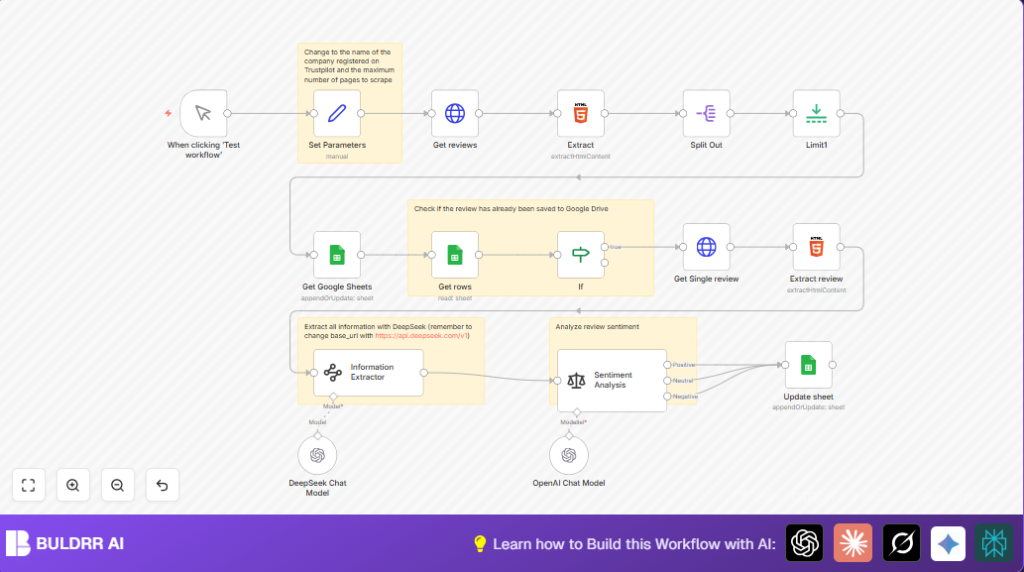

What This Automation Does
This workflow automatically gets reviews from Trustpilot for a company.
It cleans and reads each review to find who wrote it, the rating, the date, and the text.
Then it uses AI to decide if the review is positive, neutral, or negative.
Finally, it saves all this info in a Google Sheet without repeating reviews already stored.
This helps the user skip many hours of manual copying and analysis.
Inputs, Processing, and Output Explained
Inputs
- Trustpilot company profile URL: The starting point for scraping reviews.
- Max page number: Limits how many pages of reviews the workflow reads.
- Google Sheets document ID and sheet name: Where data is saved.
- API keys for DeepSeek and OpenAI: Needed for data extraction and sentiment analysis.
Processing Steps
- Get multiple pages of reviews HTML from Trustpilot using an HTTP Request for each page.
- Extract links to individual reviews from the HTML using a CSS selector.
- Split the list of review URLs to process each review separately.
- Limit the number of reviews for quick testing.
- Check Google Sheets to see if a review ID already exists to avoid duplicates.
- If the review is new, get the full HTML content for that review.
- Extract the review’s detailed content from the HTML with an HTML node.
- Use DeepSeek API to parse the review and pull out structured data fields like author, rating, date, title, text, user country, and number of past user reviews.
- Run OpenAI’s sentiment analysis on the extracted review text to classify its tone as Positive, Neutral, or Negative.
- Insert or update the review record in Google Sheets with all enriched fields and sentiment categorization.
Output
A Google Sheet that holds up-to-date, clean, and analyzed Trustpilot review data with no duplicates.
The sheet can be used for tracking customer opinions over time or further reporting.
Tools and Services Used
- n8n: Automation platform to run the workflow.
- Trustpilot: Source website for reviews.
- DeepSeek Information Extractor API: Extracts structured data from raw review HTML.
- OpenAI API: Performs sentiment analysis on review text.
- Google Sheets API: Stores processed review data.
Beginner Step-by-Step: How to Use This Workflow in n8n
Step 1: Import the Workflow
- Download the workflow file using the Download button on this page.
- Open n8n editor where you want to use this automation.
- Click “Import from File” and select the downloaded workflow file.
Step 2: Configure Critical Settings
- In the Set Parameters node, update the
company_idwith your target company’s Trustpilot ID. - Set
max_pageto how many pages of reviews to fetch. - Add or update credentials for DeepSeek API and OpenAI API in n8n if needed.
- Check the Get Google Sheets and Update Sheet nodes to confirm the Google Sheets document ID and sheet name match your Google account.
Step 3: Test the Workflow
- Run the workflow manually by clicking the trigger node (usually a manual trigger).
- Watch the log and output to confirm reviews are fetched, parsed, analyzed, and saved properly.
Step 4: Activate for Regular Use
- Once testing is successful, activate the workflow by toggling the active switch in the editor.
- Optionally, add a Cron node to schedule periodic review scraping.
- If running on own server, consider self-host n8n for full control.
Troubleshooting Common Issues
- No reviews appear after scraping: Update the CSS selector in the Extract node if the Trustpilot page layout changed.
- Sentiment analysis returns errors or no data: Check that OpenAI API Key is valid and that internet connection is stable.
- Google Sheets updates fail: Make sure the review ID used for matching is consistent and the correct column is referenced in nodes.
- Workflow runs too long or uses too many API credits: Reduce
max_pageor limit the number of reviews processed per run.
Customization Ideas
- Change the
company_idin the Set Parameters node to scrape reviews for a different company. - Adjust
max_pageto fetch more or fewer review pages depending on data needs. - Modify the prompt in the Information Extractor node to extract extra details like product names or responses from companies.
- Add more detailed sentiment categories in the Sentiment Analysis node by changing the OpenAI prompt.
- Switch Google Sheets nodes with a CRM or database integration to save review data in other business tools.
Summary
✓ Saves hours spent manually copying reviews from Trustpilot.
✓ Extracts clean and detailed review data using AI.
✓ Analyzes sentiment for better understanding of customer opinions.
✓ Avoids duplicate records by checking Google Sheets before saving.
→ Provides a ready-to-use database of customer feedback for monitoring and reporting.
