
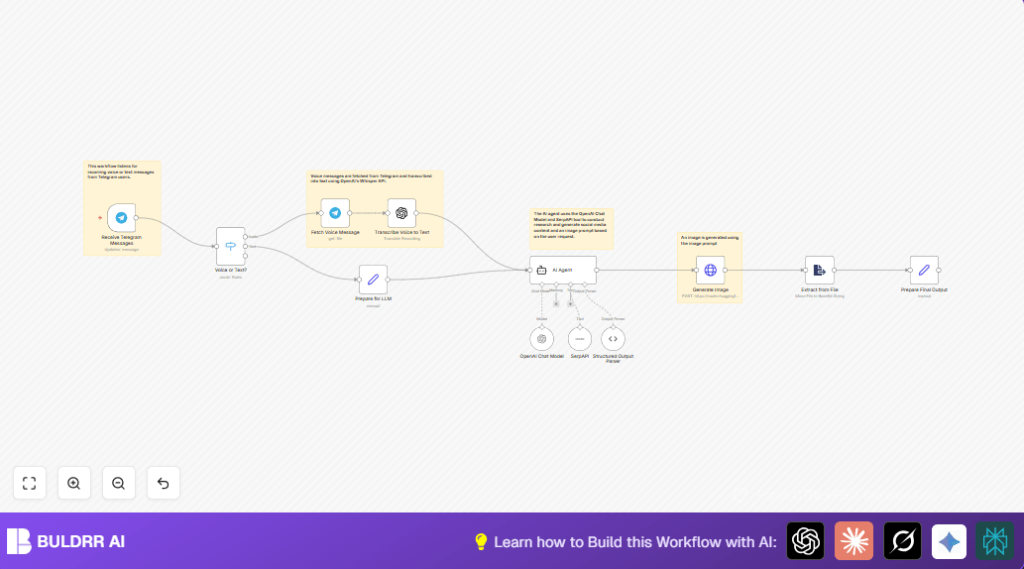

What This Automation Does
This workflow gets Telegram voice or text messages. It then turns them into social media posts that include researched facts and SEO-friendly wording. Also, it creates detailed image prompts for strong pictures. This helps save time spent on typing, researching, and writing by hand.
The process takes messages, figures out the type, fetches and transcribes voice if needed, runs research with SerpAPI, makes good content with OpenAI, and builds image prompts. The result is ready content in JSON format for posting or image generation.
Tools and Services Used
- Telegram Bot API: Receives user messages.
- OpenAI Whisper API: Transcribes voice to text.
- OpenAI Chat Model: Generates social media content.
- SerpAPI: Provides current web search results.
- HuggingFace API: Optionally creates photorealistic images.
- n8n Automation Platform: Controls and connects workflow steps.
Beginner Step-by-Step: How to Use This Workflow in n8n
Step 1: Import the Workflow
- Download the workflow file by clicking on the Download button on this page.
- Open your n8n editor (cloud or self-host n8n setup).
- Choose “Import from File” and select the downloaded workflow.
Step 2: Configure Credentials and Settings
- Add your Telegram Bot API key in the credentials section.
- Enter your OpenAI API Key for Whisper and chat model access.
- Fill in your SerpAPI Key to enable web searches.
- If generating images, add HuggingFace API credentials.
- Update any IDs, channels, or emails inside nodes if needed.
- Check prompt or code sections for ready-to-use content (copy them as needed).
Step 3: Test the Workflow
- Send a test voice or text message to your Telegram bot.
- Check the execution preview in n8n to confirm it processes properly.
Step 4: Activate for Production
- Enable the workflow in n8n to start live running.
- Monitor executions for errors at the start.
- Backup your workflow JSON regularly.
- Optionally add email or log nodes for error alerts.
Input, Process, and Output Explained
Inputs
- Incoming Telegram messages from users, including voice and text.
Processing Steps
- Telegram Trigger node captures messages.
- Switch node checks whether message is voice or text.
- For voice, the Telegram node downloads the voice file.
- OpenAI Whisper node transcribes voice to text.
- Set node standardizes text input.
- LangChain AI Agent node performs research using SerpAPI and writes a social media post and image prompt.
- Extract from File node turns AI output into JSON.
- Set node formats final content and image prompt.
- Optional HTTP Request node sends image prompt to HuggingFace to create images.
Outputs
- JSON object containing an SEO optimized social media post and a photorealistic image prompt.
- Optionally, an image file generated from the prompt.
Why This Workflow Is Needed
Many social media managers spend lots of time typing out voice messages, researching topics, and making content. This wastes time and delays posts. This workflow does all that automatically. It lets users get polished, ready-to-post content quickly from Telegram messages. It also creates strong image ideas to grab attention. This saves hours and helps keep social channels active and engaging.
Customization Ideas
- Change AI prompts in the LangChain AI Agent node to fit different social media styles or languages.
- Add more paths to the Switch node to handle photos or videos for more content types.
- Send final posts to Google Sheets or Notion automatically to keep content calendars.
- Use translation nodes before content generation to make posts in multiple languages.
- Replace the HTTP Request node with other image APIs if preferred.
Common Errors and How to Fix
- Telegram Trigger not starting: Check Telegram Bot API key and ensure ‘message’ updates are enabled.
- Voice message download failure: Verify the correct file_id is used and revalidate Telegram credentials.
- AI Agent content wrong or short: Improve prompt wording and check SerpAPI key and quota.
- Image generation errors: Confirm HuggingFace API key and limits are correct.
Deployment Checklist
- Validate Telegram Bot API keys and webhook setup.
- Test sending both voice and text messages to the bot.
- Confirm OpenAI API keys work for Whisper and chat generation.
- Ensure SerpAPI keys are valid with available quota.
- Check AI outputs with sample inputs for correct content.
- Test image generation if used.
Summary of Benefits
✓ Saves many hours wasted on manual transcription and research.
✓ Produces SEO-friendly and engaging social media posts automatically.
✓ Creates detailed image prompts ready for photorealistic picture generation.
→ Sends Telegram messages through clear, automatic processing steps.
→ Allows quick deployment and configuration in n8n with easy setup.
→ Optionally generates images for richer social media content.
