

What this workflow does
This workflow listens to every new or edited message in a Telegram group and checks if the message contains toxic language using Google Perspective API. It looks for identity attacks, threats, and profanity in the text. When a message has strong profanity (score above 0.7), the workflow sends a polite warning reply to the message sender automatically. Non-toxic messages move through without any response.
This stops toxic messages from harming the community and saves moderators from reading all chats manually.
Who should use this workflow
Community managers or admins who run Telegram groups focused on support, discussion, or sensitive topics. It suits those who want to keep chat safe and respectful without spending many hours moderating messages.
Any Telegram group that struggles with toxic comments but wants quicker, automatic handling can benefit.
Tools and services used
- Telegram Bot API: Receives and replies to chat messages.
- Google Perspective API: Analyzes message text for toxic content.
- n8n automation platform: Runs and connects all the steps together.
How this workflow works
Inputs
The workflow input is new or changed messages in a Telegram group where the bot is added.
Processing steps
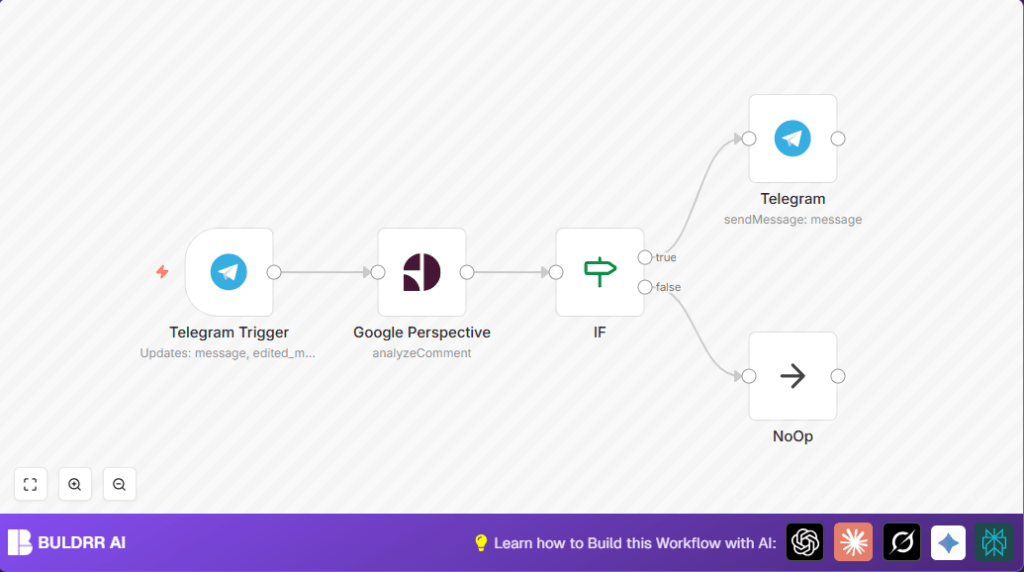
- The Telegram Trigger node listens to new and edited messages.
- The message text is sent to the Google Perspective node, requesting scores for identity attack, threat, and profanity.
- An If node checks if the profanity score is greater than 0.7 to classify toxicity.
- If the message is toxic, a Telegram node sends a polite warning reply to the sender, directly under the offending message.
- If the message is not toxic, a NoOp node does nothing and ends the workflow quietly.
Outputs
The output is either a warning message sent in the group chat under the toxic message or no action if messages are clean.
Beginner step-by-step: How to use this workflow in n8n
Step 1: Import the workflow
- Download the workflow file using the Download button on this page.
- In the n8n editor, click on “Import from File” and select the downloaded workflow file.
Step 2: Set up credentials and configurations
- Insert your Telegram bot API credentials in the Telegram Trigger and Telegram nodes.
- Add your Google Perspective API OAuth2 credentials to the Google Perspective node.
- Ensure the bot is added to your Telegram group with permission to read and send messages.
- Verify chat ID and message ID expressions are correct; usually, no changes needed unless the group setup is custom.
Step 3: Test the workflow
- Send a test message with profanity in the Telegram group.
- Check that the bot sends a polite warning reply right under the message.
- Send clean messages and confirm none trigger warnings.
Step 4: Activate workflow for production
- Click the Activate button in n8n to run the workflow live.
- Make sure your n8n instance runs continuously to listen to all messages.
- Optionally, set up error alerts if available to monitor failures.
For privacy or control, consider using self-host n8n.
Customization ideas
- Change the profanity threshold in the If node from 0.7 to suit your tolerance (e.g., 0.5 for stricter checks).
- Add more toxic attributes like sexual explicit or spam detection in the Google Perspective node.
- Edit the warning text in the Telegram node to match the community tone or add helpful info.
- Use a Google Sheets or database node to log toxic messages for later review.
- Notify moderators separately by adding another Telegram node to send alerts to mod groups.
Handling common problems
- 401 Unauthorized from Google Perspective API: Check and update OAuth2 credentials in the Google Perspective node.
- No warnings in Telegram group: Confirm bot is added and allowed to send messages. Verify chat ID expression is correct.
- Workflow not triggering on edited messages: Ensure Telegram Trigger listens to “edited_message” and “edited_channel_post” updates.
Summary of key results
✓ The workflow automatically detects toxic or profane messages in Telegram chats.
✓ It sends polite warnings only to messages that pass a set profanity threshold.
✓ Saves moderators several hours daily by replacing manual message reading.
✓ Keeps Telegram communities safer and more respectful.
