

What This Automation Does
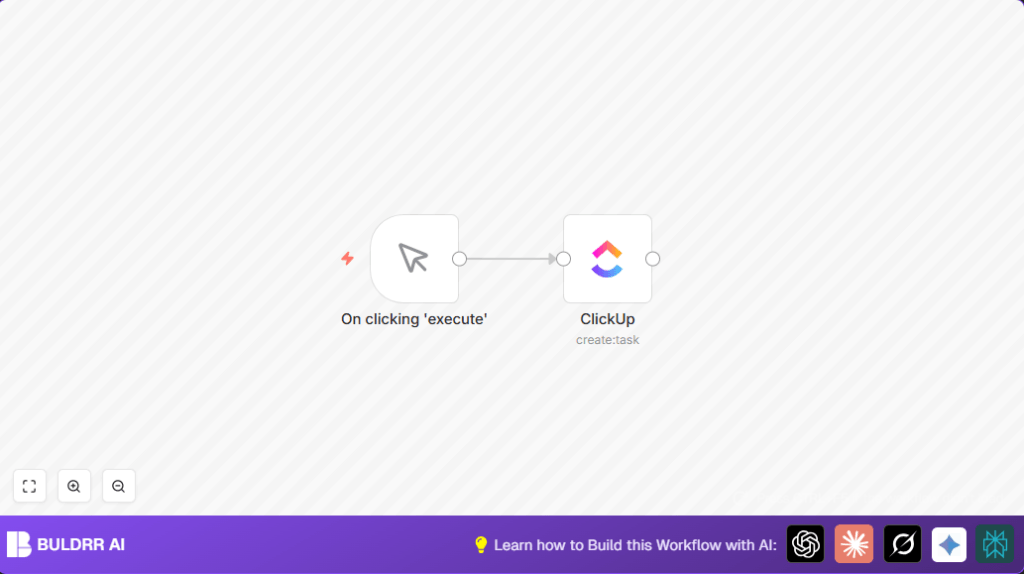
This workflow creates tasks in ClickUp automatically when you press a button. It stops you from typing the same task details over and over. It helps avoid mistakes in task info. The task shows up right away in ClickUp. You save time and keep your projects organized.
The workflow starts from you clicking a manual trigger in n8n. Then it makes a new task in a list you pick inside your ClickUp. You can change task name, team, space, folder, and list inside the node.
Who Should Use This Workflow
This automation is good for people who make many similar tasks by hand. It fits project managers, team leads, or anyone using ClickUp. If repeating task creation takes your time or causes errors, this helps you fix that.
Tools and Services Used
- n8n: Runs the automation and connects apps.
- ClickUp API: Lets n8n add tasks to ClickUp lists.
- ClickUp account: Holds your projects, lists, and tasks.
Beginner Step-By-Step: How to Use This Workflow in n8n
Import the Workflow
- Download the workflow using the Download button on this page.
- Open your n8n editor where you build workflows.
- Find the Import from File option and upload the downloaded workflow file.
Configure the Workflow
- Add your ClickUp API Key in the ClickUp node’s credentials section.
- Update ClickUp information like team ID, space ID, folder, and list ID inside the ClickUp node.
- If needed, change task name or add other details in the node settings.
Test and Activate
- Run the manual trigger once by pressing Manual Trigger node execute button.
- Check ClickUp to see if the new task appears in the right list.
- If all works, save and activate the workflow to use it anytime.
- You can also add schedules or webhooks later to run the workflow automatically.
If you use self-host n8n, consider this resource to help with setup.
Inputs, Processing Steps, and Output
Inputs
- Manual trigger press from user in n8n.
- ClickUp team, space, folder, list, and task details entered in the node.
Processing Steps
- User clicks Manual Trigger node to start workflow.
- Workflow sends API request to ClickUp using provided details.
- ClickUp creates new task with defined name and other settings.
Output
- New task appears instantly in ClickUp list chosen by user.
- User gains saved time and fewer errors in task creation.
Customizations
- Make task names change depending on date or project using expressions in the ClickUp node.
- Add due dates or priority by filling “Additional Fields” with ISO dates or numbers.
- Assign tasks to team members by adding their user IDs in assignees fields.
- Change task descriptions, tags, or even add checklists as needed.
Troubleshooting
Problem: API Key does not work or error pops up.
Cause: API Key missing, expired, or typed wrongly.
Fix: Get a new API Key from ClickUp settings and update it in n8n credentials.
Problem: No task shows up after running workflow.
Cause: List ID or other required fields wrong or empty.
Fix: Make sure you select the correct team, folder, space, and list IDs. Try running with only the minimum required fields first.
Pre-Production Checklist
- API Key for ClickUp is active and has permissions to create tasks.
- Run manual trigger multiple times to check if tasks create correctly.
- Verify all IDs (team, space, folder, list) are correct in the ClickUp node.
- Save workflow and turn it on when ready for real use.
Deployment Guide
After testing, toggle the workflow status to active in n8n.
Use manual trigger in your n8n dashboard to make tasks anytime.
Optionally, add schedule or webhook nodes to automate task creation at certain times or events.
Conclusion
With this workflow, repetitive task making in ClickUp can stop being a slow, error-prone job.
You push one button and your task is ready.
It saves time and reduces mistakes.
You can make it smarter by adding auto due dates or task assignments next.
Summary of Results
✓ Saves 10-15 minutes per task creation.
✓ Stops task details mistakes.
✓ Creates tasks instantly in the correct ClickUp list.
✓ Easy to customize without deep tech skills.
→ Makes project and task management faster and simpler.
