
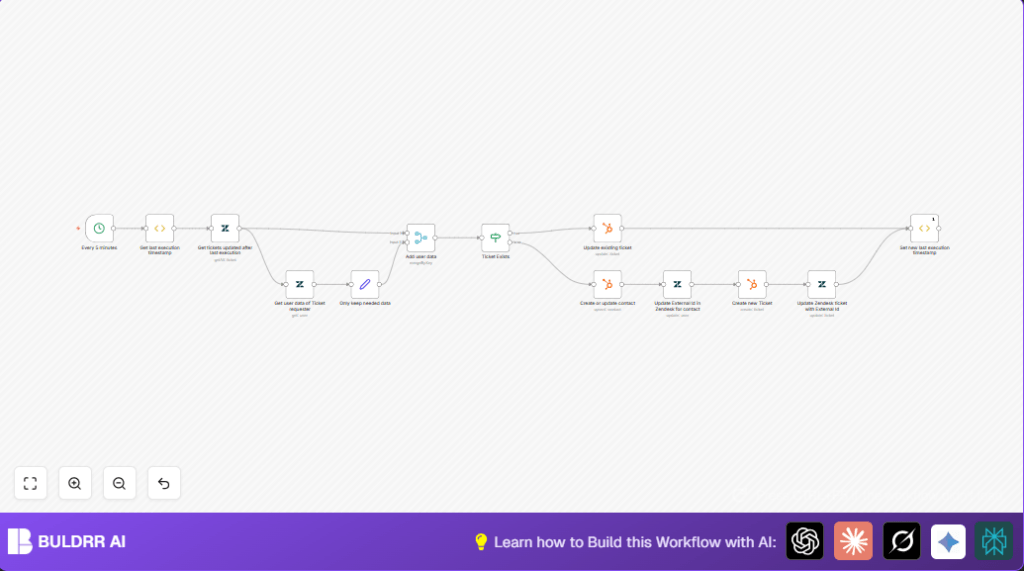

What This Automation Does
This workflow checks Zendesk for tickets updated since the last run. It gets requester info from Zendesk, then finds or creates matching tickets and contacts in HubSpot. It updates both systems so they always have correct, synced data.
This automation saves time by handling data copying and linking automatically. It stops manual errors like missing updates or wrong info, helping teams stay in sync.
Tools and Services Used
- Zendesk API: Gets tickets and user info, updates records.
- HubSpot API (OAuth2): Creates and updates tickets and contacts.
- n8n Automation Platform: Orchestrates the workflow with nodes like Cron, Function Item, Set, Merge, If, and API integration nodes.
Workflow Inputs, Processing, and Outputs
Inputs
- Zendesk tickets updated since last workflow run.
- User data for requesters linked to tickets from Zendesk.
- Stored last execution timestamp from static workflow data.
Processing Steps
- Fetch updated tickets using query on updated date after last run.
- Get requester user info for each ticket.
- Reduce user data to essential fields for syncing.
- Merge tickets with requester data by requester ID.
- Check if a HubSpot ticket already exists by external ID.
- If exists, update HubSpot ticket details; otherwise, prepare for creation.
- Create or update HubSpot contacts based on requester email.
- Update Zendesk user record with HubSpot contact ID in external_id.
- Create new HubSpot ticket associated to the contact if not existing.
- Update Zendesk ticket with the new HubSpot ticket external ID.
- Update last execution timestamp in static workflow storage.
Outputs
- HubSpot tickets that match Zendesk tickets, either updated or new.
- HubSpot contacts synced with Zendesk users.
- Zendesk tickets and users updated with HubSpot external IDs for sync consistency.
Who Should Use This Workflow
This sync is useful for users with two systems: Zendesk for support tickets and HubSpot for contact and ticket management. Users needing fast updates without manual copy-pasting will benefit most.
It fits people who want to avoid human errors and keep different teams aligned with the same updated customer info.
Beginner Step-by-Step: How to Use This Workflow in n8n
Import the Workflow
- Click the Download button on this page to save the workflow file.
- Open your n8n editor where you design workflows.
- Use Import from File option to load the downloaded workflow.
Configure Credentials and Settings
- Add your Zendesk API credentials and HubSpot OAuth2 credentials in n8n Credentials Manager.
- Update any IDs, emails, pipeline or stage numbers if needed to match your HubSpot setup.
- Check mapped fields in nodes like HubSpot ticket create/update nodes to ensure data goes to the right places.
Test and Activate
- Run the workflow once manually to check connectivity and data sync.
- Monitor the run to ensure tickets and contacts sync correctly.
- Turn the workflow on to activate automatic syncing every 5 minutes from the Cron node.
The workflow runs without needing you after activation. Adjust timing or fields as needed anytime.
You can use self-host n8n for better control if you want to run this automation on your own server.
Common Edge Cases and Failures
- If Zendesk returns no tickets, check API credentials and query syntax.
- HubSpot ticket update errors often mean the ticketId given does not exist in HubSpot.
- Missing contacts in HubSpot is usually due to not sending or mapping the email field.
- Zendesk external ID update failures come from incorrect ticket or requester ID settings.
Always use n8n execution logs to find values and errors for debugging.
Customization Ideas
- Change how often the workflow runs by adjusting the Cron node interval.
- Add more Zendesk ticket fields or custom HubSpot ticket properties to sync.
- Filter tickets by status or priority in Zendesk to only sync specific tickets.
- Expand synced contact fields like phone or tags for richer HubSpot contacts.
- Use error triggers or “Continue On Fail” options to handle failures smoothly.
Summary
✓ Workflow automatically syncs tickets and contacts between Zendesk and HubSpot.
✓ Saves hours by avoiding manual copying and mistakes.
✓ Keeps customer and support teams aligned with latest ticket updates.
→ Runs every 5 minutes but timing can be adjusted.
→ Includes full bi-directional syncing of external IDs for data integrity.
✓ Easy to import and run in n8n with only adding credentials and minor config.
