

Automate Stock Portfolio Updates with n8n and Baserow

This workflow automatically pulls investment stock data from Tradegate, updates your Baserow portfolio, and sends you a detailed HTML email report. Save time, avoid manual errors, and get up-to-date portfolio insights every weekday morning with n8n automation.
baserow
httpRequest
sendGrid
+5
Workflow Identifier: 1439
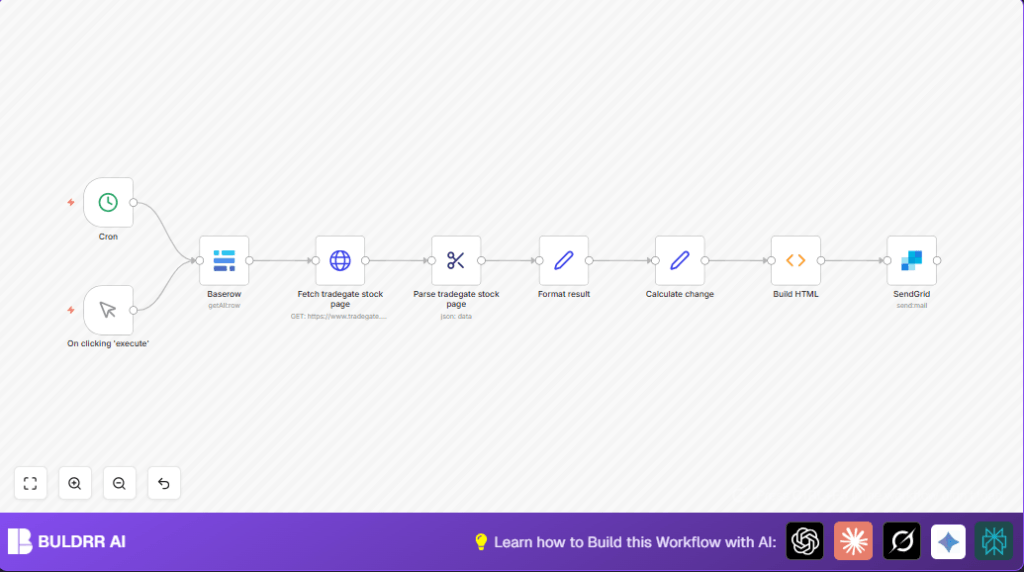
NODES in Use: Manual Trigger, Cron, Baserow, HTTP Request, HTML Extract, Set, Function, SendGrid
Automate stock updates with n8n and Baserow

Press CTRL+F5 if the workflow didn't load.

Learn how to Build this Workflow with AI:

What This Automation Does

This workflow reads stock data from a Baserow database.

It gets live prices from Tradegate for each stock.

It calculates current stock values and gains or losses.

It builds a clear HTML table with all data.

It emails this table via SendGrid every weekday morning.


Inputs

  • Baserow Database: Contains stocks with Name, ISIN, Count, Purchase Price.
  • Tradegate Website: Provides live bid and ask prices via HTTP request using ISIN.

Processing Steps

  • Fetch stocks from Baserow with API.
  • Send HTTP requests to Tradegate for each stock’s ISIN.
  • Extract live prices and info using HTML Extract with CSS selectors.
  • Convert price format to numbers and calculate current value per stock.
  • Calculate gain/loss values and percentages based on purchase price.
  • Create a styled HTML report with the table and totals.

Outputs

  • Formatted HTML email report summarizing the portfolio.
  • Email sent via SendGrid to a chosen recipient.

Who Should Use This Workflow

This helps anyone manually tracking stock portfolios and price updates.

It suits people who want daily email summaries without opening multiple sites.

No coding needed if using n8n; just connect tools and run.


Tools / Services Used

  • n8n: Automates the entire process with nodes and workflows.
  • Baserow: Stores portfolio data accessible by API.
  • Tradegate HTTP Requests: Fetch live market data per ISIN.
  • HTML Extract Node: Parses necessary stock prices from HTML content.
  • SendGrid: Sends the final report as an email.

Beginner Step-By-Step: How to Use This Workflow in n8n

Download and Import Workflow

  1. Download the workflow file by using the Download button on this page.
  2. Open your n8n editor (cloud or self-host n8n).
  3. Click on “Import from File” and select the downloaded workflow JSON file.

Configure Credentials and IDs

  1. Add or update Baserow API credentials inside the Baserow node.
  2. Make sure Database ID and Table ID match your portfolio data.
  3. Enter SendGrid API Key in the SendGrid node.
  4. Edit recipient and sender email addresses as needed.

Check and Test

  1. Run the workflow manually using the Manual Trigger node to confirm proper operation.
  2. Make sure the email arrives correctly formatted with updated stock data.

Activate the Workflow

  1. Enable the Cron node to run the report automatically Monday to Saturday at 7:15 AM.
  2. Monitor workflow executions through n8n to catch any errors early.
  3. Adjust settings as needed, then leave running for automatic updates.

Edge Cases and Failures

  • Baserow Returns No Data: Check database/table IDs and API key validity.
  • Tradegate Data Not Loading: Validate ISIN mapping; verify website availability.
  • HTML Extract Fails: Webpage structure may have changed; update CSS selectors accordingly.
  • Email Failures: Check SendGrid API Key and sender/recipient addresses.

Customization Ideas

  • Add more columns and calculations from Baserow e.g. Dividend Yield or Sector.
  • Change email schedule by editing the Cron node timing.
  • Swap SendGrid node for SMTP or Gmail nodes if preferred.
  • Build SMS alerts or integrate with portfolio tracking tools.

Summary / Results

✓ Saves you 5 hours every week by automating portfolio updates email report.

✓ Removes manual errors in price and stock calculations.

✓ Gives fast access to clear daily investment summaries by email.


Automate stock updates with n8n and Baserow

Visit through Desktop to Interact with the Workflow.

Frequently Asked Questions

It sends HTTP requests with the stock ISIN to Tradegate, then extracts live bid and ask prices using an HTML Extract node with CSS selectors.
The Baserow node will return no data, and the workflow cannot fetch stock info. Double-check database and table IDs and update API keys.
Yes, the schedule is controlled by the Cron node. Change its cron expression to adjust days or times for report emails.
Yes, the SendGrid node can be replaced with SMTP or Gmail nodes to send emails, depending on user preference.

Promoted by BULDRR AI

Related Workflows

Automate Twist Channel Creation and Messaging with n8n

This workflow automates creating and updating a channel in Twist and sending a personalized message to specific users. It eliminates manual setup errors and saves time managing Twist communications.

Automate Ideogram Image Generation with Google Sheets & Gmail

This workflow automates graphic design image generation via Ideogram AI, storing image data in Google Sheets and Google Drive, with email alerts via Gmail. It saves designers hours by automating image creation, remixing, review, and record-keeping.

Automate IT Support with Slack and OpenAI in n8n

Streamline IT support by automating Slack message handling using n8n and OpenAI. This workflow handles Slack DMs, filters bots, queries a Confluence knowledge base, and delivers AI-generated responses, improving support efficiency and response time.

Automate Crypto Analysis with CoinMarketCap & n8n AI Agent

Discover how this unique n8n workflow leverages CoinMarketCap’s multi-agent AI to deliver precise, real-time cryptocurrency insights directly via Telegram. Manage crypto data analysis efficiently with automated multi-source API integration.

Automate Gumroad to Beehiiv Subscriber Sync with n8n

Learn how to automatically add new Gumroad sales customers as Beehiiv newsletter subscribers using n8n automation. This workflow saves time by syncing sales data to Google Sheets CRM and notifying your Telegram channel instantly.

Generate On-Brand Blog Articles Using n8n and OpenAI

This workflow automates the creation of on-brand blog articles by analyzing existing company content using n8n and OpenAI. It extracts article structures and brand voice to produce consistent draft articles, saving significant content creation time.
1:1 Free Strategy Session
Your competitors are already automating. Are you still paying for it manually?

Do you want to adopt AI Automation?

Every hour your team does repetitive work, you're burning real money.
While you wait, faster businesses are cutting costs and moving quicker.
AI and automations aren't the future anymore — they're the present.

Book a live 1-on-1 session where we show you exactly which of your daily tasks can be automated — and what it’s costing you not to.