
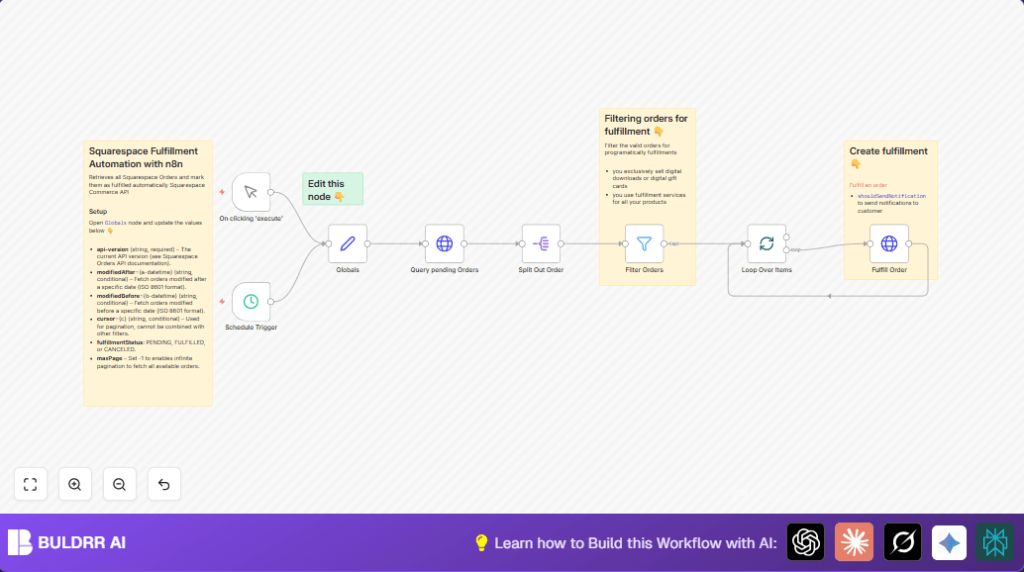

What This Workflow Does ⚙️
This workflow gets all pending orders from Squarespace. It looks for orders not fulfilled yet. Then it marks them as fulfilled. Customers get told right away. This saves time. It stops you from clicking over and over.
The script runs when told by hand or at set times. It handles many orders at once without missing any. It splits big responses into single order jobs. Then it skips orders newer than 24 hours. It works in batches so the website does not get too busy. It talks to the Squarespace API to update order status.
Inputs, Processing Steps, and Outputs
Inputs
- API version number for Squarespace.
- Fulfillment status filter set to “PENDING”.
- Date filters for order modification times (optional).
- Pagination cursor for grabbing all orders.
Processing Steps
- Make a GET request to the Squarespace API with filters.
- Use pagination cursor to get all pages of orders.
- Split the result into single order items.
- Filter orders older than 24 hours only.
- Split orders into manageable batches.
- Send POST requests with JSON body to fulfill each order.
Outputs
- Orders marked as fulfilled in Squarespace.
- Customers get notify emails immediately.
- Saved hours previously spent clicking.
Who Should Use This Workflow
This workflow is good for sellers using Squarespace who sell digital products or outsource shipping. If many orders show as pending, and collecting or marking them fulfilled is slow, this helps a lot.
If customer satisfaction drops because of delays in order status updates, this workflow helps fix that fast.
Tools and Services Needed
- Squarespace API: Used to get and update order data.
- n8n Automation Platform: Runs the workflow nodes and handles data flow.
- OAuth 2.0 Credentials: For authenticated access to Squarespace API.
- API Key: Sent in HTTP headers for access.
Beginner Step-by-Step: How to Use This Workflow in n8n
Step 1: Import Workflow into n8n Editor
- Download the workflow file using the Download button on this page.
- Open the n8n editor where workflows are managed.
- Click on “Import from File” and select the downloaded file.
Step 2: Configure Settings After Import
- Add Squarespace API OAuth 2.0 credentials in n8n’s credentials section.
- Ensure the API Key is set correctly for HTTP headers.
- Update any IDs, emails, or folder references in the workflow if unique to your setup.
- Review and set dates or batch size options in the Globals node if needed.
Step 3: Test Workflow
- Run the workflow manually using the Manual Trigger node.
- Check workflow logs to see if orders were fetched and fulfilled without errors.
Step 4: Activate Workflow for Production Use
- Activate the manual trigger node so users can run it on demand.
- Activate the scheduled trigger node to run automatically on your chosen interval.
- Monitor execution in n8n for any issues that appear.
Consider using the self-host n8n option if you want full control of hosting and reliability.
Common Errors and How to Fix Them
401 Unauthorized Error When Getting Orders
This happens if API credentials expired or are wrong.
Check credentials in n8n, reauthorize OAuth 2.0, and confirm API key correctness.
No Orders Fetched Even Though There Are Pending Orders
Filters like date ranges or pagination cursor may be set wrong.
Clear or adjust modifiedAfter, modifiedBefore, and cursor fields in Globals.
Fulfillment POST Request Fails with 400 Bad Request
URL or JSON body might be wrong or incomplete.
Confirm dynamic URL uses correct order ID and JSON is like { "shouldSendNotification": true }.
Customization Tips
- Change fulfillment status filter in Globals to other values like “FULFILLED” or “CANCELED”.
- Set date ranges in Globals for specific time periods.
- Change batch size in Split In Batches to control load.
- Turn off customer notification by setting
shouldSendNotificationto false in fulfillment POST request.
Summary
✓ Saves time fetching and marking pending Squarespace orders fulfilled.
✓ Removes manual clicks and human mistakes.
✓ Sends fulfillment notifications automatically.
→ Runs on schedule or on demand inside n8n.
→ Works with batches and all pages to avoid missing orders.
→ User gets faster order updates and better customer experience.
