

What This Workflow Does
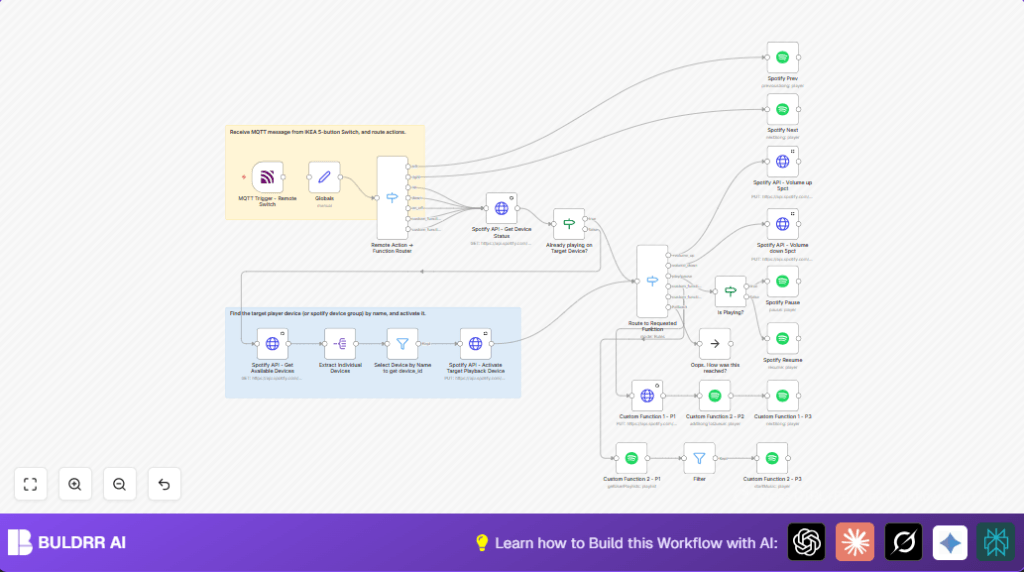
This workflow connects an IKEA 5-button remote to Spotify playback by reading messages sent via MQTT and using Spotify’s API to control music.
It stops the user from needing to switch apps or devices for music control.
The result is easy play, pause, skip, volume change, and playlist starting with simple button presses.
Tools and Services Used
- n8n Automation Platform: Runs and manages the workflow.
- Spotify API with OAuth2: Controls playback and retrieves devices and playlists.
- MQTT Broker (Zigbee2MQTT): Receives messages from the IKEA remote.
- IKEA 5-button Remote: Sends MQTT messages when buttons are pressed.
- n8n Nodes: Includes Spotify, HTTP Request, MQTT Trigger, Switch, Filter, Set, SplitOut, NoOp, and Sticky Notes.
How This Workflow Works
Inputs: MQTT messages from IKEA remote buttons and Spotify API data such as available devices and current playback status.
Processing Steps:
- MQTT Trigger node listens for remote button presses.
- Set node holds constants like target Spotify device name and favorite playlist.
- Switch node routes messages based on button actions.
- HTTP Request nodes query Spotify for devices and playback status.
- Filter node selects the user’s target playback device ID.
- HTTP Request node activates the correct playback device.
- Switch routes commands like play/pause, next/previous, volume up/down, or custom playlist triggers.
- Spotify nodes and HTTP Request nodes perform those commands by calling Spotify’s API.
Output: Spotify music playback changes happen on the selected device as per remote button presses, with volume adjusted by steps, playback toggled, and playlists started instantly.
Beginner Step-by-Step: How to Use This Workflow in n8n
1. Download and Import Workflow
- Click the Download button on this page to get the workflow file.
- Open your n8n editor where you manage workflows.
- Click the menu, select “Import from File,” and choose the downloaded workflow.
2. Configure Credentials and Settings
- Add your Spotify OAuth2 credentials in the appropriate HTTP Request node and Spotify node.
- Set up MQTT credentials so the MQTT Trigger node can connect to your broker.
- In the Set node named “Globals,” check and update device names or playlist names to match your actual setup.
3. Test the Workflow
- Press buttons on your IKEA remote within MQTT range and watch the executions in n8n for errors or successes.
- Confirm playback changes happen on your target Spotify device.
4. Activate Workflow
- Turn the workflow switch to ON in n8n editor to start automatic listening and responding to remote buttons.
- Keep the n8n instance running; for self hosting, see self-host n8n for help.
Customization Ideas
- Change the Spotify device or playlist names in the Globals node to your own speakers and favorite playlists.
- Adjust volume step size by editing JavaScript expressions in volume up/down HTTP Request nodes.
- Add extra button functions or messages if your remote sends custom events.
- Filter devices by ID instead of name for quicker device selection if device IDs are static.
Troubleshooting Common Issues
- Error 401 Unauthorized: Check Spotify OAuth2 credentials are valid and refresh them.
- No Devices Found: Confirm Spotify app is open on the target device and that device names match exactly in Globals.
- Volume API Call Fails: Verify JavaScript clamps are correct in volume HTTP Request nodes to keep volume between 20 and 100.
- Buttons Not Working: Check MQTT Trigger is receiving messages and Switch node routing matches exactly the MQTT payload strings.
Production Checklist
- Test MQTT message arrival from the IKEA remote in MQTT Trigger node.
- Make sure Spotify OAuth credentials are active and complete access is granted.
- Confirm device and playlist names exactly match in the Globals Set node.
- Verify all button routes in Switch nodes correspond to correct MQTT message strings.
- Check Spotify API response success in HTTP Request nodes during control tests.
- Save a backup of your workflow before enabling live operation.
Summary
✓ You get simple music controls directly from your IKEA remote.
✓ The workflow turns MQTT messages into Spotify commands automatically.
✓ Volume adjusts smoothly by 5% steps with safeguards.
✓ You can start favorite playlists with a hold button press.
→ This saves time and avoids juggling apps or devices for music.
