

Automate Slack Incident Alerts with ServiceNow & n8n

Discover how to automatically fetch and deliver detailed ServiceNow incident information in Slack using an n8n workflow triggered by Slack slash commands. This automation saves time and reduces manual lookup errors in incident management.
webhook
serviceNow
respondToWebhook
+3
Workflow Identifier: 1213
NODES in Use: Webhook, Set, ServiceNow, Switch, RespondToWebhook, StickyNote
Automate Slack alerts with n8n and ServiceNow

Press CTRL+F5 if the workflow didn't load.

Learn how to Build this Workflow with AI:

What This Automation Does

This workflow helps users find details about ServiceNow incidents quickly from Slack without opening many tabs or copying information.

It takes an incident ID from a Slack slash command, then looks up the incident in ServiceNow automatically, and sends the details back to Slack fast.

This stops wasting time on manual lookups, cuts errors, and gives the team answers right away.

The workflow talks to Slack and ServiceNow using API calls triggered by a webhook.


How the Workflow Works (Input → Process → Output)

Inputs

Processing Steps

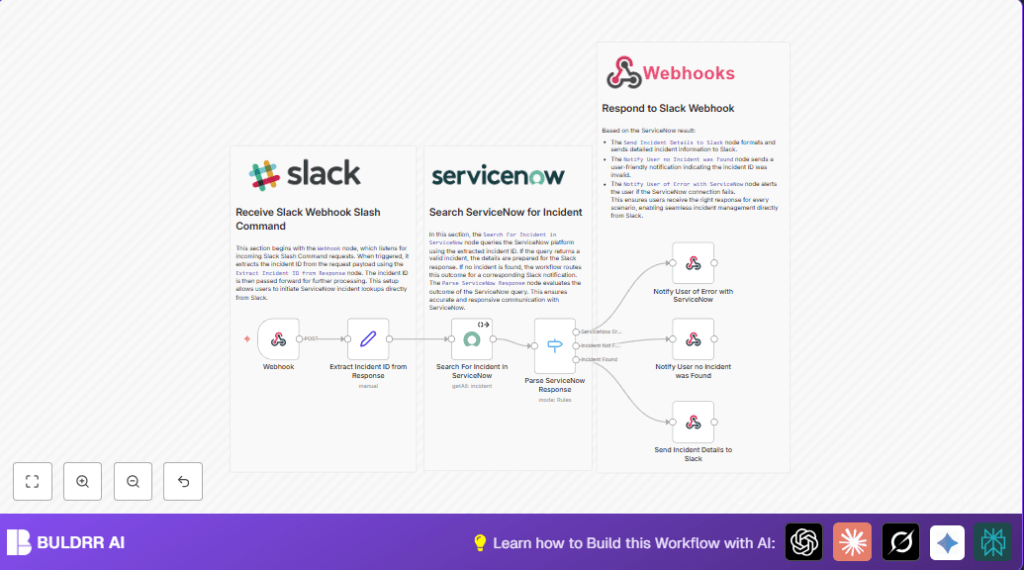
  • Webhook node receives POST request from Slack with incident ID.
  • Set node extracts the incident ID from the webhook JSON payload.
  • ServiceNow node queries the ServiceNow API for incident details using the incident ID.
  • Switch node checks if the incident was found, not found, or if an error happened.

Output

  • Sends a formatted message back to Slack with incident details if found.
  • Sends a notification to Slack if the incident wasn’t found or if an error occurred.

Beginner Step-by-Step: How to Use This Workflow in n8n Production

Import Workflow

  1. Download the workflow file using the Download button on the page.
  2. In the n8n editor, click “Import from File” and select the downloaded file.

Configure Credentials

  1. Set up your ServiceNow Basic Authentication credentials inside n8n credentials manager.
  2. Attach these credentials to the ServiceNow node.

Update Variables If Needed

  1. Edit the Slack slash command URL in Slack app settings to the webhook URL generated by the Webhook node.
  2. Update incident ID or other fields if your ServiceNow instance uses different naming conventions.

Test & Activate

  1. Run a test by typing the slash command and incident ID in Slack.
  2. Check n8n executions for errors and confirm Slack receives correct messages.
  3. Activate the workflow by turning on the Active toggle in n8n.

For hosting or running n8n on your own system, you can explore helpful options with self-host n8n.


Tools and Services Used


Common Edge Cases and Failures

  • If Slack webhook URL is wrong, webhook won’t receive data.
  • If incident ID doesn’t match, ServiceNow returns no results.
  • If the ServiceNow query syntax is off, the fetch will fail or error.
  • If Slack message JSON is malformed, the response may be blank or show errors.

Careful testing of Slack URLs, ServiceNow queries, and JSON formatting is key to avoid these.


Customization Ideas

  • Change the sysparm_query in the ServiceNow node to search other fields like caller_id.
  • Add more fields like assignment group or resolution notes in the Slack message JSON output.
  • Rename the Slack slash command to suit team needs.
  • Add a Function node to log errors externally for audits.
  • Use environment variables in n8n to keep credentials secure.

Summary

✓ Stops time lost doing manual incident searches.

✓ Gives fast, exact ServiceNow incident info inside Slack.

✓ Reduces mistakes from copying and pasting.

→ Users see results instantly with clear messages.

→ Saves hours weekly for busy IT teams.

→ Workflow easy to import, configure, test, and run.


Automate Slack alerts with n8n and ServiceNow

Visit through Desktop to Interact with the Workflow.

Author
Written By
Vikash Kumar
Building AI agents, n8n workflows and end-to-end automation for 30+ Brands across India, the US, Europe, Dubai & Australia. 7+ years of Experience saving founders real hours every week - no code required.
Author
Written By
Vikash Kumar
Building AI agents, n8n workflows and end-to-end automation for 30+ Brands across India, the US, Europe, Dubai & Australia. 7+ years of Experience saving founders real hours every week - no code required.

Frequently Asked Questions

Slack sends a POST request to the n8n webhook URL with the incident ID typed by the user.
Check the query syntax in the ServiceNow node and make sure the incident ID matches exactly the expected field.
Yes, n8n supports selecting OAuth credentials instead of Basic Auth in the ServiceNow node.
After import and configuration, run a test, then toggle the workflow to Active in n8n to start production use.

Related Workflows

Automate Twist Channel Creation and Messaging with n8n

This workflow automates creating and updating a channel in Twist and sending a personalized message to specific users. It eliminates manual setup errors and saves time managing Twist communications.

Automate Ideogram Image Generation with Google Sheets & Gmail

This workflow automates graphic design image generation via Ideogram AI, storing image data in Google Sheets and Google Drive, with email alerts via Gmail. It saves designers hours by automating image creation, remixing, review, and record-keeping.

Automate IT Support with Slack and OpenAI in n8n

Streamline IT support by automating Slack message handling using n8n and OpenAI. This workflow handles Slack DMs, filters bots, queries a Confluence knowledge base, and delivers AI-generated responses, improving support efficiency and response time.

Automate Crypto Analysis with CoinMarketCap & n8n AI Agent

Discover how this unique n8n workflow leverages CoinMarketCap’s multi-agent AI to deliver precise, real-time cryptocurrency insights directly via Telegram. Manage crypto data analysis efficiently with automated multi-source API integration.

Automate Gumroad to Beehiiv Subscriber Sync with n8n

Learn how to automatically add new Gumroad sales customers as Beehiiv newsletter subscribers using n8n automation. This workflow saves time by syncing sales data to Google Sheets CRM and notifying your Telegram channel instantly.

Generate On-Brand Blog Articles Using n8n and OpenAI

This workflow automates the creation of on-brand blog articles by analyzing existing company content using n8n and OpenAI. It extracts article structures and brand voice to produce consistent draft articles, saving significant content creation time.
1:1 Free Strategy Session
Your competitors are already automating. Are you still paying for it manually?

Do you want to adopt AI Automation?

Every hour your team does repetitive work, you're burning real money.
While you wait, faster businesses are cutting costs and moving quicker.
AI and automations aren't the future anymore — they're the present.

Book a live 1-on-1 session where we show you exactly which of your daily tasks can be automated — and what it’s costing you not to.