
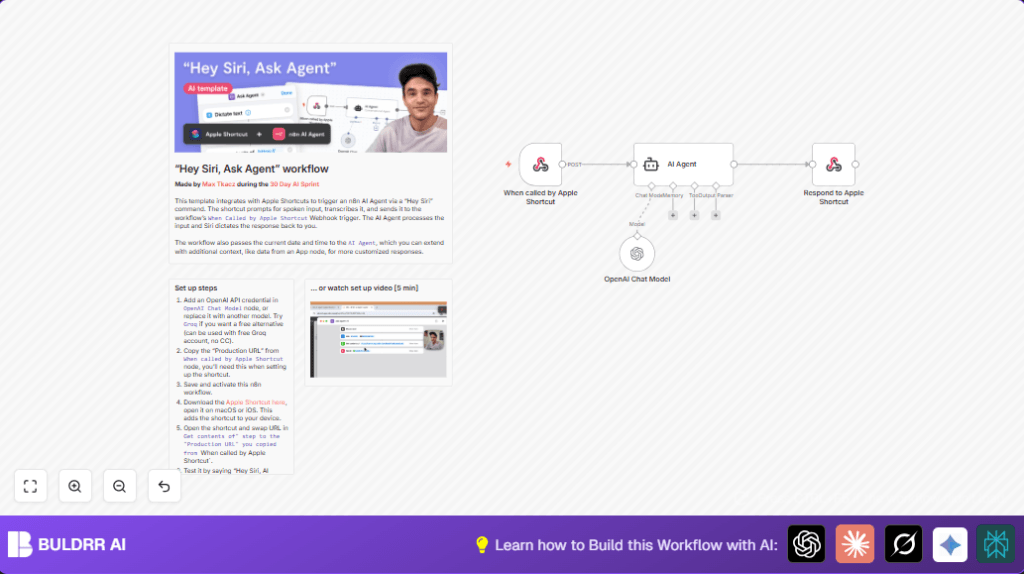

What This Workflow Does
This workflow connects Siri voice commands with an AI assistant inside n8n. It solves the problem of slow, manual app switching and typing by letting Siri talk directly to an AI. The result is a quicker, hands-free way to get helpful answers spoken back through Siri.
The Apple Shortcut records what spoken words say. Then it sends them as data to a n8n webpage address (webhook). n8n uses AI tools to understand and answer. The answer goes back to the phone, and Siri says it aloud. This creates a smooth speech talk loop.
Tools and Services Used
- Apple Shortcuts App: Captures voice and sends requests.
- n8n Workflow: Runs the processing, calls AI, sends back answers.
- OpenAI API (GPT-4o-mini model): Provides AI understanding and response generation.
- Webhook Node: Receives POST requests from Apple Shortcut.
- AI Agent Node: Handles conversation context and prompts to OpenAI.
- Respond Node: Sends the AI reply back to the shortcut.
How the Workflow Works (Input → Process → Output)
Input
Siri hears speech and records text.
The Apple Shortcut sends this text data to n8n’s webhook URL via a POST request.
Processing
The Webhook node starts the workflow when the request arrives.
The workflow passes the user’s input to the AI Agent node, which uses OpenAI GPT-4o-mini to understand the question and create a response.
The AI is guided to consider current date and time for personalized replies.
Output
The Respond node sends back the AI’s answer as plain text to Apple Shortcut.
Siri then reads the reply out loud for the user.
Beginner Step-by-Step: How to Use This Workflow in n8n Production
Step 1: Import the Workflow
- Download the workflow JSON file using the Download button on this page.
- Open your n8n editor. Choose Import from File and select the downloaded JSON.
- The workflow with nodes like Webhook node and AI Agent node will appear.
Step 2: Configure Credentials
- Open the OpenAI Chat Model node.
- Add your valid OpenAI API Key under credentials.
- If you use specific IDs, emails, or channels, update those as needed in other nodes.
Step 3: Update Webhook URL in Apple Shortcut
- Copy the webhook URL from the Webhook node settings (Production URL).
- Open the Apple Shortcut on your Apple device.
- Paste the webhook URL into the “Get Contents of URL” action inside the shortcut.
Step 4: Test the Workflow
- In n8n, run a test by sending sample data via POST to the webhook. Check if the AI Agent replies properly.
- On your device, say “Hey Siri, AI Agent” and ask a question. Siri should speak back the AI’s answer.
Step 5: Activate for Production
- Turn on (activate) the workflow in n8n with the toggle near the workflow name.
- Ensure the workflow stays active to handle real-time requests.
If self hosting n8n, see self-host n8n for setup help.
Why This Workflow Exists and Who Should Use It
Users want hands-free AI help with quick voice answers on Apple devices.
It solves difficulties with typing, switching apps, or repeating queries manually.
This suits developers, busy workers, or anyone needing fast spoken AI replies using Siri commands.
Customization Ideas
- Change AI Model: Replace GPT-4o-mini with other OpenAI models or Groq node in OpenAI Chat Model node.
- Add User Context: Insert App nodes before AI Agent to feed user-specific info.
- Adjust Siri Replies: Modify Respond to Apple Shortcut node response formatting with polite phrases or clear disclaimers.
Troubleshooting Common Problems
- Webhook URL errors: Check that Apple Shortcut has exact webhook URL copied from Webhook node production URL and workflow is active.
- API Key issues: Confirm OpenAI API Key is valid in OpenAI Chat Model node and quota isn’t overdrawn.
- Poor Siri speech: Make AI output cleaner by removing new lines or special chars in AI Agent system messages.
Pre-Production Checklist
- Make sure credentials and API keys are correct in all nodes.
- Test webhook with sample POST request manually before linking to shortcut.
- Verify Apple Shortcut URL matches webhook production URL perfectly.
- Run voice tests to check response clarity and correctness.
- Backup imported workflow JSON before big edits.
Summary of Benefits and Results
✓ Save time previously lost typing or switching apps daily.
✓ Get voice AI answers fast using Siri on Apple devices.
✓ Use a simple workflow with Apple Shortcuts linked to n8n AI Agent.
→ Have more natural, conversational AI support hands-free.
→ Easily update AI models or input context to improve replies.
