
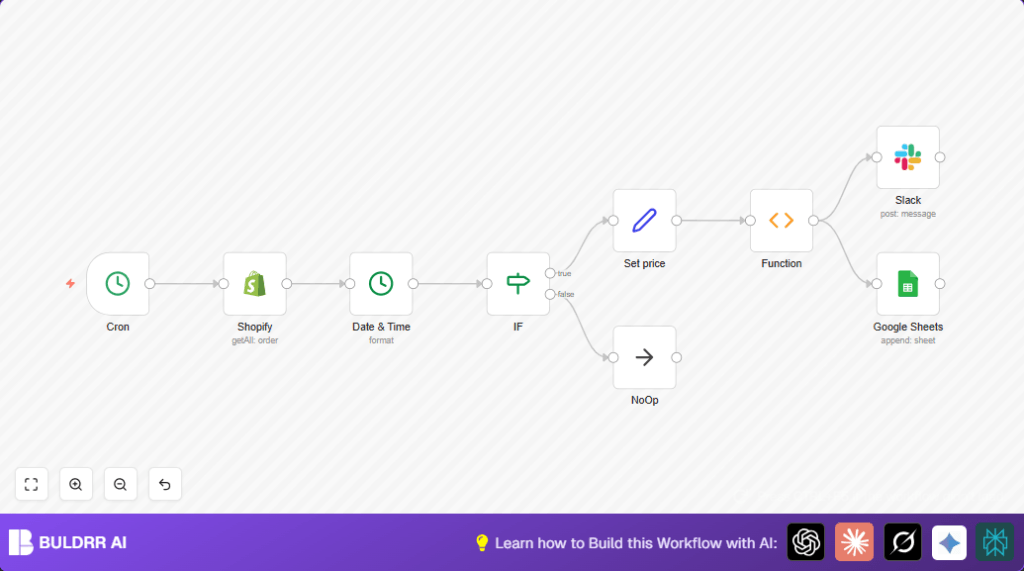

What This Workflow Does
This workflow runs every week at 10 AM to get all sales orders from a Shopify store.
It finds only orders from the last week, counts how many orders there were, and adds up total money made.
Then it sends a simple message to a Slack channel telling the team the totals.
Finally, it adds the detailed weekly sales data into a Google Sheets document to keep records.
Who Should Use This Workflow
This workflow is good for anyone who has a Shopify online store and wants to save time on weekly sales reports.
If manual reporting takes hours and causes mistakes, this will help.
You need accounts on Shopify, Slack, and Google Sheets and some basic access setup for their APIs.
Tools and Services Used
- Shopify API: To get orders data.
- Slack API: To send team messages.
- Google Sheets API: To save sales records.
- n8n Automation Platform: To build and run this workflow.
Inputs, Processing Steps, and Outputs
Inputs
- Shopify store orders accessed with API keys.
- Scheduled trigger every Monday at 10 AM.
Processing Steps
- Cron node: Triggers workflow on schedule.
- Shopify node: Fetches all orders.
- Date & Time node: Converts order creation date to usable format.
- IF node: Filters orders within last week based on date.
- Set node: Extracts total price from each order for calculation.
- Function node: Calculates count of orders and sums total revenue.
- Slack node: Sends summary message to Slack channel.
- Google Sheets node: Appends detailed sales data to a spreadsheet.
Outputs
- Slack message showing total orders and total revenue for the week.
- New rows added weekly in Google Sheet with detailed sales data.
Beginner Step-by-Step: How to Use This Workflow in n8n
1. Import the Workflow
- Click the Download button on this page to get the workflow file.
- Open your n8n editor and choose “Import from File” to add the downloaded workflow.
2. Configure Credentials and Settings
- Add your Shopify API Key credentials in n8n’s credentials settings.
- Enter Slack API Key and select the channel where messages will be sent.
- Set up Google Sheets OAuth2 credentials with permissions to append data.
- Update any IDs, such as Google Sheet ID or Slack channel name, in the workflow nodes if needed.
3. Test the Workflow
- Run the workflow manually once to check if it fetches orders, calculates totals, sends a Slack message, and appends data to Google Sheets.
- Verify that the message appears in Slack and data in Sheets is added as expected.
4. Activate the Workflow for Production
- Turn on the workflow switch in n8n to enable automatic weekly running.
- Monitor workflow history for the first runs to confirm proper operation.
- Adjust any settings if errors occur.
If using self-host n8n, visit self-host n8n for hosting options.
Customization Ideas
- Change schedule time in the Cron node to fit your preferred reporting hour.
- Adjust the IF node conditions to filter orders by specific products or date ranges.
- Modify the Slack node to send messages to a different channel or include more info.
- Map extra fields like customer name or order date in Google Sheets for detailed logs.
- Update the Function node to include discounts or refunds in total revenue calculation.
Handling Failures and Edge Cases
- If Shopify API credentials are invalid, workflow will not fetch orders — re-check or renew keys.
- If Slack message does not send, confirm API token and channel name are correct.
- If Google Sheets data fails to append, check OAuth2 access and Sheet ID permissions.
- For many orders, the Shopify node may need pagination to avoid missing data.
Summary of Benefits
✓ Run sales reports automatically every week without manual work.
✓ Get correct and up-to-date totals of orders and revenue.
✓ Instantly notify your team on Slack with simple messages.
✓ Keep clean records in Google Sheets for each week.
→ Saves several hours of manual report preparation.
→ Reduces errors from manual data handling.
→ Keeps team informed quickly.
→ Makes sales data easy to review in sheets.
