
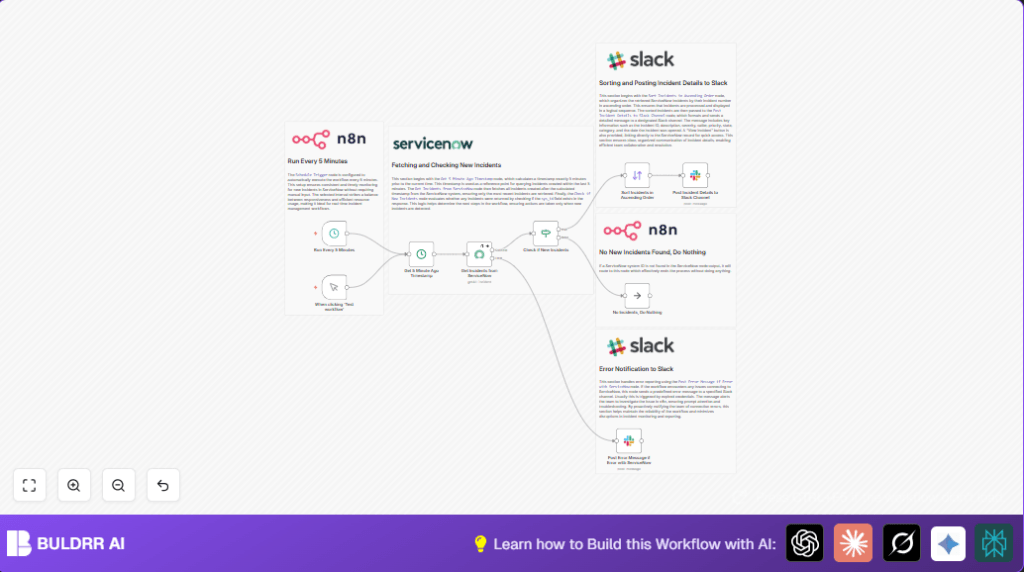

What This Automation Does
This workflow in n8n checks for new ServiceNow incidents every 5 minutes.
It finds only recently created incidents and sends details to a Slack channel.
This helps stop missing important alerts and speeds up incident fixing.
The workflow saves time and makes sure teams see new issues fast.
It sends incident data like ID, description, severity, and a button to open the incident in ServiceNow.
If there is a problem connecting to ServiceNow, it alerts the team in Slack immediately.
Overall, the workflow removes the need for manual checking and helps respond faster.
Tools and Services Used
- n8n: Platform to build and run the workflow.
- ServiceNow API: Provides incident data with basic authentication.
- Slack API: Posts messages into Slack channels via a Bot user.
- Self-host n8n (optional): For control over the workflow server, see self-host n8n.
Inputs, Processing, and Outputs
Inputs
- ServiceNow API credentials with access to incidents.
- Slack Bot API token with chat permissions.
Processing Steps
- Schedule Trigger runs every 5 minutes.
- Date & Time node calculates time 5 minutes ago in UTC.
- ServiceNow node fetches incidents created after the calculated time.
- If node checks if new incidents exist.
- Sort node orders incidents by their number ascending.
- Slack node sends formatted incident details and a view button to the Slack channel.
- NoOp node ends workflow gracefully if no incidents are found.
- Slack node sends error alerts if ServiceNow connection fails.
Output
New incident alerts with all key information in Slack.
Error messages to Slack if connection fails.
Workflow stops quietly if no new incidents.
Beginner Step-by-Step: How to Use This Workflow in n8n
Importing the Workflow
- Download the workflow file using the Download button on this page.
- Open n8n editor where you want to use the workflow.
- Click on the menu and choose “Import from File.”
- Select the downloaded workflow file to import it.
Configuring Credentials and Settings
- Add your ServiceNow API credentials (basic authentication) in n8n’s credential manager.
- Add your Slack Bot API token with the needed permissions.
- Update any specific IDs such as Slack channel name or ServiceNow instance URL if needed.
Testing and Activating
- Run the workflow manually once in n8n to check it fetches incidents and posts to Slack correctly.
- Make sure the Slack message looks right and the View Incident button works.
- Fix any errors shown in logs before proceeding.
- Activate the Schedule Trigger node to run the workflow every 5 minutes automatically.
This is all you do to get the workflow running in production.
No coding or deep setup needed beyond these steps.
Common Issues and How to Fix Them
No incidents found but recent issues exist
Check if the Date & Time node outputs the correct UTC timestamp.
Verify the ServiceNow query uses sys_created_on>={{$json.queryDate}} exactly.
Slack messages don’t appear
Make sure the Slack Bot token has permission to post in the chosen channel.
Confirm the channel ID or name is correct and the bot is added to the channel.
Workflow stops on ServiceNow errors
Enable “Continue On Fail” on the ServiceNow node to avoid full stop.
This routes errors to the Slack error alert node instead.
Time zone issues
Always use UTC time for date calculations in this workflow.
Avoid local time to prevent missing or duplicated incidents.
Customization Ideas
- Change the running interval in the Schedule Trigger node to 1, 10, or 15 minutes based on incident volume.
- Add more fields in the Slack message like assignment group or resolution notes by editing Slack Block JSON.
- Send notifications to multiple Slack channels by duplicating the Slack node and changing the target channel.
- Filter for only high priority or critical incidents by adding an If node after the ServiceNow fetch node.
Summary
✓ Automatically checks ServiceNow every 5 minutes for new incidents.
✓ Sends detailed incident alerts to Slack channels.
✓ Removes manual effort and reduces chance of missing new issues.
✓ Notifies team quickly for faster incident handling.
✓ Error alerts in Slack for connection problems.
✓ Easy to import, configure, and run in n8n without coding.
