

What This Workflow Does
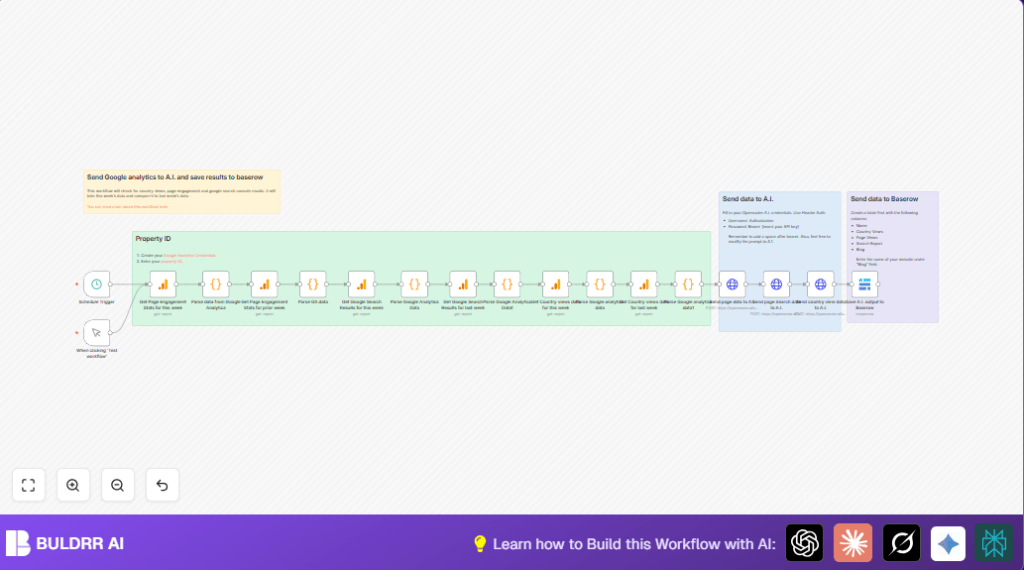
This workflow gets your Google Analytics and Search Console data for two weeks.
It compares this week and last week on page views, user activity, and countries.
It sends these details to an AI model to get simple SEO ideas.
Finally, it saves AI reports to a Baserow table to keep history.
It saves you about 5 hours of manual work each week.
Tools and Services Used
- Google Analytics GA4: supplies web traffic and engagement data.
- Google Search Console: provides search performance data.
- OpenRouter API: access Meta LLaMA AI for SEO suggestions.
- Baserow: stores AI generated SEO reports.
- n8n: builds and runs the automation workflow.
Inputs, Processing, and Output
Inputs
- Google Analytics GA4 property ID and OAuth2 credentials.
- OpenRouter API key for AI access.
- Baserow API key and table for report storage.
Processing Steps
- Fetch current and prior week page engagement metrics from Google Analytics.
- Fetch current and prior week search and country data from Google Search Console and GA.
- Use Code nodes with JavaScript to parse and format this complex data into simple JSON strings.
- Send parsed data with prompts to AI via HTTP Request nodes using OpenRouter.
- Receive SEO suggestions and markdown summaries from AI.
- Save AI results to Baserow database for future reference.
Output
Markdown tables showing trends and SEO improvement ideas.
Stored reports in Baserow for tracking over time.
Who Should Use This Workflow
People managing website SEO but not wanting to spend hours gathering analytics.
Users who want easy-to-understand SEO advice turned from raw data.
Anyone automating weekly SEO reporting without deep coding skills.
Beginner Step-by-Step: How to Use This Workflow in Production
Step 1: Download and Import Workflow
- Click the Download button on this page to get the workflow file.
- Inside your n8n editor, use the menu to “Import from File” and select the downloaded workflow.
Step 2: Configure Credentials and IDs
- Open the Google Analytics nodes and enter your GA4 property ID.
- Set up Google Analytics OAuth2 credentials in n8n and select them in these nodes.
- Open the HTTP Request nodes and add your OpenRouter API Key in the Authorization header.
- Update Baserow API key in the Baserow node and confirm the correct table and column names.
Step 3: Adjust Code or Prompt If Needed
- Copy-paste or edit JavaScript in the Code nodes if your data structure changes.
- Modify the AI prompt text in HTTP Request nodes if different SEO questions are wanted.
Step 4: Test the Workflow Once
- Run the workflow manually from the Manual Trigger.
- Check node outputs step-by-step for data correctness.
- Confirm Baserow entry creation with AI data.
Step 5: Activate Workflow for Production
- Turn on the workflow.
- If desired, enable the Schedule Trigger to run weekly automatically.
- Monitor the logs in n8n to catch errors early.
If using self-host n8n this works the same; see self-host n8n for help setting it up.
Code Snippet Example for Parsing Data
This code simplifies the raw GA4 JSON response to key values for AI input.
function transformToUrlString(items) {
  const analyticsData = items[0].json;
  const simplified = analyticsData.rows.map(row => ({
    page: row.dimensionValues[0].value,
    pageViews: parseInt(row.metricValues[0].value) || 0,
    activeUsers: parseInt(row.metricValues[1].value) || 0,
    viewsPerUser: parseFloat(row.metricValues[2].value) || 0,
    eventCount: parseInt(row.metricValues[3].value) || 0
  }));
  return encodeURIComponent(JSON.stringify(simplified));
}
const urlString = transformToUrlString($input.all());
return { json: { urlString } };
Customizations
- Change AI Model or Prompt Text
Edit the HTTP Request nodes to use different AI models or adjust SEO question prompts. - Include More GA Metrics
Add session duration or bounce rate metrics in GA nodes and update parsing code accordingly. - Change Schedule Frequency
Modify the Schedule Trigger node to run the workflow daily or monthly. - Add Email Notifications
Insert an email sending node to send SEO reports directly after AI generates them. - Adjust Baserow Table Layout
Change or add columns for extra insights or date aggregations.
Common Issues and Fixes
- Empty Data from Google Analytics
Check GA4 property ID correctness and refresh OAuth2 credentials in n8n. - AI API Calls Fail
Verify OpenRouter API URL and Authorization header with correct API Key. - Code Node Parsing Errors
Test GA nodes output separately to confirm the structure. Update parsing code for missing fields. - Baserow Save Fails
Confirm Baserow API key and exact table and column names match those in the workflow.
Summary of Benefits
✓ Saves 5+ hours weekly by automating Google Analytics and Search Console data gathering.
✓ Provides clear, AI-generated SEO suggestions in markdown tables.
✓ Keeps historical SEO insight records in Baserow database.
→ Simplifies complex data into easy actions for SEO teams.
