
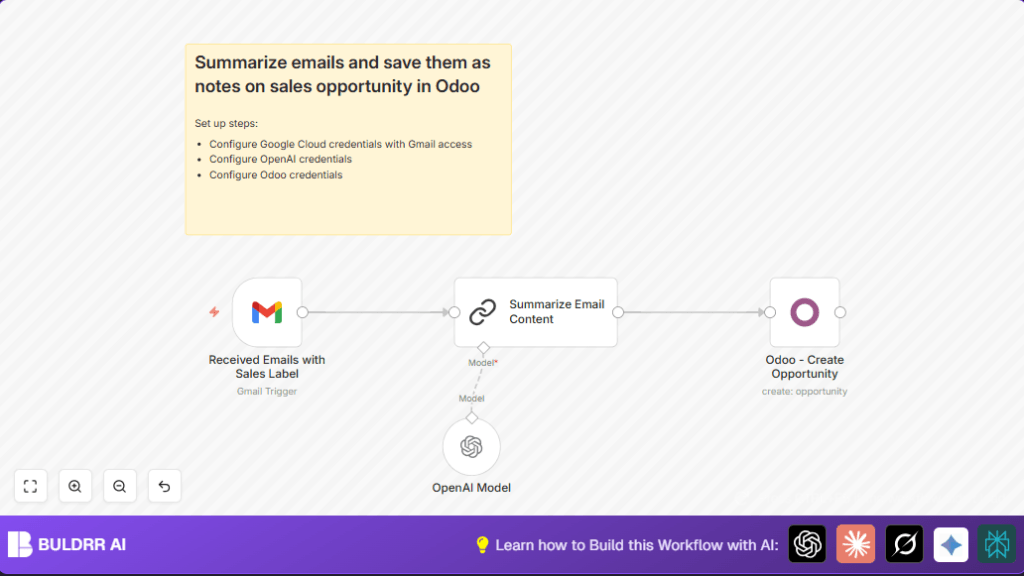

What This Workflow Does
This workflow watches a Gmail account for new emails marked with the “Sales” label.
It reads each sales email and uses OpenAI’s GPT-3.5-turbo-instruct model to make a short, clear summary.
Then, it creates a new sales opportunity in Odoo CRM with the email details and summary.
This saves time and stops sales leads from getting missed.
The main problem solved is the slow, manual handling of sales inquiry emails that wastes many hours and causes lost chances.
The outcome is automatic capturing and organizing of sales leads in Odoo, so the sales team can act fast.
Who Should Use This Workflow
This workflow is great for small to medium sales teams receiving many inquiry emails every day.
It suits sales managers or assistants who want to cut down on manual email reading and data entry.
Users running an Odoo CRM system and using Gmail will especially find this helpful.
People wanting to add AI summaries to their sales leads without coding can use this workflow easily.
Tools and Services Used
- Gmail API: Checks and reads emails tagged “Sales”.
- OpenAI API: Uses GPT-3.5-turbo-instruct model to summarize email content.
- Odoo API: Creates new sales opportunity records with lead details.
- n8n Platform: Runs the automation workflow connecting all these services.
Inputs, Processing, and Output
Inputs
- New emails in Gmail inbox with the label “Sales”.
- Email content including sender, subject, and body text.
Processing Steps
- Trigger on new Gmail emails filtering by the “Sales” label.
- Extract full text from the email body for analysis.
- Send the text to OpenAI’s GPT-3.5-turbo-instruct with a prompt asking for a concise summary including budget, timelines, and industry.
- Receive and refine the summary using a custom summarization node.
- Use Odoo’s API to create a new sales opportunity with the email’s subject as the name, sender’s email, and AI summary as description.
Output
- New sales opportunity record created in Odoo CRM containing summarized and important lead info.
Beginner step-by-step: How to use this Workflow in n8n
Step 1: Import the Workflow
- Download the workflow file by clicking the Download button on this page.
- Open the n8n editor.
- Use the “Import from File” option to upload the downloaded workflow.
Step 2: Configure Credentials
- Add your Gmail account credentials with correct OAuth2 settings.
- Add your OpenAI API key in the respective credential field.
- Add the correct Odoo API credentials that have permission to create opportunities.
Step 3: Update Parameters
- In the Gmail Trigger, confirm the Gmail label ID or name matches the “Sales” label in your Gmail.
- Check the prompt in the OpenAI node matches the example below for clear summaries.
- Verify the fields mapped in the Odoo node use correct expressions to insert email subject and sender email dynamically.
Step 4: Test and Activate
- Run the workflow manually or wait for a new “Sales” email to arrive to test the flow.
- Verify that the sales opportunity is created correctly in Odoo with the summary present.
- Activate the workflow in n8n to run automatically for production.
For private usage, consider running on your own server by exploring self-host n8n.
=Write a concise summary of the following sales inquiry:
" {{ $json.text }}"
Include structured information such as project budget, timelines, industry and a general summary

CONCISE SUMMARY:
Common Edge Cases or Failures
- If no new emails with the Sales label appear, check the label ID and Gmail access permissions in the Gmail Trigger node.
- OpenAI API errors usually mean expired or missing API key. Reauthorize and test the OpenAI node.
- Failure to create an opportunity in Odoo often comes from wrong API credentials or missing required fields. Double-check the Odoo node configuration.
- Large or unusual email formats may confuse summarization. Adjust prompt text to improve summary accuracy.
Customization Ideas
- Change the Gmail label to watch for other types like “Marketing Leads” by updating the label ID in the trigger node.
- Add extra fields to the OpenAI summarization prompt for more detailed lead info such as urgency or client size.
- Map additional Odoo opportunity fields like expected close date or product interest if available in your configuration.
- Switch OpenAI model to balance cost and detail, for example use cheaper or more powerful models.
- Extend workflow to download email attachments and save them alongside the opportunity record using extra n8n nodes.
Summary and Results
✓ Saves 10-15 hours weekly by automating email lead processing.
✓ Reduces mistakes from manual data entry.
✓ Captures all sales inquiries and organizes them in Odoo CRM automatically.
✓ Provides clean, concise lead summaries to the sales team fast.
✓ Improves sales follow-up speed and chance to close deals.
