
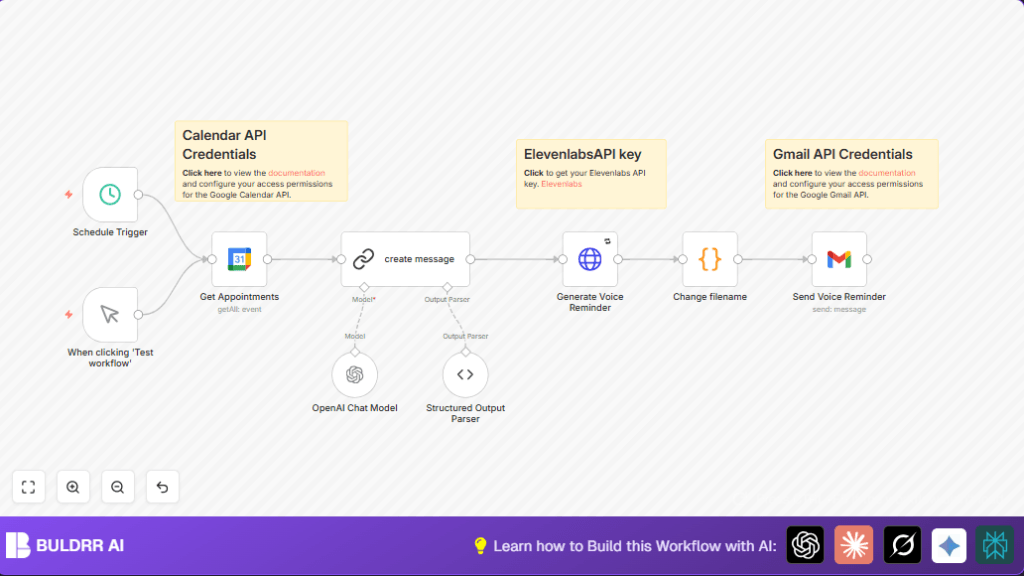

What This Automation Does
This workflow gets upcoming appointments from Google Calendar.
It creates a personal voice reminder message using OpenAI GPT-4o-mini.
Then it changes the text to speech using Elevenlabs API.
The voice message is renamed and emailed as MP3 to the client.
This saves time and stops clients from forgetting appointments.
Tools and Services Used
- Google Calendar: Holds real estate appointments.
- OpenAI GPT-4o-mini model: Makes a personal reminder message.
- Elevenlabs API: Changes text into voice audio file.
- Gmail: Sends voice reminders as email attachments.
- n8n: Runs and links all steps in the workflow.
Workflow Inputs, Processing, and Outputs
Inputs
- Upcoming Google Calendar events with client info.
- API keys for OpenAI and Elevenlabs.
- Google Calendar and Gmail account credentials.
Processing Steps
- Fetch next appointments from Google Calendar.
- Send event details to OpenAI to create a voice script.
- Use Elevenlabs API to generate MP3 audio from the script.
- Rename MP3 file based on appointment details.
- Send email to client with the MP3 attached via Gmail.
Outputs
- Email delivered to client with a professional voice reminder.
- Audio file saved and named for tracking.
Beginner Step-by-Step: How to Use This Workflow in n8n
Import the Workflow
- Click the Download button on this page to get the workflow file.
- In n8n editor, click “Import from File” and upload the downloaded file.
Configure Credentials and Settings
- Add required API Keys for OpenAI (GPT-4o-mini) and Elevenlabs in n8n credentials.
- Connect Google Calendar and Gmail accounts by selecting or adding credentials.
- Check and update calendar IDs, client email fields, or sender names if needed.
- Review OpenAI prompt texts and code snippets inside the nodes to match your style if wanted.
Test the Workflow
- Run the manual trigger node to test end-to-end process.
- Check workflow logs to confirm calendar events are fetched and emails sent.
Activate for Production
- Enable the schedule trigger node to run workflows on your chosen time.
- Monitor executions regularly for errors.
If using self-host n8n, consider linking to self-host n8n for full control.
Common Problems and Fixes
No Calendar Events Retrieved
Google Calendar permissions may be wrong or calendar ID incorrect.
Fix by checking Google Calendar node credentials and calendar selection.
Voice Audio Not Generated or HTTP 401 Unauthorized
Elevenlabs API key is missing or wrong in HTTP Request node.
Update the API key in n8n credentials and retry.
Email Sent Without Attachment
MP3 file was not linked as binary attachment in Gmail node.
Make sure Gmail node’s attachmentBinary option includes the renamed audio file correctly.
Customization Ideas
- Change voice or language model in Elevenlabs by modifying model_id.
- Add extra SMS reminder steps with Twilio or other services.
- Change reminder timing by adjusting schedule trigger node’s interval.
- Add more appointment details like parking or contacts in OpenAI prompt.
- Update email sender name to company or agent brand in Gmail node.
Summary
✓ Saves hours weekly by automating reminders.
✓ Stops clients missing appointments.
✓ Sends personal voice reminders via email.
✓ Easy to test, adjust, and run inside n8n.
✓ Can expand to calls, SMS, or other bookings.
