
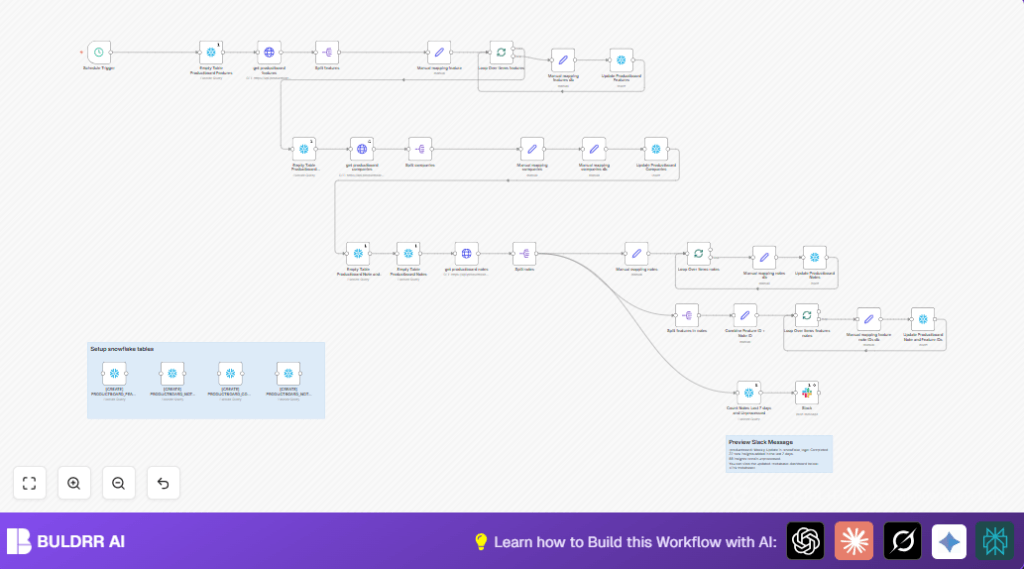

What this workflow does
This workflow connects Productboard with Snowflake to copy product data automatically.
It saves time by removing manual export and import tasks that often cause mistakes.
The workflow pulls companies, features, and notes from Productboard, cleans and organizes the data, then loads it into Snowflake tables.
It also sends a weekly Slack message with a summary of new and unprocessed notes, linking to business reports.
Who should use this workflow
This suits anyone needing automatic syncing of Productboard data to a data warehouse.
It helps product managers, analysts, and data teams who want accurate, up-to-date info ready for reporting.
Users with basic knowledge of APIs, SQL, and Slack will find the setup easier.
Tools and services used
- n8n: Runs the automation workflow.
- Productboard API: Source of product notes, companies, and features.
- Snowflake: Data warehouse for storing structured product data.
- Slack: Sends weekly summary notifications.
Workflow inputs, processing, and outputs
Inputs
- Productboard API with notes, features, and companies data.
- Snowflake database ready to receive new data.
- Slack channel for sending notifications.
Processing steps
- Schedule trigger runs the workflow weekly.
- Snowflake tables are created or emptied to start fresh.
- Productboard API is called to get all features, companies, and notes with paging support.
- Data is transformed and mapped manually into fields matching Snowflake table columns.
- Notes linked to features are split into pairs for insertion.
- Data batches loop through Snowflake update operations to insert clean data.
- Counts of recent and unprocessed notes are fetched.
- Slack message is sent with these counts and a dashboard link.
Outputs
- Updated Snowflake tables: PRODUCTBOARD_COMPANIES, PRODUCTBOARD_FEATURES, PRODUCTBOARD_NOTES, PRODUCTBOARD_NOTES_FEATURES.
- Weekly Slack notifications with note counts and a link to analytics dashboard.
Beginner step-by-step: How to run this workflow in n8n
Import and setup
- Click the Download button on this page to get the workflow file.
- Open n8n editor and click “Import from File” to load the workflow.
- Add Productboard API credentials in n8n and assign them to all HTTP Request nodes.
- Enter Snowflake credentials for all Snowflake nodes.
- Set the Slack bot token and target channel ID in the Slack node.
- Update any IDs, emails, table names, or dashboard URLs to match your environment.
Testing the workflow
- Run the workflow manually once in n8n to confirm data pulls and insertions happen without errors.
- Check Snowflake tables to see if data appears as expected.
- Verify Slack receives the summary message with correct info.
Activate for production
- Turn on the workflow in n8n to run on the schedule (weekly Mondays at 8 AM by default).
- Monitor executions and logs for any errors.
- Adjust schedule or notify channels as needed in workflow settings.
If hosting your own n8n instance, consider self-host n8n for full control.
Customizations and common adjustments
- Change how often the workflow runs by editing the Schedule Trigger node’s frequency (daily, weekly, monthly).
- Add fields from Productboard by modifying the Set nodes to map new data properties.
- Send Slack notifications to different users or channels by changing the channelId parameter.
- Update dashboard links in Slack messages for other BI tools like Tableau or Power BI.
Handling errors and edge cases
- If Productboard calls fail with authentication errors, refresh and update the stored API Key credentials.
- Snowflake permission errors happen if user lacks rights to create or empty tables. Contact your database admin to add needed privileges.
- Slack message failures usually mean the bot token or channel ID is incorrect or missing posting rights. Correct the credentials.
- Pagination settings must be enabled on HTTP Request nodes to avoid missing data.
Summary of benefit
✓ Saves over 6 hours every week by automating data sync.
✓ Removes manual errors from exports and imports.
✓ Keeps Snowflake tables updated with fresh product data.
✓ Sends regular Slack reports with key insights.
→ Provides consistent, timely product info for better decision-making.
