
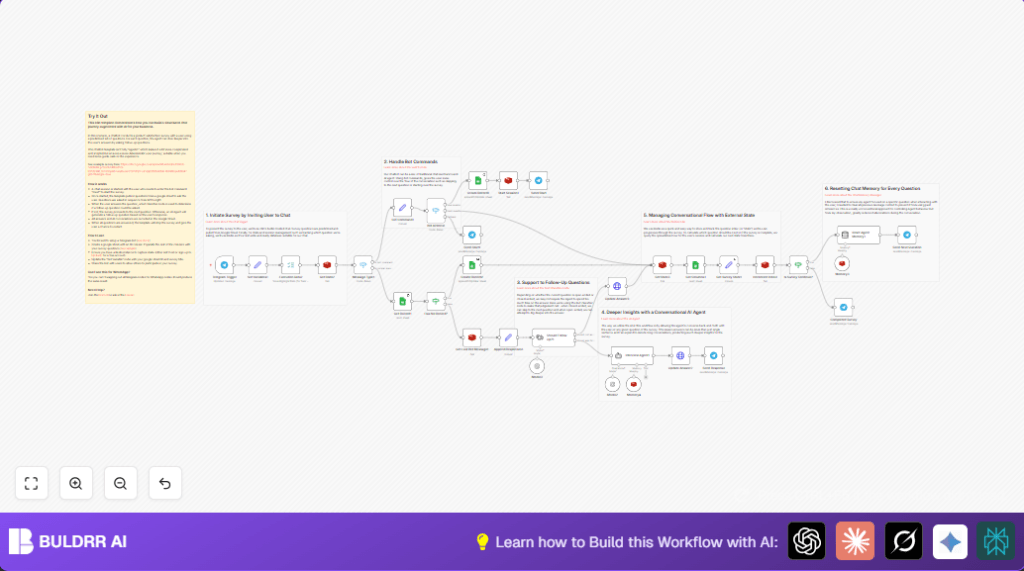

What This Workflow Does
This workflow runs a survey in Telegram chat and collects detailed user feedback automatically.
It solves the problem of manual survey sending, which has low response and hard data collection.
Users answer questions step-by-step, and AI follows up on some answers to dig deeper.
All data is saved in Google Sheets for easy review later.
Tools And Services Used
- Telegram Bot API: Receives user messages and sends questions and replies.
- Google Sheets: Stores survey questions and saves user answers.
- Redis: Keeps track of each user’s survey progress and session state.
- OpenAI GPT-4o-mini (via LangChain): Generates AI follow-up questions for open-ended responses.
- n8n Automation Platform: Runs and connects the workflow nodes.
Who Should Use This Workflow
This workflow is for teams or managers who need better surveys with chat.
It helps avoid manual collecting and reading of feedback.
The workflow delivers more answers that are richer because AI asks follow-ups.
How the Workflow Works
Inputs
- User messages in Telegram using commands like “/start”, “/next”, and “/reset”.
- Survey questions stored as columns in Google Sheet.
- Redis stores user session to track current question.
Processing Steps
- The Telegram Trigger Telegram Trigger listens for any user message.
- A Set node defines survey info, like title and Google Sheet ID.
- Google Sheets node reads the full list of survey questions.
- Redis node fetches current user progress by a unique Redis key.
- If no session exists, new session is created and saved to Redis.
- Switch and Set nodes parse user commands to control survey steps.
- Survey question index updates and completion status computed.
- Telegram node sends current survey question to user.
- User answers received and formatted.
- Text Classifier node decides if AI follow-up is needed.
- If follow-up needed, LangChain Agent calls GPT-4o-mini to ask deeper questions.
- Agent memory is reset regularly to keep answers focused.
- All responses written back to Google Sheets.
- Redis index incremented to move to next question.
- When survey ends, user is told survey is complete and can restart.
Outputs
- Users get questions and AI replies sent in Telegram chat.
- Raw user responses and AI follow-ups saved in Google Sheets.
- Survey progress tracked live in Redis.
Beginner Step-by-Step: How To Use The Workflow In Production Inside n8n
Importing The Workflow
- Download the workflow file using the Download button on this page.
- Open the n8n editor (assuming you are already logged in).
- Click on menu and choose “Import from File”.
- Select the downloaded workflow file to load it into n8n.
Configuring The Workflow
- Go to each credential node and add your own API Keys or OAuth tokens:
- Telegram Bot API credentials.
- Google Sheets OAuth credentials.
- Redis connection details.
- OpenAI API Key with GPT-4o-mini access.
- Edit the Set node named “Set Variables1”:
- Replace the Google Sheet ID with your survey sheet’s ID.
- Optionally change the survey title.
- Make sure Redis key pattern fits your use case.
- Check Text Classifier node “Should Follow Up?1” prompt if you want to adjust follow-up sensitivity.
- Update any Telegram message templates in Telegram nodes if needed.
Testing And Activating
- Test the workflow by sending “/start” and “/next” commands to the Telegram bot.
- Check Google Sheets for recorded responses.
- If testing succeeds, activate the workflow toggling the switch on the top-right.
- Optionally, enable retries on critical nodes to handle network errors.
If using self-host n8n or running on server, see self-host n8n for setup tips.
Input → Process → Output Summary
Inputs
- User commands in Telegram chat.
- Survey questions from Google Sheets.
- Session state from Redis key-value store.
Process
- Trigger on Telegram message.
- Load questions.
- Check session progress.
- Send question to user.
- Classify answer to decide AI follow-up.
- Generate AI follow-up question if needed.
- Store answers in Google Sheets.
- Update Redis session.
Output
- Survey questions and AI responses sent via Telegram.
- Answers saved to Google Sheet.
- Session state updated for next survey question.
Customization Ideas
- Add more questions by adding columns to your Google Sheet.
- Switch Telegram nodes to WhatsApp nodes to use WhatsApp instead.
- Tune AI follow-up chance by changing the Text Classifier node settings.
- Edit welcome messages in the Telegram “Send Start” node.
- Change sheet ID or survey title in the “Set Variables1” node.
Handling Errors And Troubleshooting
- Telegram Trigger no response: Fix webhook and API token in Telegram Trigger.
- Google Sheets errors: Check OAuth permissions and that sheet ID is correct.
- Redis missing data: Confirm Redis keys match and Redis service is connected.
- AI not triggering follow-ups: Review Text Classifier settings and OpenAI API status.
Summary
✓ This workflow runs step-by-step surveys inside Telegram chat, pushing questions one at a time.
✓ It uses Redis to track user progress so interruptions are handled.
✓ It triggers AI follow-up questions for open answers to get deeper insights.
✓ All responses are saved into Google Sheets for easy viewing and analysis.
✓ Users get immediate replies in chat, improving engagement.
✓ Setup requires Telegram, Google Sheets, Redis, and OpenAI credentials.
✓ Activating the workflow in n8n automates all survey messaging and data storage.
survey_user_{{ $json.sessionId }}Sample Text Classifier Prompt For “Should Follow Up?1” Node
This prompt lets the node decide if the answer needs AI follow-up.
Is this user response detailed enough? Answer "yes" if simple or closed ended, "no" if open ended or unclear.User response: "{{$json.answer}}" 