

What This Workflow Does
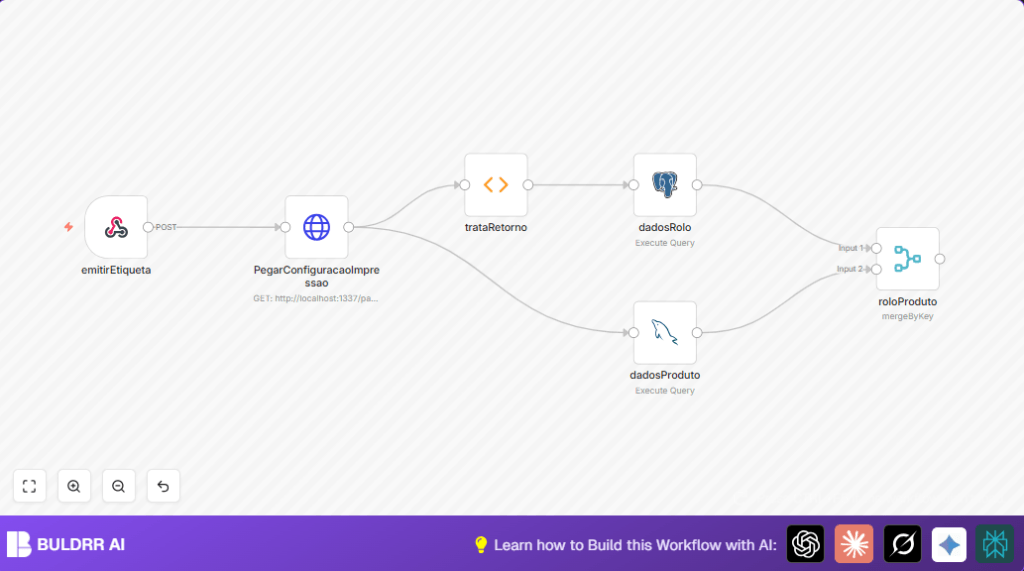
This workflow listens for a webhook request to print a new label for textile products. It solves the problem of slow, error-prone manual label data collection by automatically gathering product and fabric roll details from two databases. The outcome is a clean, combined data set ready for printing an accurate label quickly.
It receives product grade and fabric roll information via an API call, fetches print settings from an internal HTTP API, queries MySQL for detailed product info, and queries Postgres for fabric roll data. Then, it joins all data by a matching ID to output complete label details.
Who Should Use This Workflow
This workflow benefits inventory managers and textile production teams who spend hours manually preparing labels. It reduces errors and saves about 5 hours weekly of manual work. Users who have product grade data in MySQL and fabric roll info in Postgres databases will find this especially useful.
It is also good for anyone wanting to automate label generation triggered by an API call without mixing manual steps or separate systems.
Tools and Services Used
- n8n Webhook node: To receive API calls triggering label printing.
- n8n HTTP Request node: To get print configuration from internal API.
- n8n MySQL node: Queries product grade and details from MySQL database.
- n8n Function node: Extracts fabric roll IDs from webhook data.
- n8n Postgres node: Queries fabric roll information from Postgres database.
- n8n Merge node: Combines product and roll data by movement detail ID for label output.
Inputs, Processing Steps, and Output
Inputs
- JSON payload via Webhook node containing product grade ID and fabric roll list.
- Print configuration settings from internal HTTP API.
Processing Steps
- HTTP Request node fetches latest label format settings from internal API with authentication header.
- MySQL node runs a parameterized query fetching product grade info, brand, composition, and fabric width based on product grade ID.
- Function node extracts fabric roll object IDs from webhook data into an array.
- Postgres node queries fabric roll details where IDs match extracted array from function node.
- Merge node joins product data and fabric roll data using the shared movement detail ID field.
Output
A single merged dataset combining detailed product and fabric roll information ready for label printing or next processing steps.
Beginner Step-by-Step: How to Use This Workflow in n8n
Step 1: Import the Workflow
- Download the workflow file using the Download button on this page.
- Inside the n8n editor, click “Import from File” and select the downloaded workflow.
Step 2: Configure Credentials and Settings
- Enter MySQL and Postgres credentials in the respective nodes for database access.
- Set the URL of the internal print configuration API in the HTTP Request node.
- Update any IDs in webhook or database queries if your system uses different values.
Step 3: Test the Workflow
- Send a POST request to the webhook URL with sample data matching expected product grade and fabric rolls.
- Check the output data for merged detailed label info.
Step 4: Activate for Production
- Activate the workflow in n8n to keep it running and responding to real webhook calls.
- Connect downstream printing tools or processes to use the merged output data for label generation.
For users running n8n on own servers, see self-host n8n resources for setup help.
Common Problems and Fixes
- Webhook does not respond or shows 404: Check webhook path is exactly “/emitirEtiqueta” and HTTP method is POST.
- MySQL query returns no data or errors: Confirm correct MySQL credentials and that query parameters point to existing product grade IDs.
- Postgres query fails with invalid array error: Verify the function node extracts roll IDs correctly as string array for the SQL IN clause.
- Merge node doesn’t join data: Ensure both input datasets have the “id_movimentacao_detalhe” field and values match exactly.
Customization Ideas
- Change print configuration API URL to point to a live environment.
- Modify the MySQL query in dadosProduto node to add more filters or include other product attributes.
- Add more columns to Postgres fabric roll query for extra details like weight or batch info.
- Insert a logging node after the merge node to save or audit the final combined label data.
Summary
✓ Automates label data collection from multiple databases on API trigger.
✓ Reduces manual errors and saves ~5 hours per week.
✓ Outputs a merged, complete data record ready for label printing.
✓ Simple to configure in n8n with webhook trigger and database queries.
✓ Supports textile products with complex fabric roll data.
