
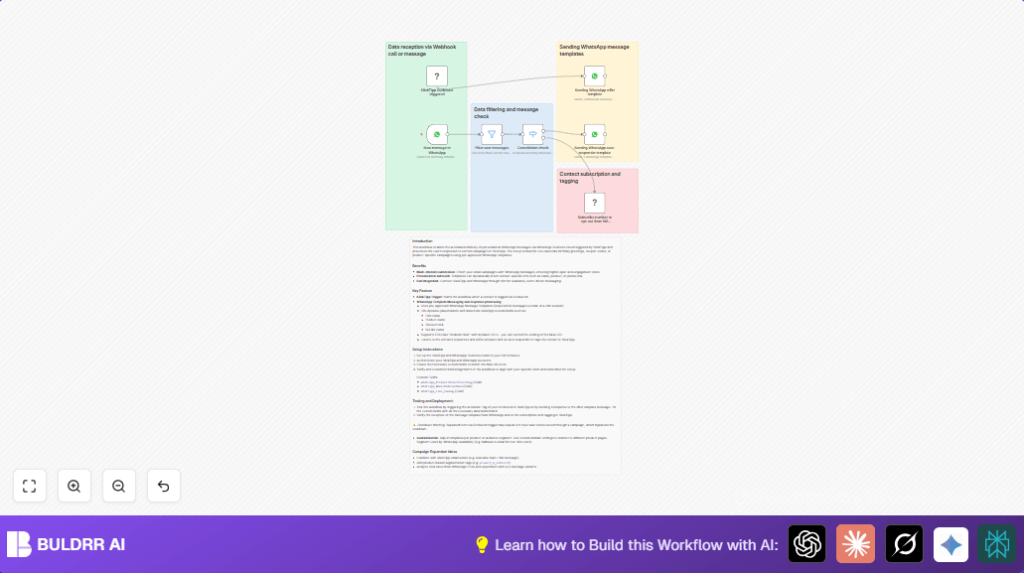

What This Automation Does
This workflow starts by getting events from KlickTipp about subscribers joining campaigns.
Then it sends personal WhatsApp message templates that include names, products, and discount links.
It watches replies to catch “STOP” messages to let users opt out.
If a person says “STOP,” it sends a helpful reply pointing them to support.
The system adds or removes the person from KlickTipp lists based on their WhatsApp answers.
It blocks automated replies so messages do not loop forever.
The result is less manual work and better message timing that fits what users want.
The whole process keeps subscriber lists neat and helps marketing get better sales and happier customers.
Tools and Services Used
- n8n: To build and run the workflow that connects services.
- KlickTipp API: Provides subscriber events and manages subscriber lists.
- WhatsApp Business Cloud API: Sends message templates and listens for replies.
- WhatsApp Business Manager: Holds pre-approved message templates.
- KlickTipp Custom Fields: Holds subscriber data like first name, product interest, and links.
Inputs, Processing, and Outputs
Inputs
- Subscriber tagging events from KlickTipp outbound campaigns.
- Subscriber data like phone number and custom fields.
- Incoming WhatsApp messages from subscribers.
Processing
- Trigger workflow on KlickTipp subscriber events.
- Format phone numbers and fill WhatsApp templates with subscriber data.
- Send WhatsApp offer messages.
- Listen for incoming WhatsApp replies.
- Filter only real user messages, ignore system/automated replies.
- Check if incoming WhatsApp message text starts with “STOP” (case-insensitive, whitespace removed).
- If “STOP” is detected, send a supportive auto-responder message.
- Add or remove subscribers from KlickTipp lists accordingly.
Outputs
- WhatsApp messages with dynamic offer content sent successfully.
- Auto-responder messages sent after opt-out requests.
- Subscriber list updates in KlickTipp based on WhatsApp replies.
- Prevention of message loops and unwanted triggers.
Beginner Step-by-Step: How to Use This Workflow in n8n
Step 1: Import Workflow
- Click the Download button on this page to get the workflow file.
- Inside your n8n editor, click the menu and choose “Import from File.”
- Select the downloaded workflow file to load it.
Step 2: Configure Credentials
- Add your KlickTipp API credentials in the KlickTipp nodes.
- Add your WhatsApp Business Cloud OAuth credentials in WhatsApp nodes.
Step 3: Update IDs and Fields
- Check the message template names match your approved WhatsApp templates.
- Update any list IDs or tags in KlickTipp nodes if your account uses different values.
- Verify the custom field names match your KlickTipp setup for names, products, and URLs.
Step 4: Test the Workflow
- Tag a subscriber in KlickTipp to trigger sending a WhatsApp offer message.
- Send a WhatsApp reply with “STOP” to test the opt-out response and list update.
Step 5: Activate for Production
- Once testing is successful, switch the workflow toggle in n8n to activate it.
- Watch the executions panel to see messages and events in real time.
If you use self-host n8n, here is a helpful resource: self-host n8n for stable production use.
Common Situations and Handling Steps
Phone Number Formatting
Incoming phone numbers may start with “00”.
This workflow replaces “00” with “+” for WhatsApp API formats.
Make sure numbers saved in KlickTipp follow this or messages may fail.
Opt-Out Handling
User messages with different cases or spaces around “STOP” are recognized.
The Switch node checks the start of the cleaned lowercase text for “stop” to catch opt-out.
Message Loop Prevention
The workflow filters out automated replies like WhatsApp system notifications.
This stops endless triggering of message sends and auto-responses.
API Errors
Errors can come from wrong template names or bad credentials.
Check credentials and template names carefully if errors appear in n8n executions.
Customizations
- You can change WhatsApp templates named in the WhatsApp nodes to fit new campaigns.
- Add extra custom fields from KlickTipp in the template placeholders to make messages more personal.
- Modify the stop-word detection in the Switch node to check for other opt-out keywords.
- Include an Email Send node to follow up by email if subscribers do not use WhatsApp.
- Segment or tag subscribers in KlickTipp automatically based on their WhatsApp interaction for better lists.
Summary
✓ Sends custom WhatsApp offer messages automatically when subscribers are tagged.
✓ Detects opt-out messages with “STOP” and replies with support info.
✓ Updates subscriber lists in KlickTipp based on WhatsApp replies.
✓ Stops automated responses from causing endless loops.
✓ Saves time and keeps customer contact details up-to-date.
✓ Helps marketing communicate more personally and timely with users.
