

Automate PDF to PDF/A Conversion with n8n and ConvertAPI

Discover how to automatically convert any PDF file to PDF/A format using an n8n workflow integrated with ConvertAPI. This automation saves you manual effort and ensures regulatory compliance for archival purposes.
manualTrigger
httpRequest
readWriteFile
+1
Workflow Identifier: 2475
NODES in Use: Manual Trigger, HTTP Request, Read & Write File, Sticky Note
Automate PDF to PDF/A with n8n and ConvertAPI

Press CTRL+F5 if the workflow didn't load.

Learn how to Build this Workflow with AI:

What this workflow does 📁

This workflow changes normal PDF files into PDF/A files for archiving. PDF/A keeps files safe and proper for a long time. It stops people from doing the work by hand and making mistakes.

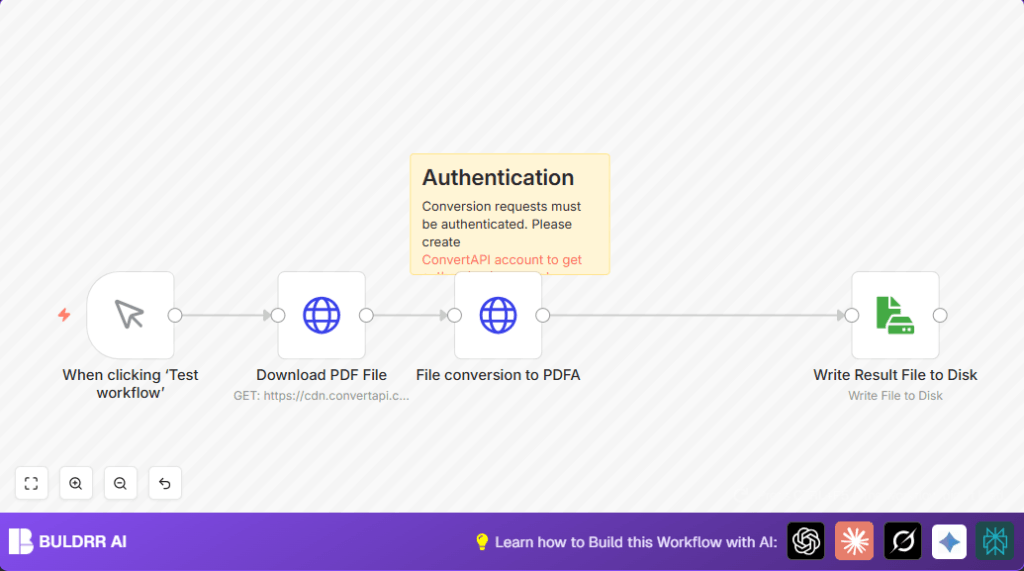
The workflow downloads a PDF, sends it to ConvertAPI to make it PDF/A, then saves the new file. This saves time and stops errors.


Tools and services used

  • n8n: Runs the workflow automation.
  • ConvertAPI: Converts PDF files to PDF/A format.
  • HTTP Request node: Downloads and sends files.
  • Read & Write File node: Saves files to disk.

Inputs → Processing → Outputs

Inputs

  • URL link to a PDF file (public link).
  • ConvertAPI API Key for authentication.

Processing Steps

  • Manual trigger to start workflow.
  • HTTP Request node to download PDF file as binary.
  • HTTP Request node sends file to ConvertAPI for PDF to PDF/A conversion.
  • ConvertAPI returns the PDF/A file in binary form.
  • Read & Write File node saves the PDF/A file to local disk.

Output

  • A local PDF file named document.pdf compliant with PDF/A archival standards.

Beginner step-by-step: How to use this workflow in n8n

Step 1: Download and Import Workflow

  1. Click the Download button on this page to save the workflow file.
  2. Open the n8n editor where you want to run the automation.
  3. Use the “Import from File” option in n8n and pick the downloaded file.

Step 2: Configure API Keys and Settings

  1. Go to the File conversion to PDFA HTTP Request node.
  2. Add or update the ConvertAPI API Key in the HTTP Query Authentication section.
  3. Check if Download PDF File node URL needs to be changed to your own PDF file link.
  4. Change any other IDs, emails, folders, or table info if present.

Step 3: Test and Activate Workflow

  1. Run the workflow once by clicking the manual trigger’s execute button to test.
  2. If the PDF/A file saves correctly without errors, the workflow is ready.
  3. Activate the workflow in n8n for production use.

You don’t need to build the workflow from scratch. Just import, configure, test, and run. Simple and clear.


Common Problems and Fixes 🔧

  • 401 Unauthorized Error: Happens when the API key is missing or wrong.
    Fix it by updating the API Key in the File conversion to PDFA node.
  • Empty or Corrupt Output File: Happens if binary data is not mapped right.
    Fix it by making sure the File conversion to PDFA node outputs binary and the Write Result File to Disk node uses the correct binary data.

Customization Ideas ✏️

  • You can change the PDF link in the Download PDF File node to any public file.
  • Adjust the PdfaVersion form parameter to other versions like “pdfa-1b” if supported.
  • Save PDF/A files with unique names using expressions like {{$now}}.pdf in the write file node.
  • Add an email node after saving the file to send alerts when conversion finishes.

Pre-Production Checklist ✅

  • Make sure the ConvertAPI account is active and the API Key is valid.
  • Test the workflow manually to check if document.pdf opens as PDF/A.
  • Try different PDF files as input to confirm workflow handles varied inputs.
  • Backup the workflow before deploying to avoid losing work.

Deployment Guide

Save and activate the workflow inside n8n to run live.
Use the manual trigger for tests or add webhook and other triggers for automation.
Enable error logging in n8n to watch for problems.
For those using self-host n8n, check this link for server help.


Summary of the result

✓ Saves hours by automating PDF to PDF/A conversion.
✓ Removes human error in file formatting.
✓ Provides a simple way to ensure documents meet archival compliance.
✓ Outputs a ready-to-use, properly formatted PDF/A file on disk.


Automate PDF to PDF/A with n8n and ConvertAPI

Visit through Desktop to Interact with the Workflow.

Author
Written By
Vikash Kumar
Building AI agents, n8n workflows and end-to-end automation for 30+ Brands across India, the US, Europe, Dubai & Australia. 7+ years of Experience saving founders real hours every week - no code required.
Author
Written By
Vikash Kumar
Building AI agents, n8n workflows and end-to-end automation for 30+ Brands across India, the US, Europe, Dubai & Australia. 7+ years of Experience saving founders real hours every week - no code required.

Frequently Asked Questions

The error comes from missing or incorrect ConvertAPI API Key in the HTTP Query Authentication settings of the File conversion to PDFA node.
Make sure the binary data output from the File conversion to PDFA node is properly mapped to the Write Result File to Disk node.
Yes. Change the URL in the Download PDF File node to any public HTTP/HTTPS link of a PDF file.
Download the workflow file from the page, import it into n8n, add the ConvertAPI API Key, update any needed parameters, test once, and activate the workflow.

Related Workflows

Automate Twist Channel Creation and Messaging with n8n

This workflow automates creating and updating a channel in Twist and sending a personalized message to specific users. It eliminates manual setup errors and saves time managing Twist communications.

Automate Ideogram Image Generation with Google Sheets & Gmail

This workflow automates graphic design image generation via Ideogram AI, storing image data in Google Sheets and Google Drive, with email alerts via Gmail. It saves designers hours by automating image creation, remixing, review, and record-keeping.

Automate IT Support with Slack and OpenAI in n8n

Streamline IT support by automating Slack message handling using n8n and OpenAI. This workflow handles Slack DMs, filters bots, queries a Confluence knowledge base, and delivers AI-generated responses, improving support efficiency and response time.

Automate Crypto Analysis with CoinMarketCap & n8n AI Agent

Discover how this unique n8n workflow leverages CoinMarketCap’s multi-agent AI to deliver precise, real-time cryptocurrency insights directly via Telegram. Manage crypto data analysis efficiently with automated multi-source API integration.

Automate Gumroad to Beehiiv Subscriber Sync with n8n

Learn how to automatically add new Gumroad sales customers as Beehiiv newsletter subscribers using n8n automation. This workflow saves time by syncing sales data to Google Sheets CRM and notifying your Telegram channel instantly.

Generate On-Brand Blog Articles Using n8n and OpenAI

This workflow automates the creation of on-brand blog articles by analyzing existing company content using n8n and OpenAI. It extracts article structures and brand voice to produce consistent draft articles, saving significant content creation time.
1:1 Free Strategy Session
Your competitors are already automating. Are you still paying for it manually?

Do you want to adopt AI Automation?

Every hour your team does repetitive work, you're burning real money.
While you wait, faster businesses are cutting costs and moving quicker.
AI and automations aren't the future anymore — they're the present.

Book a live 1-on-1 session where we show you exactly which of your daily tasks can be automated — and what it’s costing you not to.