
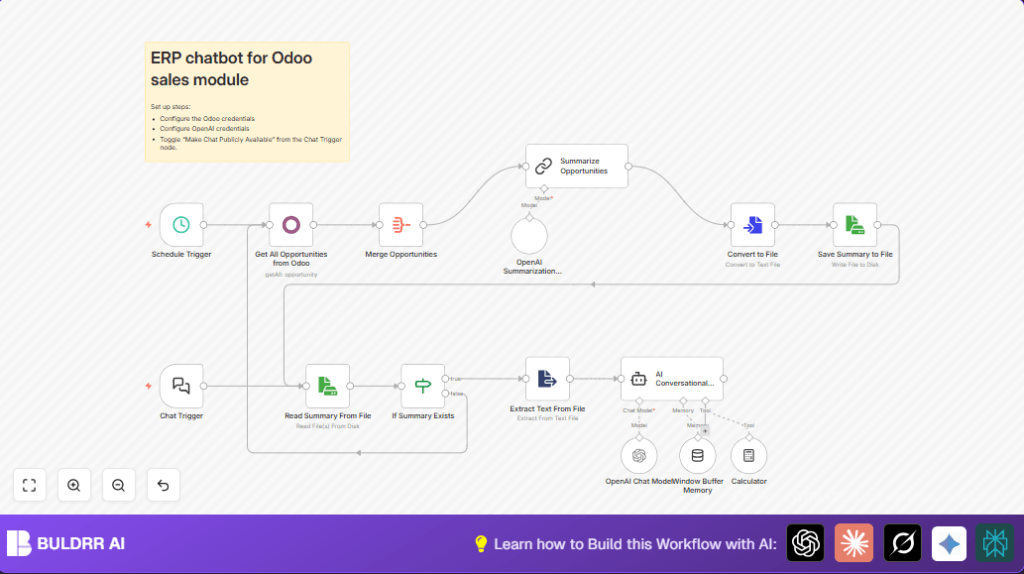

What This Automation Does
This workflow fetches sales opportunities from an Odoo ERP system every set time.
It collects info about deals including won status, contacts, and expected money.
Then, it uses the GPT-4 Turbo model from OpenAI to make a short, clear summary of all sales data.
The summary saves as a file for easy access later.
The user can ask questions in a chatbot, which replies using the summary and keeps memory of past talks.
This saves many hours weekly on reporting and lowers errors in sales updates.
Tools and Services Used
- Odoo ERP API: Provides sales opportunity data.
- OpenAI GPT-4 Turbo: Summarizes and answers sales questions.
- n8n Automation Platform: Runs the scheduled flow and chatbot.
- Langchain: Manages AI chain and conversation memory.
Who Should Use This Workflow
This is useful for sales managers who spend too much time making sales reports.
Also good for teams needing quick, clear answers about current sales chances.
It works for users with some basic knowledge about APIs and n8n setup.
Workflow Inputs, Processing, and Outputs
Inputs
- Odoo ERP sales opportunity data via API (won status, description, contact info, expected revenue).
- User text questions triggered through the chatbot interface.
Processing Steps
- Automatically fetch and collect all sales opportunities with a timed schedule.
- Combine and merge all fetched opportunity records into one dataset.
- Use OpenAI GPT-4 Turbo via Langchain to generate a short, easy-to-read summary per opportunity.
- Convert the summary to a text file and save it locally for fast reuse.
- When chatbot starts, read the cached summary file if it exists; if not, refresh data from Odoo.
- Answer user questions using a conversational AI agent, which keeps track of previous messages using memory buffers.
- Allow the agent to use a calculator tool to do simple math during conversations.
Outputs
- A saved text file holding the latest sales summary.
- Interactive chatbot replies based on up-to-date sales data and conversation context.
Beginner Step-by-Step: How To Use This Workflow In n8n
Step 1: Import the Workflow
- Download the workflow file using the Download button given on this page.
- Inside the n8n editor, choose “Import from File” to load the workflow.
Step 2: Configure Credentials
- Add your Odoo ERP API credentials under Credentials → New → Odoo API with your server URL, username, and API key.
- Add your OpenAI API key under Credentials → New → OpenAI API.
Step 3: Update Node Settings if Needed
- Check nodes like Get All Opportunities from Odoo to ensure correct fields and “Return All” is enabled.
- Verify file path and name in Save Summary to File and Read Summary From File if your system setup differs.
- If needed, update any emails, IDs, or channels used in chatbot or file nodes.
Step 4: Test and Activate
- Run the scheduled trigger Schedule Trigger manually to create the initial summary file.
- Test chatbot by sending input to the Chat Trigger node to check the AI answers.
- If all works well, toggle the workflow toggle to “Active” to start automatic runs.
Remember to check logs and file storage occasionally for errors or missing data.
For advanced privacy or control, consider self-host n8n.
Customizations
- Change how often sales data updates by altering the interval in Schedule Trigger.
- Add more fields like probability or customer segments in the Odoo node for deeper summaries.
- Edit AI prompt text inside the Summarize Opportunities and AI Conversational Agent nodes for company-specific language.
- Move summary saving and reading from local files to cloud storage such as AWS S3 by swapping the appropriate nodes.
- Add security to the chatbot’s public endpoint by enabling authentication or API key validation.
Troubleshooting
Problem: Cannot Connect to Odoo API
Cause: The credential details or API URL might be wrong.
Solution: Verify and update Odoo API credentials under n8n Credentials with correct server URL, username, and API key.
Problem: OpenAI API Key Not Accepted
Cause: API key expired or malformed.
Solution: Replace OpenAI API key with a valid key from the OpenAI dashboard.
Problem: cache.txt Summary File Missing
Cause: File was deleted or creation failed.
Solution: Run Schedule Trigger manually to regenerate the file; check file permissions if errors persist.
Pre-Production Checklist
- Confirm Odoo API credentials connect successfully.
- Check OpenAI API key is valid and active in credentials.
- Run Schedule Trigger node manually and ensure
cache.txtis created with summary text. - Send test input to the chatbot and check AI responses.
- Backup current summary file before any workflow changes.
Deployment Guide
Turn the workflow “Active” in the n8n editor to start automated runs.
Monitor executions and watch for errors in the n8n log viewer.
Share chatbot webhook securely only with authorized users.
Check storage for cache.txt regularly to ensure summary updates.
Summary / Results
✓ Saves roughly five hours every week on manual sales reporting.
✓ Reduces mistakes by automating data fetching and summarizing.
✓ Gives clear, easy summaries of all active sales opportunities.
✓ Enables real-time chatbot answering important sales questions.
✓ Keeps conversation context for ongoing user interactions.
✓ Frees sales managers to focus more on closing deals, less on data work.
