

Automate Nightly Discord Cleanup with n8n

Struggling with cluttered Discord channels slowing your community engagement? This n8n workflow automates nightly deletion of messages older than seven days, saving hours of manual cleanup every week.
discord
scheduleTrigger
wait
+3
Workflow Identifier: 2258
NODES in Use: scheduleTrigger, discord, wait, splitInBatches, filter, stickyNote
Automate Discord cleanup with n8n

Press CTRL+F5 if the workflow didn't load.

Learn how to Build this Workflow with AI:

What This Workflow Does

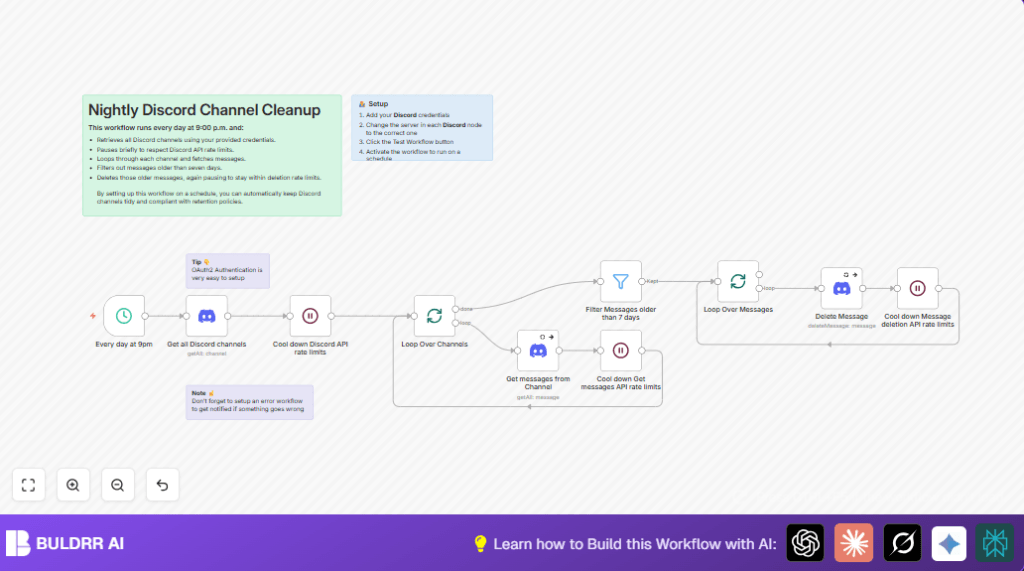
This workflow runs every night at 9 PM to clean up older messages in a Discord server. It deletes messages that are older than seven days in all text and announcement channels. This stops message clutter and helps keep the server organized. The cleanup works without stopping if errors happen and respects Discord’s API limits.


Who Should Use This Workflow

Any Discord server owner or moderator with many messages piling up can use this. It is best for servers that want to remove old chats automatically to save time and avoid manual cleaning. Users need some basic knowledge of n8n and an authorized Discord bot with permission to read and delete messages.


Tools and Services Used

  • n8n Automation Platform: To build and run the workflow.
  • Discord API with OAuth2 credentials: To access channels and delete messages securely.
  • Wait Nodes in n8n: To pause between API calls and avoid rate limit errors.

Inputs, Processing, and Output

Inputs

  • Discord server ID (guild ID).
  • Discord OAuth2 Bot credentials with permissions.

Processing Steps

  • Trigger starts every night at 9 PM.
  • Fetch all text and announcement channels in the server.
  • Pause 2 seconds to avoid hitting API limits.
  • Loop over each channel one at a time.
  • Fetch all messages in the current channel.
  • Pause 2 seconds again before fetching messages.
  • Filter messages older than 7 days.
  • Loop over each old message one by one.
  • Delete each message, continuing even if some fail.
  • Pause 1 second between each deletion to respect rate limits.

Output

  • Discord server channels have no messages older than seven days.
  • The server stays tidy and easier to manage.
  • Automatic daily cleanup saves hours of manual work.

Beginner Step-by-Step: How to Use This Workflow in n8n

Import the Workflow

  1. Download the workflow file using the Download button on this page.
  2. Inside the n8n editor, click on “Import from File”.
  3. Select the downloaded workflow file to load it.

Configure Credentials

  1. In n8n, go to the credentials section and add your Discord OAuth2 Bot credentials.
  2. Make sure the bot has permissions to read channels, read messages, and delete messages in the server you want to clean.
  3. Update the node with your server guild ID if it is not already set.

Test and Activate

  1. Run the workflow manually once to check if it fetches channels and deletes test messages successfully.
  2. If it works fine, activate the workflow to run daily at 9 PM automatically.

If using self-host n8n or running on your own server, consider adjusting wait times based on your server size and API limits. See self-host n8n for hosting help.


Customization Ideas

  • Change the message retention period by editing the filter node to a different number of days.
  • Modify the channel filter to select only specific channels by name or type.
  • Add error notification using a separate workflow that triggers if deleting messages fails.
  • Adjust wait node durations to balance speed vs. preventing rate limits based on your server size.

Handling Errors and Rate Limits

  • If rate limit errors happen, increase wait node pauses between API calls.
  • If unauthorized errors appear, check your Discord OAuth2 credentials and make sure permissions are correct.
  • If messages don’t delete, verify the bot role has message deletion rights in each channel.
  • Enable “continue on error” options in delete message nodes to stop full workflow from crashing.

Summary of Results

✓ The workflow cleans up all messages older than seven days every night.
✓ It runs safely without manual work and respects Discord API limits.
✓ Keeps the Discord server tidy and improves usability.
✓ Saves hours of manual cleaning for moderators.


Automate Discord cleanup with n8n

Visit through Desktop to Interact with the Workflow.

Author
Written By
Vikash Kumar
Building AI agents, n8n workflows and end-to-end automation for 30+ Brands across India, the US, Europe, Dubai & Australia. 7+ years of Experience saving founders real hours every week - no code required.
Author
Written By
Vikash Kumar
Building AI agents, n8n workflows and end-to-end automation for 30+ Brands across India, the US, Europe, Dubai & Australia. 7+ years of Experience saving founders real hours every week - no code required.

Frequently Asked Questions

The Discord bot needs permissions to read channels, read messages, and delete messages in the server.
The workflow uses wait nodes to pause between API calls, typically 1 to 2 seconds, to prevent rate limit errors.
Yes, the number of days can be changed in the message filter node to keep messages longer or delete them sooner.
Check if the bot has the proper deletion permissions and that the message and channel IDs are correct; also enable continue on error to avoid workflow stops.

Related Workflows

Automate Twist Channel Creation and Messaging with n8n

This workflow automates creating and updating a channel in Twist and sending a personalized message to specific users. It eliminates manual setup errors and saves time managing Twist communications.

Automate Ideogram Image Generation with Google Sheets & Gmail

This workflow automates graphic design image generation via Ideogram AI, storing image data in Google Sheets and Google Drive, with email alerts via Gmail. It saves designers hours by automating image creation, remixing, review, and record-keeping.

Automate IT Support with Slack and OpenAI in n8n

Streamline IT support by automating Slack message handling using n8n and OpenAI. This workflow handles Slack DMs, filters bots, queries a Confluence knowledge base, and delivers AI-generated responses, improving support efficiency and response time.

Automate Crypto Analysis with CoinMarketCap & n8n AI Agent

Discover how this unique n8n workflow leverages CoinMarketCap’s multi-agent AI to deliver precise, real-time cryptocurrency insights directly via Telegram. Manage crypto data analysis efficiently with automated multi-source API integration.

Automate Gumroad to Beehiiv Subscriber Sync with n8n

Learn how to automatically add new Gumroad sales customers as Beehiiv newsletter subscribers using n8n automation. This workflow saves time by syncing sales data to Google Sheets CRM and notifying your Telegram channel instantly.

Generate On-Brand Blog Articles Using n8n and OpenAI

This workflow automates the creation of on-brand blog articles by analyzing existing company content using n8n and OpenAI. It extracts article structures and brand voice to produce consistent draft articles, saving significant content creation time.
1:1 Free Strategy Session
Your competitors are already automating. Are you still paying for it manually?

Do you want to adopt AI Automation?

Every hour your team does repetitive work, you're burning real money.
While you wait, faster businesses are cutting costs and moving quicker.
AI and automations aren't the future anymore — they're the present.

Book a live 1-on-1 session where we show you exactly which of your daily tasks can be automated — and what it’s costing you not to.