
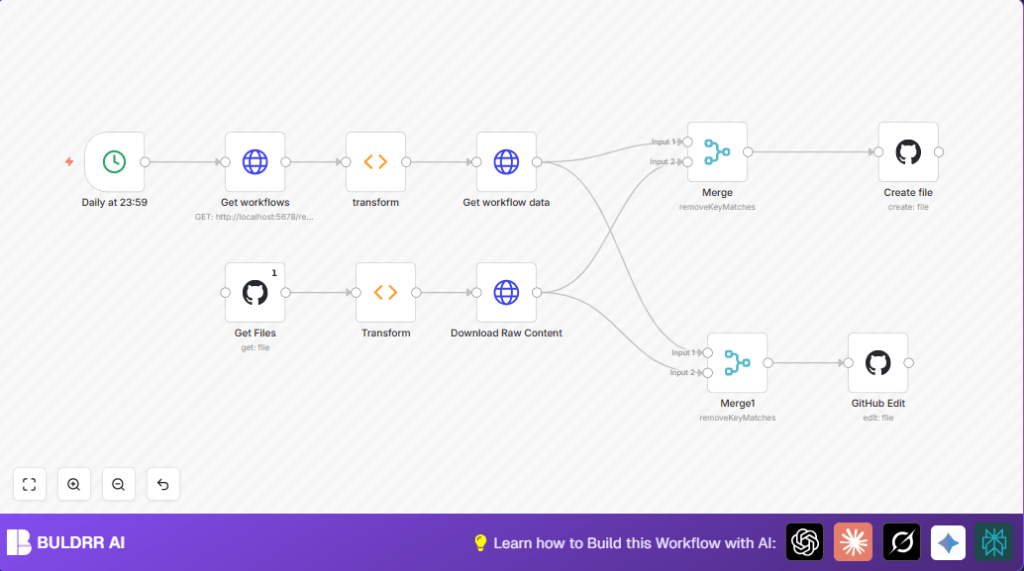

What this workflow does
This workflow backs up n8n workflows automatically to a GitHub repository every day at 23:59.
It solves the problem of manually saving workflows, which can waste time and risk losing data.
The workflow fetches local workflows, checks GitHub for existing backups, then creates or updates files only if changes happened.
This saves time, avoids mistakes, and keeps backups up to date without manual work.
Who should use this workflow
This is for users who run their own n8n instance, especially those who want daily backups of workflow data without manual effort.
It is useful for automation specialists and teams managing many workflows.
Anyone wanting safer, versioned backups on GitHub benefits from running this workflow.
Tools and services used
- n8n local instance REST API: Provides workflow data via HTTP calls.
- GitHub API: Manages backup files by listing, creating, and updating JSON files.
- n8n nodes involved: Cron, HTTP Request, GitHub, Function, Merge.
- Basic Authentication: Secures HTTP requests to the local n8n instance.
Inputs, processing steps, and outputs
Inputs
- Schedule trigger from the Cron node at 23:59 daily.
- Workflow list and details fetched from the local n8n REST API.
- Existing backup file details and content downloaded from the GitHub repo.
Processing Steps
- The HTTP Request node calls the n8n API to get all workflow metadata.
- The Function node splits workflows into individual items.
- Another HTTP Request fetches detailed data for each workflow.
- The GitHub node lists files in the backup repository.
- A Function node transforms the GitHub file list into usable format.
- An HTTP Request node downloads raw JSON content of existing backup files.
- Merge nodes compare local workflows and GitHub files to find new or changed workflows.
- The GitHub node creates new files for workflows not on GitHub yet.
- Another GitHub node edits existing files if workflow data changed.
Outputs
- New workflow backup JSON files added to GitHub.
- Updated workflow files overwritten only when changes exist.
- GitHub repository remains clean without duplicates or unnecessary commits.
- Daily saved backups of all n8n workflows secured on GitHub.
Beginner step-by-step: How to use this workflow in n8n
Importing and setup
- Download the workflow file using the Download button on this page.
- Open your n8n editor and select Import from File option.
- Choose the downloaded workflow file to import.
- After import, add necessary credentials:
- Enter your n8n API Basic Auth credentials in the relevant HTTP Request nodes.
- Set GitHub API credentials (personal access token with repo rights) in the GitHub nodes.
- Update GitHub repository fields in the GitHub nodes to match your account and repo.
Run and activate
- Test run the workflow manually to check connections and data flow.
- After verification, activate the workflow by toggling the enable switch at the top right.
- The workflow will now back up your n8n workflows every day at 23:59 automatically.
For safety, monitor the GitHub repo after initial runs to confirm files create and update correctly.
Refer to self-host n8n if you need help with managing your local n8n instance.
Edge cases and troubleshooting
- GitHub API errors like 403 or rate limits happen if too many requests occur or token lacks rights.
- Empty or wrong workflow data occurs when n8n REST API is off or wrong credentials used.
- The Merge node may not filter duplicates properly if wrong property names or data formats are used.
- Test all credentials and API URLs before enabling production use.
Customization ideas
- Change the backup time in the Cron node by adjusting the schedule.
- Back up to a different GitHub repo by editing the repository fields.
- Add filters in the HTTP Request node fetching workflows to exclude some workflows.
- Duplicate GitHub nodes to save backups to multiple repositories.
- Extend workflow to also back up workflow execution history if needed.
Summary
✓ Automatically backs up n8n workflows daily to GitHub.
✓ Avoids manual saving and mistakes.
✓ Only creates or updates files when needed to reduce commits.
✓ Keeps backups organized without duplicates.
✓ Saves user time and protects workflow data securely.
