

What This Automation Does
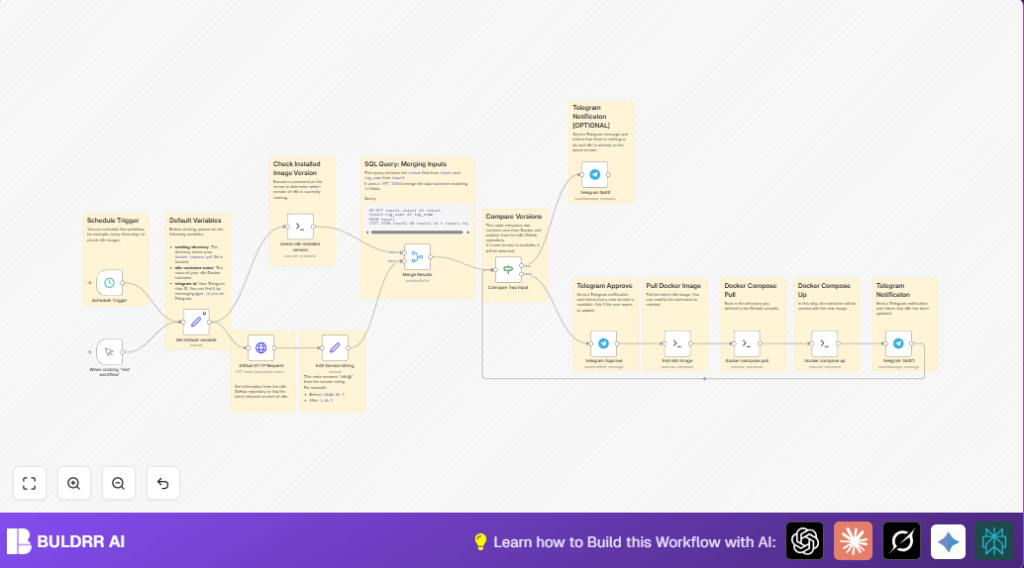
This workflow checks the n8n Docker container version on a server and compares it with the latest release on GitHub.
If there’s a newer version, it asks the user on Telegram if the update should start.
If approved, the workflow pulls the new image, updates the container, and sends success notifications.
It stops manual, error-prone updating and cuts downtime risks to zero.
Who Should Use This Workflow
This automation fits users running self-host n8n on a server using Docker.
Users who want updates without manual checking, avoiding mistakes, and Telegram alerts should use it.
Tools and Services Used
- SSH Access: To send commands to the server remotely.
- Docker & Docker Compose: To manage the n8n container.
- GitHub API: To get latest n8n release info.
- Telegram Bot API: Receives user messages and sends notifications.
- n8n Platform: Runs the workflow automation.
Beginner Step-by-Step: How to Use This Workflow in n8n
Download and Import
- Download the prebuilt workflow using the Download button on this page.
- Open your n8n editor and use Import from File to load the workflow.
Configure Credentials and Variables
- Add your SSH credentials for the server where Docker runs.
- Create or add your Telegram Bot API Key and your Telegram chat ID.
- Edit the Set Default variable node:
- Set
working-directoryto the folder path wheredocker-compose.ymlis on your server. - Set
n8n-container-nameexactly as your Docker container is named. - Set
telegram-idwith your Telegram chat ID.
- Set
Test and Activate
- Run the workflow once manually to test the version check and Telegram notification.
- Check that messages appear correctly and SSH commands run without error.
- If all is good, activate the workflow to run regularly using the Schedule Trigger node.
Inputs, Processing, and Outputs
Inputs
- The current n8n container version fetched by a remote SSH docker inspect command.
- The latest n8n version from GitHub releases fetched via HTTP request.
Processing Steps
- Extracts version string from SSH output.
- Cleans GitHub tag to remove prefix for matching.
- Merges both versions into a data set.
- Compares local and remote versions.
- If equal, sends Telegram message “n8n is up to date.” and ends.
- If different, sends Telegram approval request message.
- Waits for user reply interactively.
- On approval, runs SSH commands to pull latest Docker image, run
docker compose pull, and thendocker compose up -d. - Sends Telegram message confirming successful update.
Outputs
- Telegram notifications about status and approval requests.
- Automated Docker container updated with the latest n8n version.
Edge Cases and Troubleshooting
- Issue: SSH command for current version fails.
Check: Container name is exact and user has sudo on server. - Issue: Telegram messages not arriving.
Check: Bot API Key and chat ID are correct and bot is active. - Issue: Workflow gets stuck waiting for approval.
Check: Telegram reply is sent and the bot can receive messages.
Customization Ideas
- Change Schedule Trigger timing to daily or weekly checks.
- Edit Telegram messages to use your language or tone.
- Add extra SSH commands after update to clean old Docker images or restart other containers.
Summary
✓ Check current n8n Docker version by SSH.
✓ Get latest release version from GitHub.
✓ Compare versions and notify on Telegram.
✓ Ask user for update approval on Telegram.
✓ Pull latest image and update container automatically.
→ Save time and avoid downtime.
→ Automate safe n8n updates with manual control.
