

What this workflow does
This workflow takes a normal job description written in plain words and turns it into a search to find LinkedIn profiles.
It solves the problem of making hard Boolean search strings by hand and saves a lot of time.
The output is a Google Sheet with a list of LinkedIn profile URLs that match the job search.
Who should use this workflow
Anyone who needs to find candidates on LinkedIn fast without writing complex search queries.
Recruiters, HR teams, and tech firms looking for an easier way to gather candidate profiles will find this useful.
Tools and services used
- n8n platform: for automation workflow execution.
- OpenAI GPT-4O-MINI model: creates Boolean search strings from plain job descriptions.
- Google Sheets: stores the collected LinkedIn profile URLs.
- Google Search with authenticated cookies: runs the Boolean search queries and gets real-time results.
- Chrome Cookie-Editor extension: extracts Google login cookies to avoid CAPTCHA and access Google Search reliably.
- JavaScript code nodes: parse Google search result pages to pick out LinkedIn URLs.
How this workflow works
Inputs
The main input is a job description in natural language, typed into the Webhook node chat trigger.
This node listens for new messages from the user wanting to start a candidate search.
Processing steps
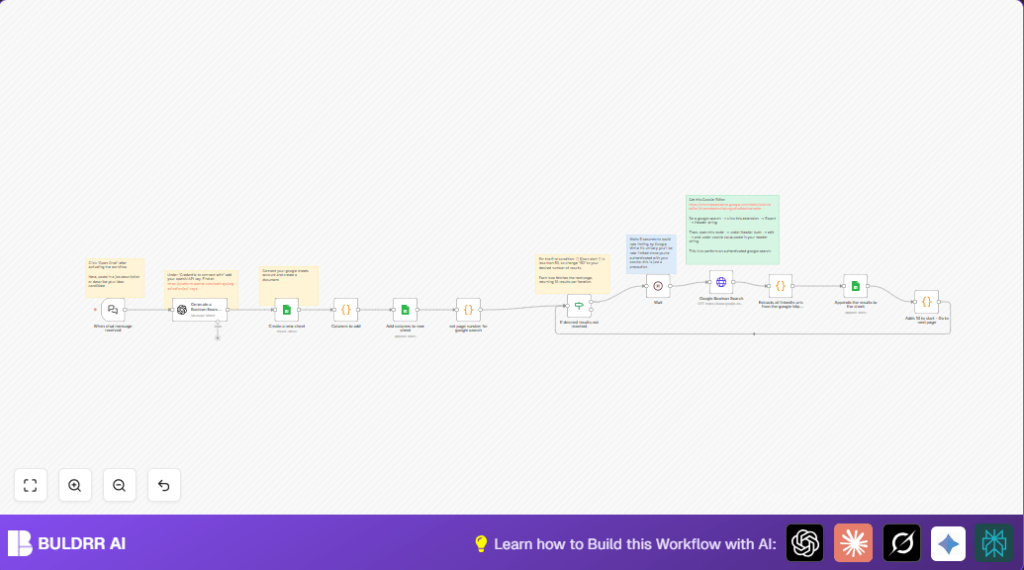
- The job description is sent to the Generate a Boolean Search String node, running GPT-4O-MINI. It turns text into a Boolean string that finds LinkedIn profiles.
- A new Google Sheet is created, named after the search parameters plus current time.
- Columns are added to the Sheet including the ‘linkedin_url’ column.
- The Google Search start page number is set to zero for pagination.
- The Google Boolean Search HTTP request node runs the search with the Boolean string and cookie header for authentication.
- The raw HTML result is parsed by a code node that extracts LinkedIn URLs. It cleans and removes duplicates from the URLs found.
- The LinkedIn URLs are added to the Google Sheet in a clean format.
- The pagination index increases by 10 to get next pages.
- A condition checks if the number of pages searched is under 50. If under, the workflow waits 5 seconds then repeats the search for the next page.
- If 50 results pages are done, the workflow stops.
Output
The final output is a Google Sheet filled with LinkedIn profile links matching the job description criteria.
The Sheet updates automatically as new pages of search results are added.
Beginner step-by-step: How to use this workflow in n8n
1. Download and import
- Click the Download button to get the workflow file.
- Inside the n8n editor, go to “Import from File” and load the workflow file.
2. Configure credentials
- Add your OpenAI API Key in the Generate a Boolean Search String node credentials. Get keys at platform.openai.com.
- Connect Google Sheets with OAuth2 credentials for editing spreadsheets.
- Paste your Google authentication cookie string in the Google Boolean Search node headers. Extract the cookie using the Chrome Cookie-Editor extension.
3. Adjust settings
- If needed, update sheet names, Google Sheet IDs, or columns inside their nodes for personalized data storage.
4. Test and activate
- Run the workflow manually first by sending a short job description in the chat trigger.
- Check the Google Sheet to confirm LinkedIn URLs are collected properly.
- Activate the workflow for ongoing real-time searches.
For continuous running without pauses, consider self-host n8n.
Inputs → Process → Outputs summary
- Input: Job description text from chat trigger.
- Process: Convert text to Boolean search → create spreadsheet → run Google Search with authentication → parse HTML → extract LinkedIn URLs → append to spreadsheet → loop through result pages.
- Output: Google Sheet listing clean LinkedIn profile URLs for candidates.
Common issues and fixes
- Too many requests error (HTTP 429) means Google blocked search due to speed. Fix by increasing wait time between search pages.
- No LinkedIn URLs found usually means the search string is wrong or cookie invalid. Test Boolean string on Google manually and update cookie string.
Customization ideas
- Adjust the maximum number of search result pages in the condition node to get more or fewer LinkedIn profiles.
- Edit the OpenAI prompt to search on other social networks or include keywords.
- Add more columns to the Google Sheet to store additional candidate info or metadata.
- Change wait time between search requests to better avoid Google blocking.
Summary
✓ Converts plain job descriptions into Boolean search strings automatically.
✓ Collects LinkedIn profile links from authenticated Google Search pages.
✓ Saves the list in a Google Sheet named by search criteria and current time.
➔ Helps recruiters find candidates fast without manual search string writing.
➔ Automates paging through Google results with delay to avoid blocking.
