
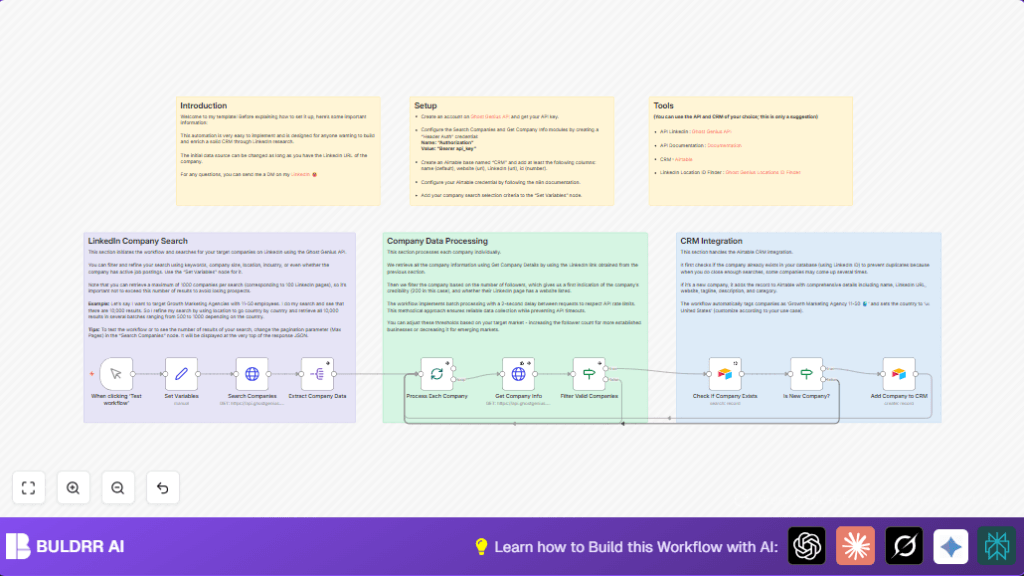

What This Automation Does
This workflow finds LinkedIn companies that match keywords, size, and location you choose.
It checks company details and adds new ones to Airtable CRM without duplicates.
The automation saves many hours of manual work and keeps business data fresh and useful.
When running, it searches companies, filters good ones, and adds new entries to your Airtable.
Workflow Inputs, Processing, and Outputs
Inputs
- Your target keywords like company type.
- Company size codes to specify employee ranges.
- Location ID for a geographic filter.
- API keys for Ghost Genius and Airtable access.
Processing Steps
- Send LinkedIn company search requests with filters.
- Break company list into single items for processing.
- Fetch detailed info from company LinkedIn URLs.
- Filter companies without websites or low followers.
- Check Airtable for existing LinkedIn company IDs to avoid duplicates.
- Add new, valid companies into Airtable with fields such as name, website, and description.
- Use batching and delays to stay within API call limits.
Outputs
- New companies saved in Airtable CRM, ready for sales follow-up.
- Error handling logs when API or data problems occur.
Beginner Step-by-Step: How To Use This Workflow in n8n
Importing the Workflow
- Download the workflow file using the Download button on this page.
- Open your n8n editor (cloud or self-host n8n setup).
- Click “Import from File” and select the downloaded workflow JSON.
Configuring Credentials and Settings
- Add your Ghost Genius API key in the HTTP Header Auth credential.
- Add your Airtable Personal Access Token in another HTTP Header Auth credential.
- Update the Set Variables node values with your target keywords, company size code, and location ID.
- Check the Airtable node settings to confirm your base and table names match, and field mappings are correct.
Testing and Activating
- Run the workflow once manually using the Manual Trigger node’s test button.
- Check the execution panel to confirm successful API calls and data added to Airtable.
- If all works well, activate the workflow toggle to enable production runs.
Customization Ideas
- Change the company type in Set Variables node to search other industries.
- Adjust follower count limits in the Filter Valid Companies node to be stricter or more lenient.
- Add more or fewer fields in the Add Company to CRM Airtable node to suit your data needs.
- Switch location ID to target other countries or regions.
- Change batch size or request delay in Get Company Info node to manage API rate limits effectively.
Common Problems and Fixes
API Rate Limit Errors in Get Company Info
Too many requests sent too fast cause API errors.
Set small delays (e.g., 2000 ms) between batch requests in Get Company Info node to prevent this.
Airtable Search Finds No Records Despite Existence
Formula in Check If Company Exists node may be wrong or not matching data types.
Confirm formula uses correct syntax and that company ID is a number as in Airtable.
Empty Responses from Get Company Info Node
LinkedIn URL missing or formatted wrong causes empty data return.
Make sure LinkedIn URL is present and valid before making API calls.
Pre-Production Checklist
- Check that all API keys and credentials for Ghost Genius and Airtable are set in n8n.
- Test with a small number of pages (1 or 2) to quickly verify results.
- Validate Airtable base structure and fields match the workflow’s expectations.
- Run manual tests to catch errors early.
- Backup Airtable data before large imports for safety.
Summary and Results
✓ Saves hours of manual LinkedIn company searches and data entry.
✓ Keeps Airtable CRM clean by avoiding duplicate company records.
✓ Finds and adds companies that fit specific size, location, and follower criteria.
✓ Manages API calls smartly with batches and delays.
→ Leads to faster sales outreach and more reliable prospect lists.
